Slik administrerer du lagring i PowerPath for Windows
Summary: Hvis kunden rapporterer at disker ikke er synlige, og i Powermt-visningsalternativer Hvis du oppdager at lagringsarrayet ikke er administrert, Slik administrerer du det
This article applies to
This article does not apply to
This article is not tied to any specific product.
Not all product versions are identified in this article.
Instructions
I enkelte situasjoner, når en kunde rapporterer at de ikke er i stand til å legge merke til noen disker levert fra lagringsarray i PowerPath. Når du kjører powermt-skjermalternativer, Hvis du legger merke til at lagringsarrayet som "Uadministrert" deretter I et Windows-miljø med PowerPath. Følg den anbefalte handlingsplanen i denne kunnskapsartikkelen for å gjøre det samme som "Managed".
Her er et scenario der kunden har presentert disker fra Symmetrix-lagringsarray og har rapportert at de ikke kan oppdage noen disker i PowerPath etter oppgraderingen.
Utgangen av " powermt skjermalternativer "Viser:
** POWERMT-SKJERMALTERNATIVER **
Vis CLARiiON LUN-navn: true
Path Latency Monitor: Off
Persist Path Information: On
Performance Monitor: deaktivert
Autostandby: IO-er per feil (iopf): Aktivert
IOPF-aldringsperiode: 1 D
IOPF grense: 6000
Auto Host Registration: disabled
Storage
System Class Attributes
------------ ----------
Symmetrix periodic autorestore = on
reactive autorestore = on
status = unmanaged
proximity based autostandby = on
proximity based autostandby threshold = default
CLARiiON periodic autorestore = on
reactive autorestore = on
status = unmanaged
proximity based autostandby = N/A
Invista periodic autorestore = on
reactive autorestore = on
status = managed
proximity based autostandby = N/A
Hitachi periodic autorestore = on
reactive autorestore = on
status = unmanaged
proximity based autostandby = N/A
HP xp periodic autorestore = on
reactive autorestore = on
status = unmanaged
proximity based autostandby = N/A
Ess periodic autorestore = on
reactive autorestore = on
status = unmanaged
proximity based autostandby = N/A
Generic periodic autorestore = on
reactive autorestore = on
status = managed
proximity based autostandby = N/A
VPLEX periodic autorestore = on
reactive autorestore = on
status = managed
proximity based autostandby = on
proximity based autostandby threshold = default
VNX periodic autorestore = on
reactive autorestore = on
status = unmanaged
proximity based autostandby = N/A
NetApp periodic autorestore = on
reactive autorestore = on
status = unmanaged
proximity based autostandby = N/A
XtremIO periodic autorestore = on
reactive autorestore = on
status = managed
proximity based autostandby = N/A
Unity periodic autorestore = on
reactive autorestore = on
status = unmanaged
proximity based autostandby = N/A
SC periodic autorestore = on
reactive autorestore = on
status = managed
proximity based autostandby = off
Notice how some of the storage array and especially Symmetrix here is "unmanaged"
Here are the steps along with the screenshot from our lab server , how to make it "Managed"
Open Control Panel :
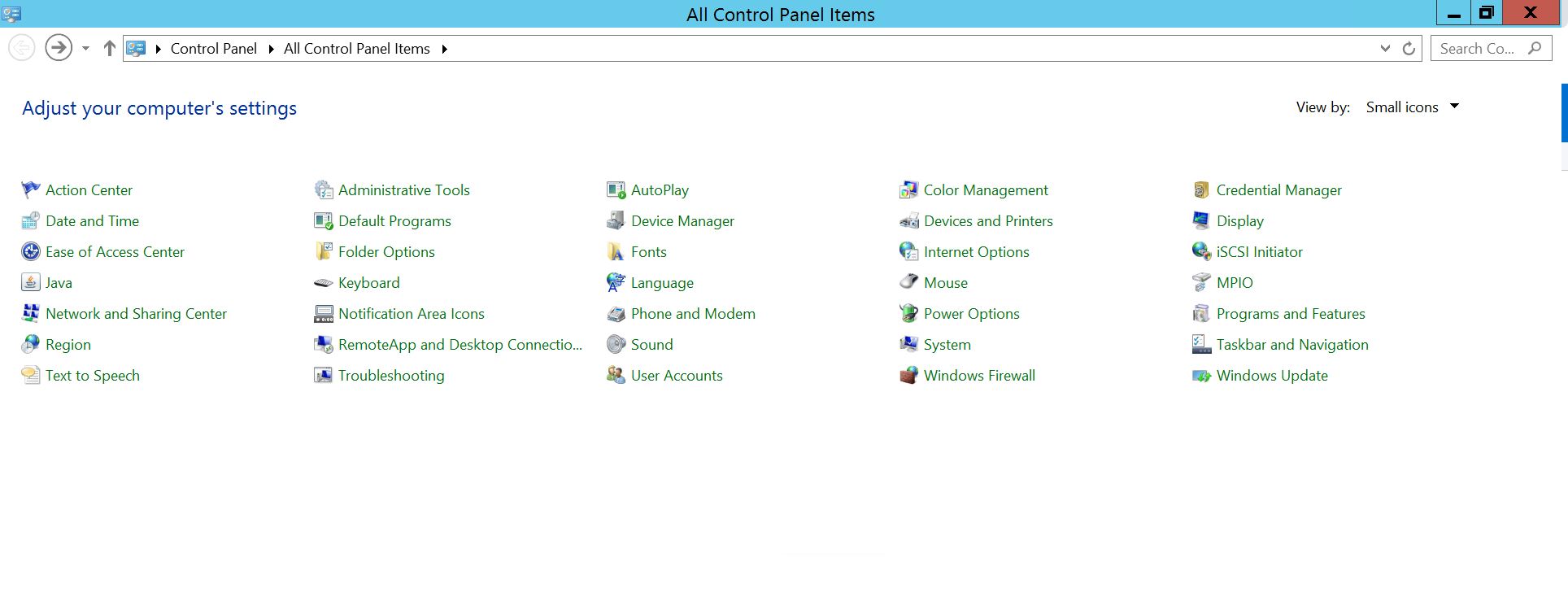
Velg Program og funksjoner
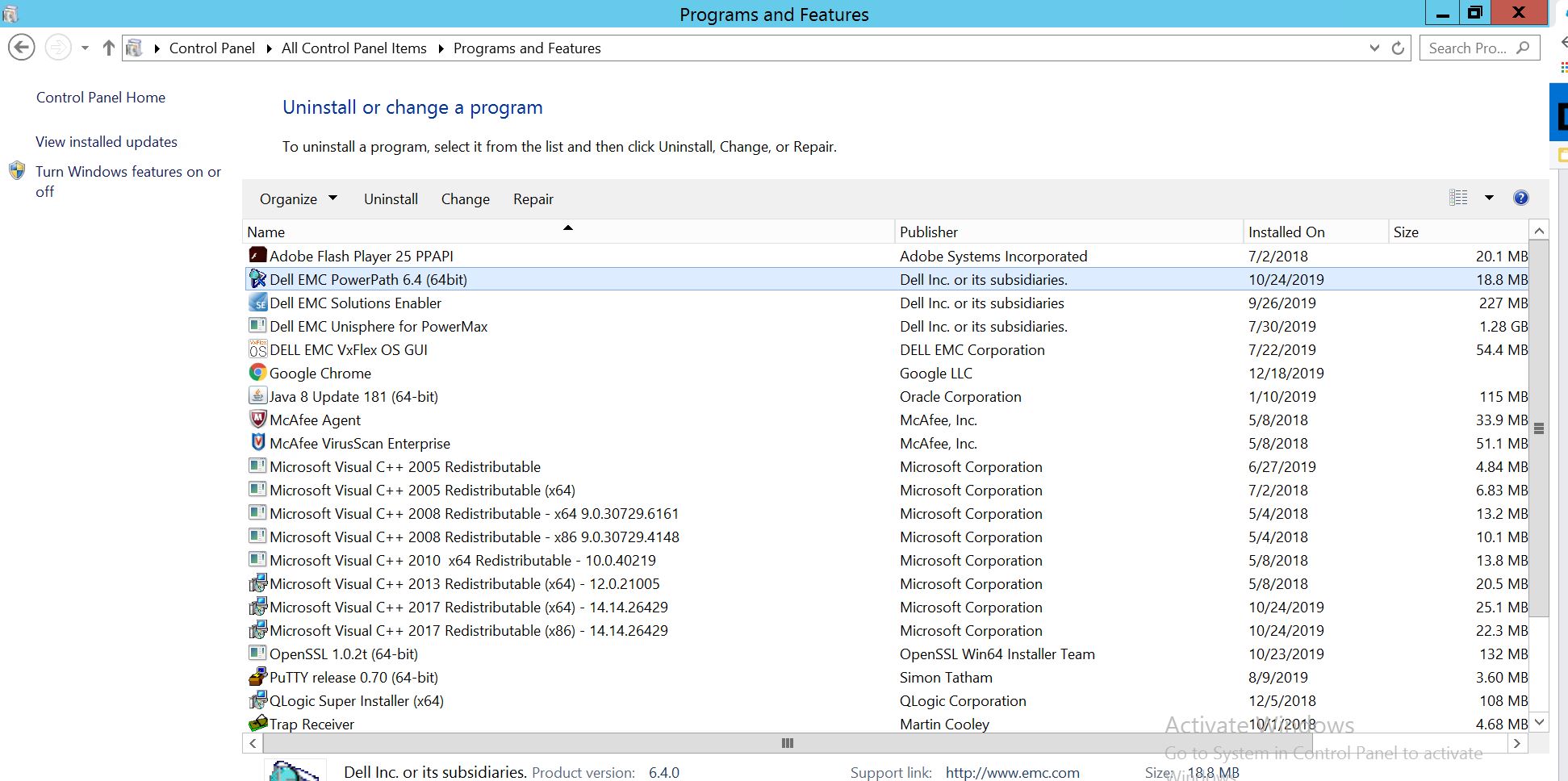
Velg PowerPath, og velg endre/endre, som åpner installasjonsledeteksten:
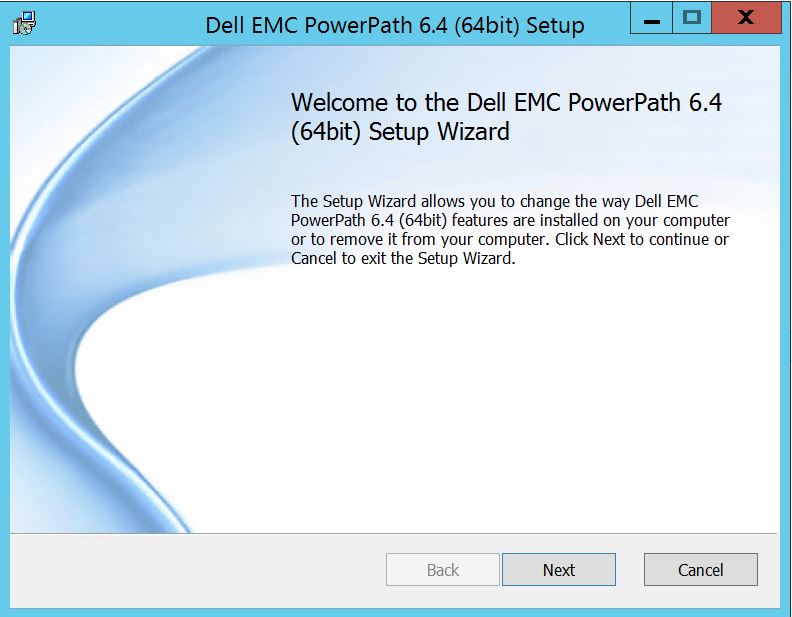
Klikk Neste og følg velg endre:
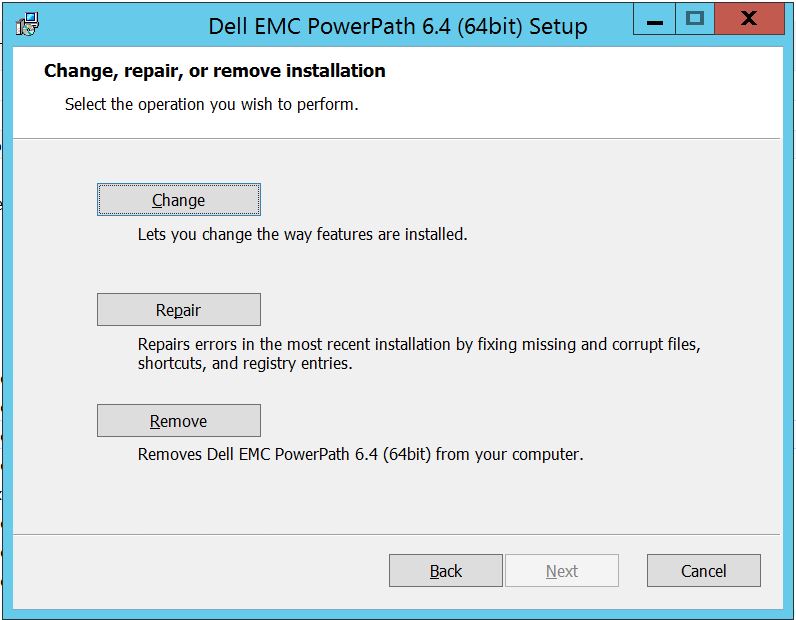
Som tar deg til tilpasset oppsett:
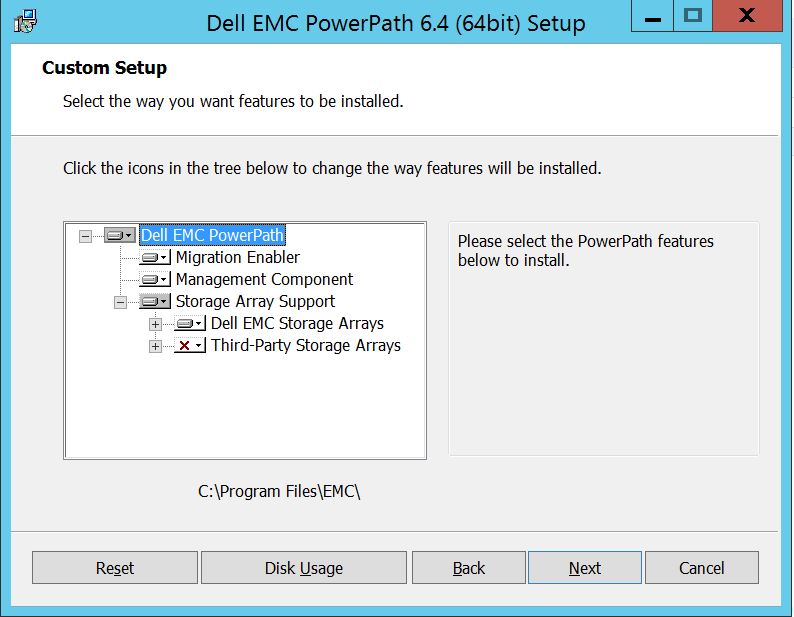
Du kan nå utvide lagringsarraystøtten, hvis ikke allerede, og også utvide Dell EMC-lagringsmatriser som viser alle lagringsarrayene som støttes under PowerPath:
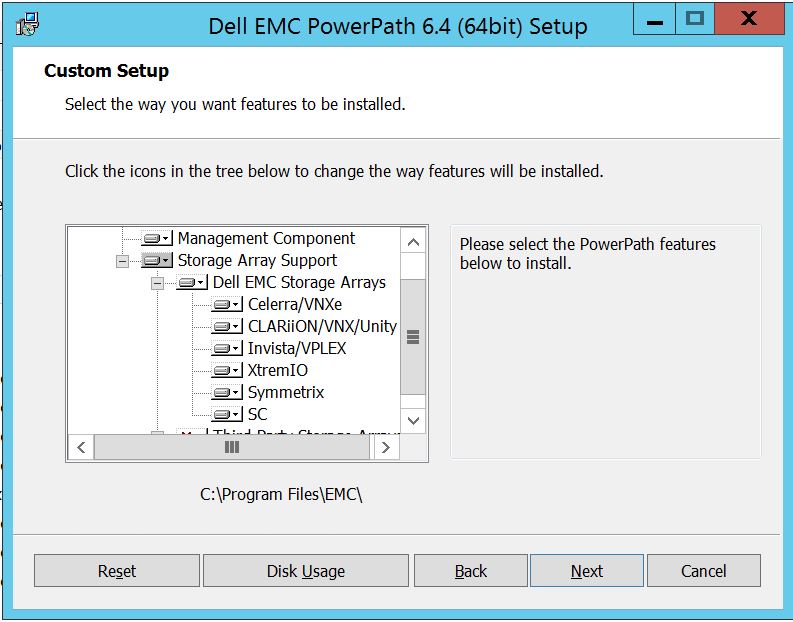
Deretter kan du videre bruke den lille nedtasten i nærheten av hvilken som helst av lagringen. For eksempel, her la oss ta Symmetrix. Det vil videre vise 2 alternativer:
1. Installeres på lokal harddisk
2. Hele funksjonen installeres på den lokale harddisken
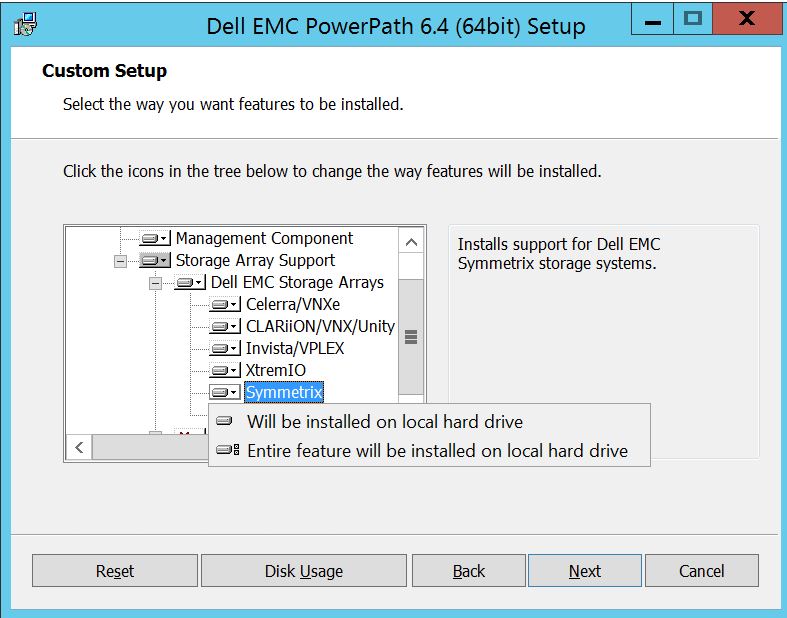
Hvis du vil at hele Dell EMC-lagringsarrayet skal administreres (som egentlig er standard)
Du kan også gjøre det samme i rullegardinmenyen Dell EMC Storage Array: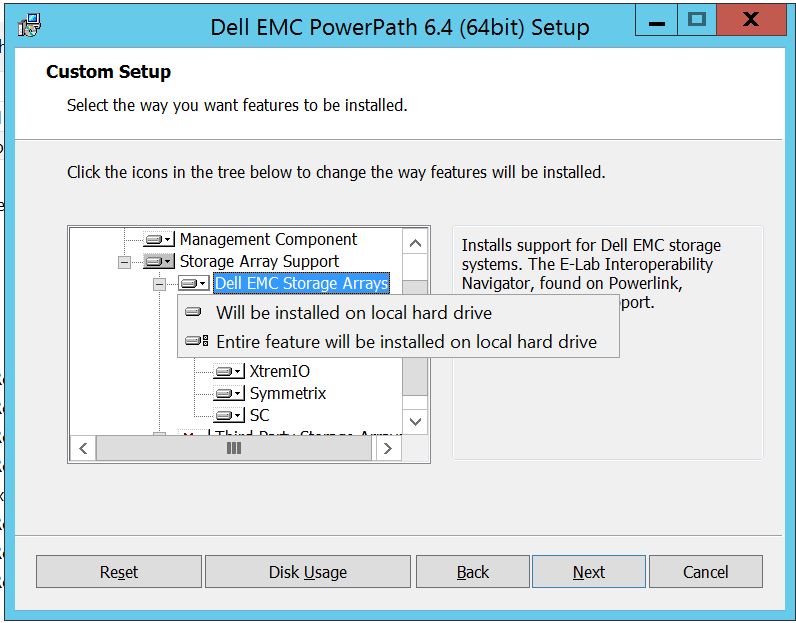
Når du er ferdig Velg neste
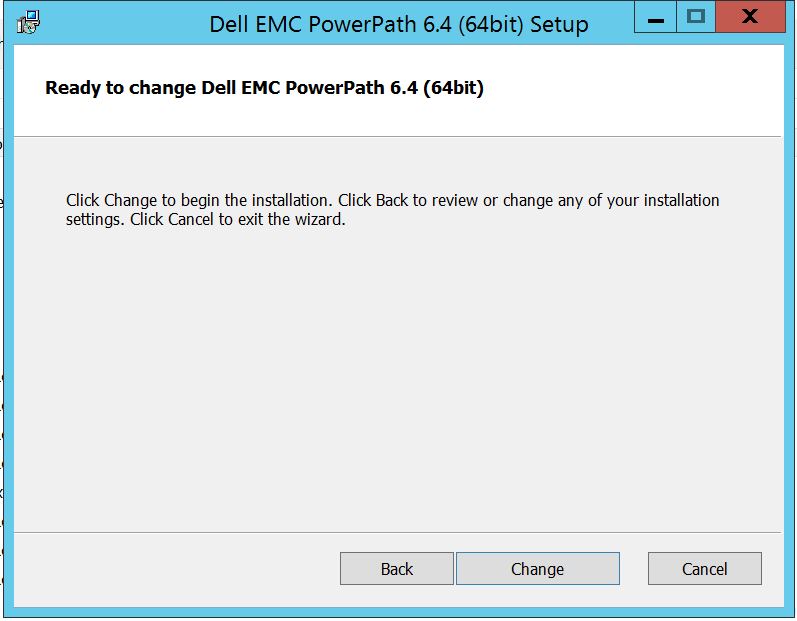
Klikk på Endre som fullfører de nødvendige endringene:
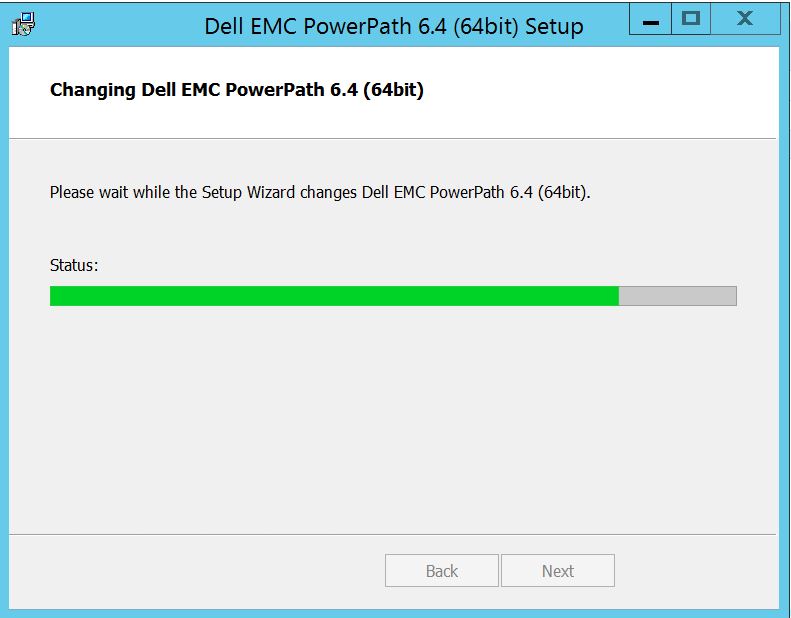
Post som du skal se dette hvor i du kan velge "Finish "Post finish vil
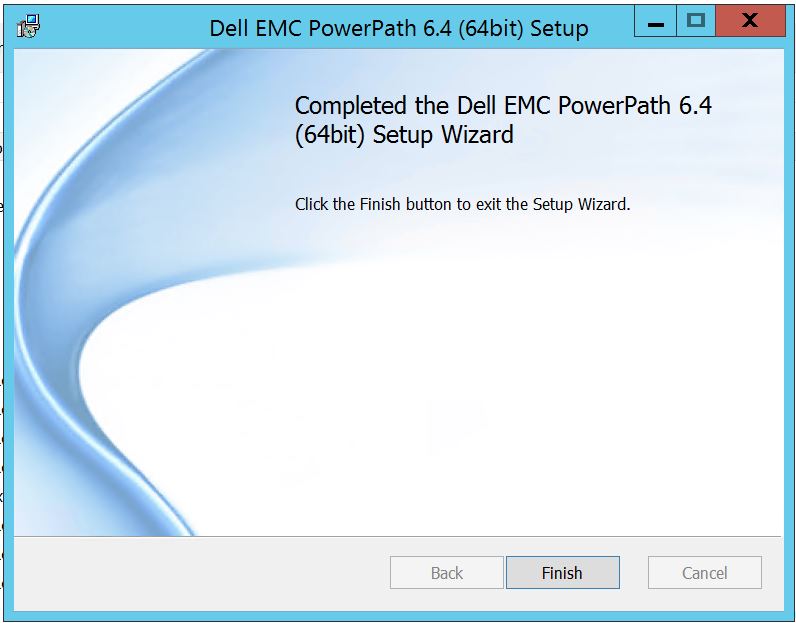 du få en pop up ber om omstart, kan du velge å starte serveren på nytt Siden endringene må implementeres på servernivå som vil da gjøre lagringsarrayet disker synlig i PowerPath.
Post omstart når du kjører powermt-skjermalternativer, Slik vil utgangen se ut:
** POWERMT-SKJERMALTERNATIVER **
Vis CLARiiON LUN-navn: true
Path Latency Monitor: Off
Persist Path Information: On
Performance Monitor: deaktivert
Autostandby: IO-er per feil (iopf): Aktivert
IOPF-aldringsperiode: 1 D
IOPF grense: 6000
Storage
System Class Attributes
------------ ----------
Symmetrix periodic autorestore = on
reactive autorestore = on
status = managed
proximity based autostandby = off
auto host registration = enabled
app finger printing = enabled
device to array performance report = enabled
device in use to array report = enabled
CLARiiON periodic autorestore = on
reactive autorestore = on
status = managed
proximity based autostandby = N/A
auto host registration = disabled
app finger printing = N/A
device to array performance report = N/A
device in use to array report = N/A
Invista periodic autorestore = on
reactive autorestore = on
status = managed
proximity based autostandby = N/A
auto host registration = N/A
app finger printing = N/A
device to array performance report = N/A
device in use to array report = N/A
Hitachi periodic autorestore = on
reactive autorestore = on
status = unmanaged
proximity based autostandby = N/A
auto host registration = N/A
app finger printing = N/A
device to array performance report = N/A
device in use to array report = N/A
HP xp periodic autorestore = on
reactive autorestore = on
status = unmanaged
proximity based autostandby = N/A
auto host registration = N/A
app finger printing = N/A
device to array performance report = N/A
device in use to array report = N/A
Ess periodic autorestore = on
reactive autorestore = on
status = unmanaged
proximity based autostandby = N/A
auto host registration = N/A
app finger printing = N/A
device to array performance report = N/A
device in use to array report = N/A
Generic periodic autorestore = on
reactive autorestore = on
status = managed
proximity based autostandby = N/A
auto host registration = N/A
app finger printing = N/A
device to array performance report = N/A
device in use to array report = N/A
VPLEX periodic autorestore = on
reactive autorestore = on
status = managed
proximity based autostandby = on
proximity based autostandby threshold = default
auto host registration = N/A
app finger printing = N/A
device to array performance report = N/A
device in use to array report = N/A
VNX periodic autorestore = on
reactive autorestore = on
status = managed
proximity based autostandby = N/A
auto host registration = disabled
app finger printing = N/A
device to array performance report = N/A
device in use to array report = N/A
NetApp periodic autorestore = on
reactive autorestore = on
status = unmanaged
proximity based autostandby = N/A
auto host registration = N/A
app finger printing = N/A
device to array performance report = N/A
device in use to array report = N/A
XtremIO periodic autorestore = on
reactive autorestore = on
status = managed
proximity based autostandby = N/A
auto host registration = N/A
app finger printing = N/A
device to array performance report = N/A
device in use to array report = N/A
Unity periodic autorestore = on
reactive autorestore = on
status = managed
proximity based autostandby = N/A
auto host registration = disabled
app finger printing = N/A
device to array performance report = N/A
device in use to array report = N/A
SC periodic autorestore = on
reactive autorestore = on
status = managed
proximity based autostandby = N/A
auto host registration = N/A
app finger printing = N/A
device to array performance report = N/A
device in use to array report = N/A
Her er et scenario der kunden har presentert disker fra Symmetrix-lagringsarray og har rapportert at de ikke kan oppdage noen disker i PowerPath etter oppgraderingen.
Utgangen av " powermt skjermalternativer "Viser:
** POWERMT-SKJERMALTERNATIVER **
Vis CLARiiON LUN-navn: true
Path Latency Monitor: Off
Persist Path Information: On
Performance Monitor: deaktivert
Autostandby: IO-er per feil (iopf): Aktivert
IOPF-aldringsperiode: 1 D
IOPF grense: 6000
Auto Host Registration: disabled
Storage
System Class Attributes
------------ ----------
Symmetrix periodic autorestore = on
reactive autorestore = on
status = unmanaged
proximity based autostandby = on
proximity based autostandby threshold = default
CLARiiON periodic autorestore = on
reactive autorestore = on
status = unmanaged
proximity based autostandby = N/A
Invista periodic autorestore = on
reactive autorestore = on
status = managed
proximity based autostandby = N/A
Hitachi periodic autorestore = on
reactive autorestore = on
status = unmanaged
proximity based autostandby = N/A
HP xp periodic autorestore = on
reactive autorestore = on
status = unmanaged
proximity based autostandby = N/A
Ess periodic autorestore = on
reactive autorestore = on
status = unmanaged
proximity based autostandby = N/A
Generic periodic autorestore = on
reactive autorestore = on
status = managed
proximity based autostandby = N/A
VPLEX periodic autorestore = on
reactive autorestore = on
status = managed
proximity based autostandby = on
proximity based autostandby threshold = default
VNX periodic autorestore = on
reactive autorestore = on
status = unmanaged
proximity based autostandby = N/A
NetApp periodic autorestore = on
reactive autorestore = on
status = unmanaged
proximity based autostandby = N/A
XtremIO periodic autorestore = on
reactive autorestore = on
status = managed
proximity based autostandby = N/A
Unity periodic autorestore = on
reactive autorestore = on
status = unmanaged
proximity based autostandby = N/A
SC periodic autorestore = on
reactive autorestore = on
status = managed
proximity based autostandby = off
Notice how some of the storage array and especially Symmetrix here is "unmanaged"
Here are the steps along with the screenshot from our lab server , how to make it "Managed"
Open Control Panel :
Velg Program og funksjoner
Velg PowerPath, og velg endre/endre, som åpner installasjonsledeteksten:
Klikk Neste og følg velg endre:
Som tar deg til tilpasset oppsett:
Du kan nå utvide lagringsarraystøtten, hvis ikke allerede, og også utvide Dell EMC-lagringsmatriser som viser alle lagringsarrayene som støttes under PowerPath:
Deretter kan du videre bruke den lille nedtasten i nærheten av hvilken som helst av lagringen. For eksempel, her la oss ta Symmetrix. Det vil videre vise 2 alternativer:
1. Installeres på lokal harddisk
2. Hele funksjonen installeres på den lokale harddisken
Hvis du vil at hele Dell EMC-lagringsarrayet skal administreres (som egentlig er standard)
Du kan også gjøre det samme i rullegardinmenyen Dell EMC Storage Array:
Når du er ferdig Velg neste
Klikk på Endre som fullfører de nødvendige endringene:
Post som du skal se dette hvor i du kan velge "Finish "Post finish vil
du få en pop up ber om omstart, kan du velge å starte serveren på nytt Siden endringene må implementeres på servernivå som vil da gjøre lagringsarrayet disker synlig i PowerPath.
Post omstart når du kjører powermt-skjermalternativer, Slik vil utgangen se ut:
** POWERMT-SKJERMALTERNATIVER **
Vis CLARiiON LUN-navn: true
Path Latency Monitor: Off
Persist Path Information: On
Performance Monitor: deaktivert
Autostandby: IO-er per feil (iopf): Aktivert
IOPF-aldringsperiode: 1 D
IOPF grense: 6000
Storage
System Class Attributes
------------ ----------
Symmetrix periodic autorestore = on
reactive autorestore = on
status = managed
proximity based autostandby = off
auto host registration = enabled
app finger printing = enabled
device to array performance report = enabled
device in use to array report = enabled
CLARiiON periodic autorestore = on
reactive autorestore = on
status = managed
proximity based autostandby = N/A
auto host registration = disabled
app finger printing = N/A
device to array performance report = N/A
device in use to array report = N/A
Invista periodic autorestore = on
reactive autorestore = on
status = managed
proximity based autostandby = N/A
auto host registration = N/A
app finger printing = N/A
device to array performance report = N/A
device in use to array report = N/A
Hitachi periodic autorestore = on
reactive autorestore = on
status = unmanaged
proximity based autostandby = N/A
auto host registration = N/A
app finger printing = N/A
device to array performance report = N/A
device in use to array report = N/A
HP xp periodic autorestore = on
reactive autorestore = on
status = unmanaged
proximity based autostandby = N/A
auto host registration = N/A
app finger printing = N/A
device to array performance report = N/A
device in use to array report = N/A
Ess periodic autorestore = on
reactive autorestore = on
status = unmanaged
proximity based autostandby = N/A
auto host registration = N/A
app finger printing = N/A
device to array performance report = N/A
device in use to array report = N/A
Generic periodic autorestore = on
reactive autorestore = on
status = managed
proximity based autostandby = N/A
auto host registration = N/A
app finger printing = N/A
device to array performance report = N/A
device in use to array report = N/A
VPLEX periodic autorestore = on
reactive autorestore = on
status = managed
proximity based autostandby = on
proximity based autostandby threshold = default
auto host registration = N/A
app finger printing = N/A
device to array performance report = N/A
device in use to array report = N/A
VNX periodic autorestore = on
reactive autorestore = on
status = managed
proximity based autostandby = N/A
auto host registration = disabled
app finger printing = N/A
device to array performance report = N/A
device in use to array report = N/A
NetApp periodic autorestore = on
reactive autorestore = on
status = unmanaged
proximity based autostandby = N/A
auto host registration = N/A
app finger printing = N/A
device to array performance report = N/A
device in use to array report = N/A
XtremIO periodic autorestore = on
reactive autorestore = on
status = managed
proximity based autostandby = N/A
auto host registration = N/A
app finger printing = N/A
device to array performance report = N/A
device in use to array report = N/A
Unity periodic autorestore = on
reactive autorestore = on
status = managed
proximity based autostandby = N/A
auto host registration = disabled
app finger printing = N/A
device to array performance report = N/A
device in use to array report = N/A
SC periodic autorestore = on
reactive autorestore = on
status = managed
proximity based autostandby = N/A
auto host registration = N/A
app finger printing = N/A
device to array performance report = N/A
device in use to array report = N/A
Affected Products
PowerPath for WindowsProducts
PowerPath for WindowsArticle Properties
Article Number: 000158477
Article Type: How To
Last Modified: 17 أكتوبر 2025
Version: 4
Find answers to your questions from other Dell users
Support Services
Check if your device is covered by Support Services.