DPA: Unable to Install DPA Agent
Summary: The DPA agent installation fails on a Unix/Linux server with a fatal error, even after reinstalling, uninstalling, or rebooting.
This article applies to
This article does not apply to
This article is not tied to any specific product.
Not all product versions are identified in this article.
Symptoms
After installing, uninstalling and even rebooting the DPA agent on a Unix/Linux server, the installation keeps failing with the following error:
Error: Fatal error occurred during installation, Rolling back the installation....
The uninstallation could not complete due to an error.

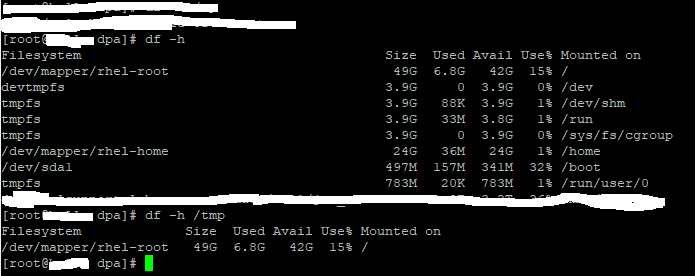
There is enough disk space for the installer to install the agent.
Cause
The following is a list of known causes for this error:
- A file is locked and cannot be overwritten.
- The setup may have been corrupted after installation. As a result, it fails with this error during uninstallation.
- The /tmp file system is full.
Resolution
The agent's _uninstall directory is empty and cannot be used to run the Uninstall_Data_Protection_Advisor script to uninstall the agent.
Manually remove the agent's dpa directory:
# rm -r <agent_install_dir:>/dpa
Point the installer to another directory with more disk space by setting the following environment variable:
> export IATEMPDIR=/large_tmp
In this example, /large_tmp is a file system with enough disk space.
Then run the installer to complete the agent installation.
Article Properties
Article Number: 000168067
Article Type: Solution
Last Modified: 09 يوليو 2026
Version: 6
Find answers to your questions from other Dell users
Support Services
Check if your device is covered by Support Services.