VPLEX:「show-use-hierarchy」CLI 命令錯誤:「沒有名稱為 <裝置名稱> 的裝置」
Summary: 本文討論以下問題:將支線重新連接至鏡像時,show-use-hierarchy 命令會報告沒有具有該名稱的裝置。
This article applies to
This article does not apply to
This article is not tied to any specific product.
Not all product versions are identified in this article.
Symptoms
「show-use-hierarchy」命令 在以相同名稱重新連接連接裝置後 無法取得裝置的詳細資料
重新連接相同的鏡像支線後,「show-use-hierarchy」命令失敗,並顯示錯誤:
No device with the name <device name>".
此錯誤的範例:
VPlexcli:/> show-use-hierarchy distributed-storage/distributed-devices/device_EAST_UNITY_NONPROD_255
show-use-hierarchy:  Evaluation of <<show-use-hierarchy distributed-storage/distributed-devices/device_EAST_UNITY_NONPROD_255>> failed.
cause:               Cannot get value of attribute 'used-by'.
cause:               Firmware command error.
cause:               No device with the name <device name>.
Cause
N/A
Resolution
-
列出裝置報告錯誤,並檢查其是否健全。
範例:
VPlexcli:/> ll /distributed-storage/distributed-devices/device_EAST_UNITY_NONPROD_255

Attributes:
Name                    Value
----------------------  ---------------------------------
application-consistent  false
auto-resume             true
block-count             1342177280
block-size              4K
capacity                5T
clusters-involved       [cluster-1, cluster-2]
geometry                raid-1
health-indications      []
health-state            ok
locality                distributed
operational-status      ok
rebuild-allowed         true
rebuild-eta             -
rebuild-progress        -
rebuild-status          done
rebuild-type            full
rule-set-name           cluster-2-detaches
service-status          running
stripe-depth            -
system-id               device_EAST_UNITY_NONPROD_255
thin-capable            false
transfer-size           2M
virtual-volume          device_EAST_UNITY_NONPROD_255_vol
-
檢查 UI 以查看裝置階層是否可見。
請按照以下步驟從 UI 進行檢查:
- 前往佈建儲存裝置 -- 分散式 -- 分散式裝置
- 選取分散式裝置名稱,在 DD 名稱上按一下滑鼠右鍵,然後按一下「檢視地圖」選項,如下所示:
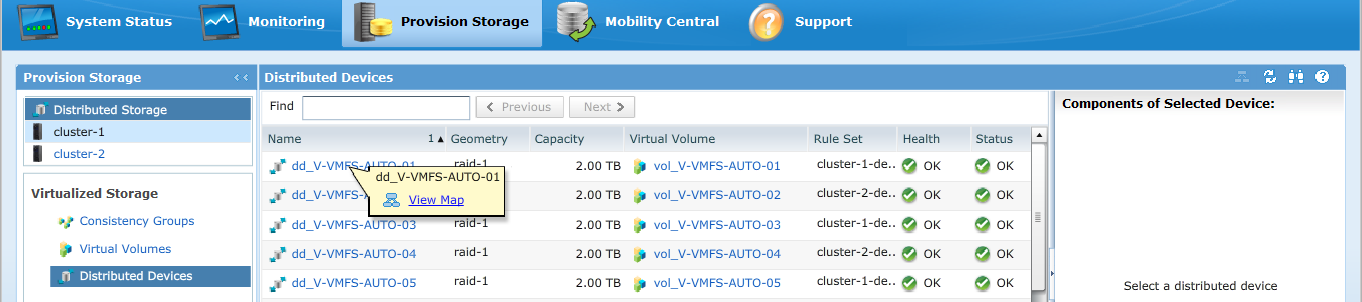
UI 地圖檢視的範例: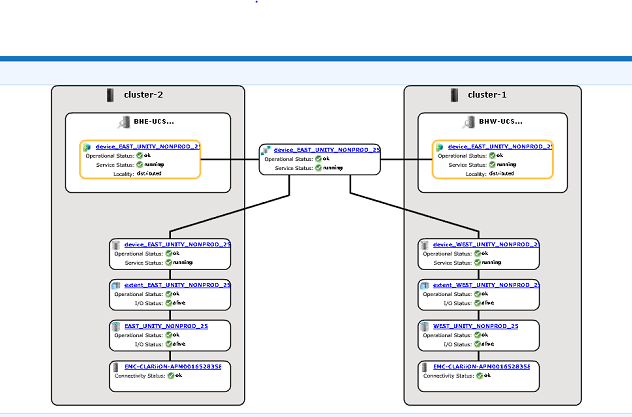
-
如果裝置出現在地圖檢視中,請遵循以下因應措施。
- 使用以下命令重新開機管理主控台
service@managementserver:~> sudo /etc/init.d/VPlexManagementConsole restart
Restarting EMC VPlex Management Console...                     done
- 或請參閱以下列出的文章,瞭解如何重新啟動管理主控台:
000040517: VPLEX:如何重新啟動 VPlexManagement Console 以重新整理 VPLEX CLI 或 UI
- 使用以下命令重新開機管理主控台
如果在 UI 中無法檢視裝置對應,或是 VPLEX 管理主控台無法修正問題,請開啟與 VPLEX 支援的即時聊天。
注意:若要開啟與支援人員聊天,請在「支援」頁面上前往 https://www.dell.com/support/ ,您應該會看到黑色功能表列,按一下功能表列最右側的「聯絡支援」,這會帶您前往「聯絡資訊」頁面。在畫面右側,您會看到「Dell EMC 系統管理聊天」,按一下此選項,便會前往「即時聊天」頁面。第一步,從「選取聊天主題」欄位中按一下右側的下拉箭頭,然後選取聊天的相關主題。然後按照要求的其餘步驟操作,為每個問題/選擇提供必要的資訊。
Additional Information
本內容已翻譯為其他語言:
| https://downloads.dell.com/TranslatedPDF/AR-SA_533945.pdf |
| https://downloads.dell.com/TranslatedPDF/DE_533945.pdf |
| https://downloads.dell.com/TranslatedPDF/ES_533945.pdf |
| https://downloads.dell.com/TranslatedPDF/ES-XL_533945.pdf |
| https://downloads.dell.com/TranslatedPDF/FR_533945.pdf |
| https://downloads.dell.com/TranslatedPDF/IT_533945.pdf |
| https://downloads.dell.com/TranslatedPDF/JA_533945.pdf |
| https://downloads.dell.com/TranslatedPDF/KO_533945.pdf |
| https://downloads.dell.com/TranslatedPDF/NL_533945.pdf |
| https://downloads.dell.com/TranslatedPDF/PT_533945.pdf |
| https://downloads.dell.com/TranslatedPDF/PT-BR_533945.pdf |
| https://downloads.dell.com/TranslatedPDF/RU_533945.pdf |
| https://downloads.dell.com/TranslatedPDF/SV_533945.pdf |
| https://downloads.dell.com/TranslatedPDF/ZH-CN_533945.pdf |
| https://downloads.dell.com/TranslatedPDF/ZH-TW_533945.pdf |
Affected Products
VPLEX SeriesProducts
VPLEX Series, VPLEX VS1, VPLEX VS6Article Properties
Article Number: 000168361
Article Type: Solution
Last Modified: 05 فبراير 2026
Version: 5
Find answers to your questions from other Dell users
Support Services
Check if your device is covered by Support Services.