如何获取 Dell Command Update 的 MSI 安装程序包
Summary: 了解有关从 Dell Command |更新 (DCU) 可执行文件。
This article applies to
This article does not apply to
This article is not tied to any specific product.
Not all product versions are identified in this article.
Instructions
MSI 安装程序包
以下步骤可用于获取 MSI 安装程序包:
-
转至 Dell Command |更新 产品页面。
-
下载 可用的最新版本。
提醒:此表中的链接会自动识别计算机。如果这不是首选,请转至 安装部分 以安装首选。适用于配备英特尔或 AMD 处理器的计算机的 DCU 5.7(2026 年 4 月发布) 适用于 配备 ARM 处理器的计算机的 DCU 5.6(2025 年 11 月发布) -
右键单击 Windows 开始菜单图标,然后选择 运行。
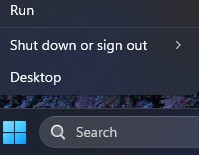
-
在运行框中,键入
CMD,然后同时按 Ctrl + Shift + Enter 键以运行提升的命令提示符。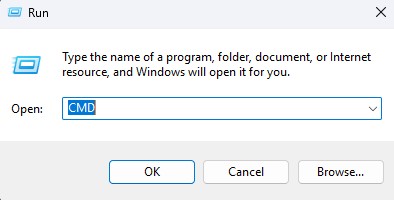
-
如果系统提示输入用户帐户控制 (UAC),请单击 Yes 以继续。
-
浏览至下载的可执行文件的文件夹位置。
-
键入以下命令,然后按 Enter 键:
提醒:开关区分大小写。Dell-Command-Update-Application_[VERSION].exe /passthrough /X /B”[EXTRACTION PATH]” Example: C:\Dell>Dell-Command-Update-Application_5CR1Y_WIN64_5.6.0_A00.exe /passthrough /X /B”C:\Dell\DCU_Extracted”
-
如果系统提示卸载,请单击 No 。
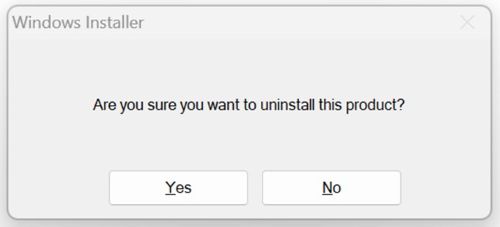
-
在 Windows 资源管理器中,转至
[EXTRACTION PATH],然后找到 MSI 安装程序包。
Additional Information
推荐的文章
以下是您可能会感兴趣的与此主题相关的一些推荐文章。
Affected Products
Dell Command | UpdateArticle Properties
Article Number: 000177292
Article Type: How To
Last Modified: 08 مايو 2026
Version: 17
Find answers to your questions from other Dell users
Support Services
Check if your device is covered by Support Services.