VMware Host Stuck Entering Maintenance Mode for a Long Time with No Error
Summary: The host is stuck entering maintenance mode for a long time with no error.
This article applies to
This article does not apply to
This article is not tied to any specific product.
Not all product versions are identified in this article.
Symptoms
The host is stuck in entering maintenance mode for a long time with no error.
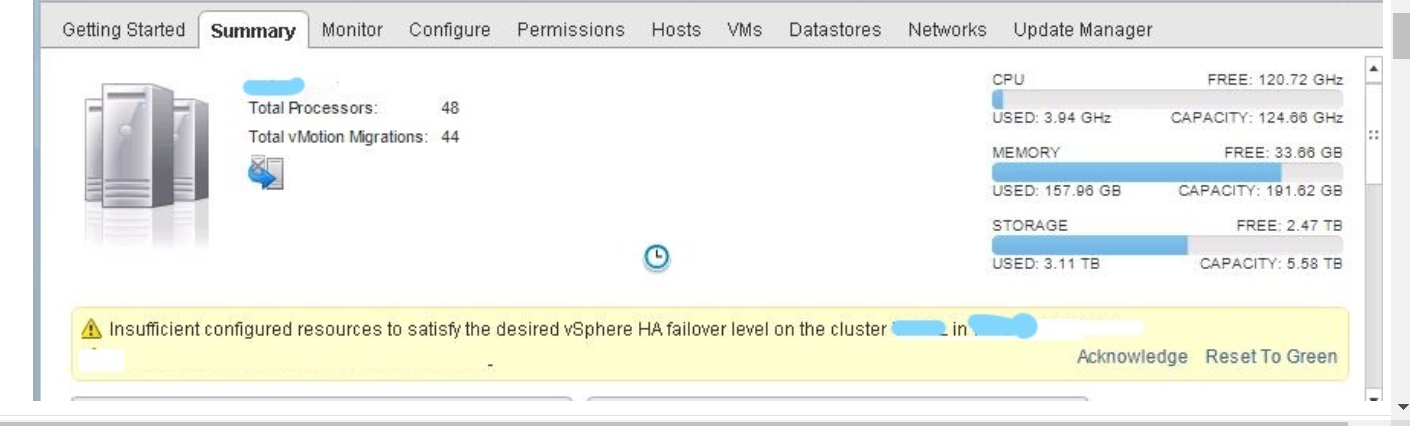
Warning Insufficient resources to satisfy configured failover level for vSphere HA is appearing on the cluster.
Cause
This issue may occur in smaller clusters with two or three hosts.
Resolution
Temporarily turn off HA with the steps below. This should allow the host to enter maintenance mode.
To disable vSphere HA in the vSphere Client:
To disable vSphere HA in the vSphere Client:
- Log in to the vSphere Client.
- From the Home screen, click Hosts and Clusters.
- Browse to the cluster.
- Click the Configure tab.
- Select vSphere Availability and click Edit.
- Clear the VMware HA option.
- Click OK.
Note: The process may take some time to complete.
To disable vSphere HA in the vSphere Web Client:
- Log in to the vSphere Web Client.
- From the Home screen, click Hosts and Clusters.
- Browse to the cluster.
- Click the Configure tab.
- Select vSphere Availability and click Edit.
- Clear the Turn On VMware HA option.
- Click OK.
Affected Products
PowerFlex rack, VxRail, ScaleIOArticle Properties
Article Number: 000180477
Article Type: Solution
Last Modified: 09 يناير 2026
Version: 5
Find answers to your questions from other Dell users
Support Services
Check if your device is covered by Support Services.