NVP-vProxy:映像層級還原失敗,並顯示「無法更新 vmx 檔案的「nvram」項目」
Summary: 虛擬機器 (VM) 映像和即時復原失敗,並顯示「無法更新 vmx 檔案的『nvram』項目」
This article applies to
This article does not apply to
This article is not tied to any specific product.
Not all product versions are identified in this article.
Symptoms
NetWorker VMware Protection (NVP) 整合是透過 vProxy 裝置進行設定。建立復原的 VM 目錄後,映像層級復原 (虛擬機器和即時) 失敗,並在還原記錄中出現下列錯誤:
159373:nsrvproxy_recover: vProxy Log: YYYY-MM-DDTHH:MM:SSZ INFO:   [@(#) Build number: 34] Creating directory for storage type "VMFS".
159373:nsrvproxy_recover: vProxy Log: YYYY-MM-DDTHH:MM:SSZ INFO:   [@(#) Build number: 34] Successfully created the directory "[Datastore] <recovered VM name>" in datastore.
159373:nsrvproxy_recover: vProxy Log: YYYY-MM-DDTHH:MM:SSZ WARN:   [@(#) Build number: 34] Did not find nvram entry in vmx file.
159373:nsrvproxy_recover: vProxy Log: YYYY-MM-DDTHH:MM:SSZ ERROR:  [@(#) Build number: 34] Could not update vmx file's 'nvram' entry.
159373:nsrvproxy_recover: vProxy Log: YYYY-MM-DDTHH:MM:SSZ ERROR:  [@(#) Build number: 34] Unable to upload the configuration files: "Could not update vmx file's 'nvram' entry."
159373:nsrvproxy_recover: vProxy Log: YYYY-MM-DDTHH:MM:SSZ WARN:   [@(#) Build number: 34] RecoverVMSessions "11cda4f5-b22d-4fb6-8c1f-98ddbd9c4e05" cleaning up running recover session due to error.
159373:nsrvproxy_recover: vProxy Log: YYYY-MM-DDTHH:MM:SSZ ERROR:  [@(#) Build number: 34] Task to remove folder/file "" failed: Invalid datastore path ''.
159373:nsrvproxy_recover: vProxy Log: YYYY-MM-DDTHH:MM:SSZ ERROR:  [@(#) Build number: 34] Unable to remove the VM directory . Invalid datastore path ''.
159373:nsrvproxy_recover: vProxy Log: YYYY-MM-DDTHH:MM:SSZ ERROR:  [@(#) Build number: 34] Unable to tear down the recover session.
159373:nsrvproxy_recover: vProxy Log: YYYY-MM-DDTHH:MM:SSZ INFO:   [@(#) Build number: 34] Disconnected from session on vCenter 'vappvm101.dc.vapp.ctc'.
159373:nsrvproxy_recover: vProxy Log: YYYY-MM-DDTHH:MM:SSZ ERROR:  [@(#) Build number: 34] Failed to recover to a new VM. Could not update vmx file's 'nvram' entry.
儘管成功下載了 VM 的 vmx 檔案,但此問題仍發生在單個 VM 的多個儲存集中,包括最新的備份。
Cause
VM 的 vmx 檔案缺少識別 VM 的 nvram 檔案的 nvram 項目 (例如:nvram = “VM_name.nvram”)。
此問題可能是因為在 vCenter Server 上部署/匯入 VM 時發生錯誤所造成。
存儲集的配置檔與進行備份時的 VM 的 vmx 檔匹配。
Resolution
為了防止未來備份時發生此問題,虛擬機器的 vmx 檔案必須使用 nvram 檔案項目進行更新。VMware 系統管理員必須執行此變更。
可從 VM 資料存放區資料夾下載 VM 的 .vmx 檔案: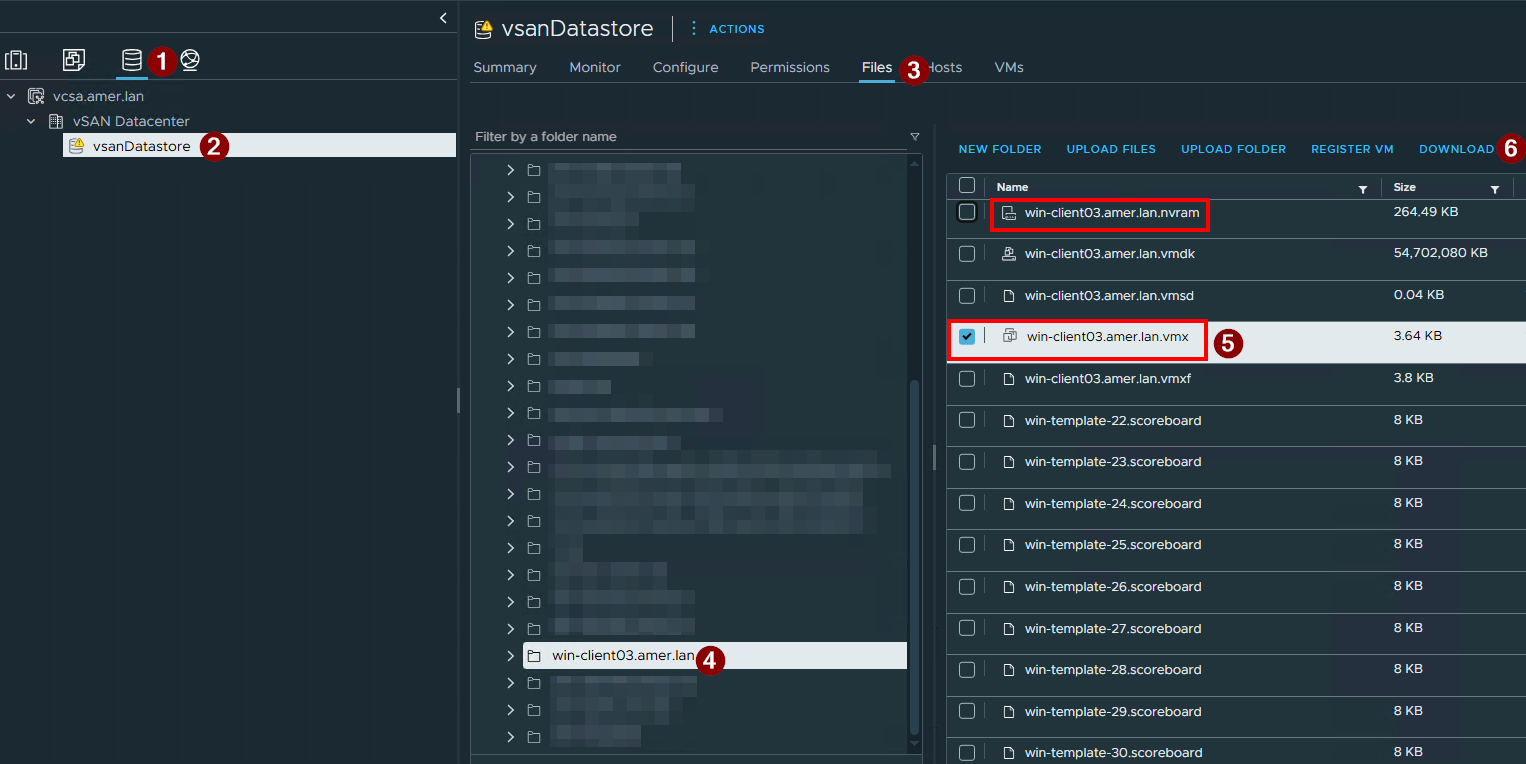
注意:VM 的 nvram 檔案也應與其 .vmx 檔案位於同一個目錄中,如上所示。
使用文字編輯器開啟 vmx 檔案。請確定檔案包含指定 nvram 檔案的行,例如:
如果缺少該條目,請使用正確的 nvram 檔名將其添加到檔中。儲存檔案,關閉虛擬機器,然後將更新的 .vmx 檔案上傳回 VMware 中的虛擬機器資料存放區資料夾。開啟虛擬機器電源。
針對在此更正後進行的備份執行的還原,預計不會遇到此失敗。
注意:若為較舊受影響的儲存集,請使用「虛擬磁碟復原」建立新虛擬機器,作為復原資料的因應措施。此還原方法不需要 .vmx 檔案。
Affected Products
NetWorkerProducts
NetWorker FamilyArticle Properties
Article Number: 000188180
Article Type: Solution
Last Modified: 03 ديسمبر 2025
Version: 3
Find answers to your questions from other Dell users
Support Services
Check if your device is covered by Support Services.