Dell EMC Unity: "Delete VMware Virtual Volume" jobs hanging (Dell EMC Correctable)
Summary: High number of hanging jobs "Delete VMware Virtual Volume" Unity Administrator did not initialise any of those jobs (all started automatically)
This article applies to
This article does not apply to
This article is not tied to any specific product.
Not all product versions are identified in this article.
Symptoms
In Unity GUI we can observe high number of running jobs "Delete VMware Virtual Volume" with 0% progress
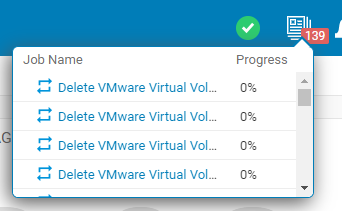
Not necessary all jobs "Delete VMware Virtual Volume" will be hanging, some of them might be completed successfully.
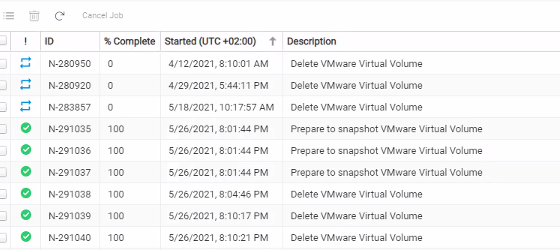
Not necessary all jobs "Delete VMware Virtual Volume" will be hanging, some of them might be completed successfully.
Cause
Dirty inode is produced when creating snapshot(replica) fails. If there is huge new write IO on the FileSystem when creating new snapshot, space accounting check will fail, and new snapshot creation fails.
This is a temporarily failure, and the FileSystem will try again to create snapshot, and it will succeed. However, due to a bug in code, the dirty inode that was produced during the failed replica creation is not discarded and is left in memory.
The error in create replica causes the created vnode to stay in the initializing state, which causes the truncates or unmounts to get stuck on the newly created vnode. Unity Code release 5.1.x fixes this problem with the failure path in replica creation, by discarding the new vnode properly.
This is a temporarily failure, and the FileSystem will try again to create snapshot, and it will succeed. However, due to a bug in code, the dirty inode that was produced during the failed replica creation is not discarded and is left in memory.
The error in create replica causes the created vnode to stay in the initializing state, which causes the truncates or unmounts to get stuck on the newly created vnode. Unity Code release 5.1.x fixes this problem with the failure path in replica creation, by discarding the new vnode properly.
Resolution
Please contact Technical Support and refer to this Article.
Please note that SP rebooting will be required to clear stuck truncate..
The issue of the stuck truncate has been fixed in Unity Code 5.1.x.
Related Articles:
Please note that SP rebooting will be required to clear stuck truncate..
The issue of the stuck truncate has been fixed in Unity Code 5.1.x.
Related Articles:
Additional Information
From CLI , job details:
From Service Data:
Many entries indicating “vVols delete” in C4_safe_ktrace.log:
| service@unity spb:~/user# uemcli -no /sys/task/job -id N-281382 show -detail
1: ID = N-281382 Type = Storage resource provisioning Title = Delete VMware Virtual Volume State = Running Result description = User = Local/VASA 2.0 Client Step = Start time = Elapsed time = Estimated time left = 3s Percent complete = 0% Associated object = |
From Service Data:
Many entries indicating “vVols delete” in C4_safe_ktrace.log:
| 2021/06/02-13:33:07.895016 21 7F438AA2D705 std:TCD: (Unbind) RemoveVVolListFromPE - VVol 6006016046F04400:C56F9C8FB1544865 at index 0 removed from PE.
2021/06/02-13:33:07.895017 0 7F438AA2D705 std:TCD: UnbindBuildNewSGList - updated PE SG 600601604EF04400:C452E6DE008A4C57, index 27, old NumLuns 44, new NumLuns 43. 2021/06/02-13:33:07.895030 11 7F438AA2D705 std:TCD: UnbindDetermineXlusToDelete - VVol 6006016046F04400:C56F9C8FB1544865 at index 0 marked ready for delete. 2021/06/02-13:33:07.895031 0 7F438AA2D705 std:TCD: UnbindDetermineXlusToDelete - 1 VVols marked for delete (before dup check). 2021/06/02-13:33:07.895049 17 7F438AA2D705 std:TCD: UnbindBuildNewXluList - Old total Xlu count 616, new total XLU count 615. 2021/06/02-13:33:07.895068 19 7F438AA2D705 std:TCD: UnbindBuildNewXluList - VVol XLU 6006016046F04400:C56F9C8FB1544865 removed from global list. |
Affected Products
Dell EMC Unity, Dell Unity 300Article Properties
Article Number: 000188804
Article Type: Solution
Last Modified: 10 مايو 2026
Version: 5
Find answers to your questions from other Dell users
Support Services
Check if your device is covered by Support Services.