Integrated Data Protection Appliance Alert - Password Out Of Sync
Summary: The alert "Password out of Sync" may be seen in the ACM Dashboard. This Integrated Data Protection Appliance (IDPA) article is intended as a guide to better understand this alert. It is not to be considered a solution in and of itself. ...
This article applies to
This article does not apply to
This article is not tied to any specific product.
Not all product versions are identified in this article.
Symptoms
The
Or


"Password out of Sync" alert can show as a result of one of two update requests as follows:
"IDPA System Manager admin password is out of sync. Please update the password."
Or
"Backup Server Proxy 'admin' user password is out of sync. Please update the latest password."
Figure 1: Error message examples
Cause
While all passwords are kept synchronized using IDPA common password, it can happen that a password is changed. If not properly updated, the change is identified in ACM.
Here is a list of the users known to ACM:
Here is a list of the users known to ACM:
- DPA System Manager
DPC                     |  root
DPC                     |  admin
User for UI login   | LDAP user part of LDAP group
- Backup Server
Avamar  |  root          |  (Avamar OS root user)    Should be same as OS admin user.
Avamar  |  admin      |   (OS admin user)    Should be same as OS root user.
Avamar  |  root          | Should be same as MCUser, viewuser
Avamar  |  MCUser   | Should be same as AV server root, viewuser
Avamar  |  viewuser  | Should be same as AV server root user, MCUser

AVProxy | admin | Should be same as AVProxy root
AVProxy | root     | Should be same as AVProxy admin
- Protection Storage
DataDomain  |  sysadmin
DataDomain  |  DDBoostUser
- Reporting and Analytics - DPAdvisor
Application Server                 | root
Datastore Server                   | root
Data Collection Agent            | root
Data Processor Tool              | root
Application Server Admin UI  | administrator
- Search
Index Master         |  root
Index Data nodes  | root
User for UI login    | LDAP user part of LDAP group
- Virtualization
VCSA  |  root and vsphere.local\Administrator

ESXi   |  root

LDAP | Internal or External
Resolution
The first step to troubleshoot a password out of sync is to attempt entering the known common password. A message appears when clicking the error in ACM:
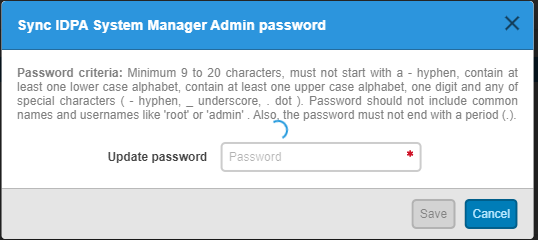
If the known common password does not meet these criteria, it must be manually changed. Steps to perform this and other known issues is found in the Dell PowerProtect Data Protection Series Appliance Product Guide for your version and model.
If this step is unsuccessful, contact Dell Technical Support. Gather logs to provide to support can be gathered on the ACM at:
Should Hypervisor or Hypervisor Manager be out of sync, all components show RED.
Figure 2: IDPA System Manager Admin Update Password input field.
If the known common password does not meet these criteria, it must be manually changed. Steps to perform this and other known issues is found in the Dell PowerProtect Data Protection Series Appliance Product Guide for your version and model.
If this step is unsuccessful, contact Dell Technical Support. Gather logs to provide to support can be gathered on the ACM at:
/usr/local/dataprotection/var/configmgr/server_data/logs/server.log
Should Hypervisor or Hypervisor Manager be out of sync, all components show RED.
To sync Hypervisor (ESXi) and Hypervisor Manager (vCenter) passwords using IDPA commands:
- Log in to an ACM server using SSH
#cd /usr/local/dataprotection/customscripts/tools/
- Sync vCenter password
#./sync_vcenter_password.sh -d -v "<vcenter-password>"
Example:
#./sync_vcenter_password.sh -d -v "abc123"
- Sync ESXi server password
#./sync_ESX_Passwords.sh -d -I <ESX-1-ip-address> -P "<password>" -I <ESX-2-ip-address> -P "<password>" -I <ESX-3-ip-address> -P "<password>"
Example:
#./sync_ESX_Passwords.sh -d -I 192.168.1.10 -P "abc123" -I 192.168.1.11 -P "abc123" -I 192.168.1.12 -P "abc123"
- Once password is synced, restart ACM web service.
# service dataprotection_webapp stop
# service dataprotection_webapp start
- Log in to the IDPA dashboard and verify that the issue is resolved.
Additional Information
For additional information around this alert, see the following collection of articles:
- IDPA: System Manager admin password is out of sync
- IDPA System Manager root password goes Out of Sync frequently
- IDPA: ACM UI shows error "Backup Server viewuser user password is out of sync. Update the latest password" on Backup Server Dashboard
- IDPA: Avamar Proxy root password out of sync in IDPA ACM
[FAILED] Backup Server - Failed to change password for Avamar OS user. [FAILED] Backup Server - Failed to change password for Avamar server user.See IDPA: ChangeAvamarPasswords failed to perform change-passwords command on Avamar Utility Node.
Affected Products
PowerProtect Data Protection Software, Integrated Data Protection Appliance Family, Integrated Data Protection Appliance SoftwareArticle Properties
Article Number: 000192460
Article Type: Solution
Last Modified: 09 يناير 2026
Version: 7
Find answers to your questions from other Dell users
Support Services
Check if your device is covered by Support Services.