PowerProtect Data Manager: Failed to add NAS share with "<hostname> ping failed" error
Summary:
This KB article discusses a PowerProtect Data Manager issue in which a NAS share experienced a " ping failed" error.
This article applies to
This article does not apply to
This article is not tied to any specific product.
Not all product versions are identified in this article.
Symptoms
From the user interface (UI), it shows <hostname> ping failed, and the Save button is disabled: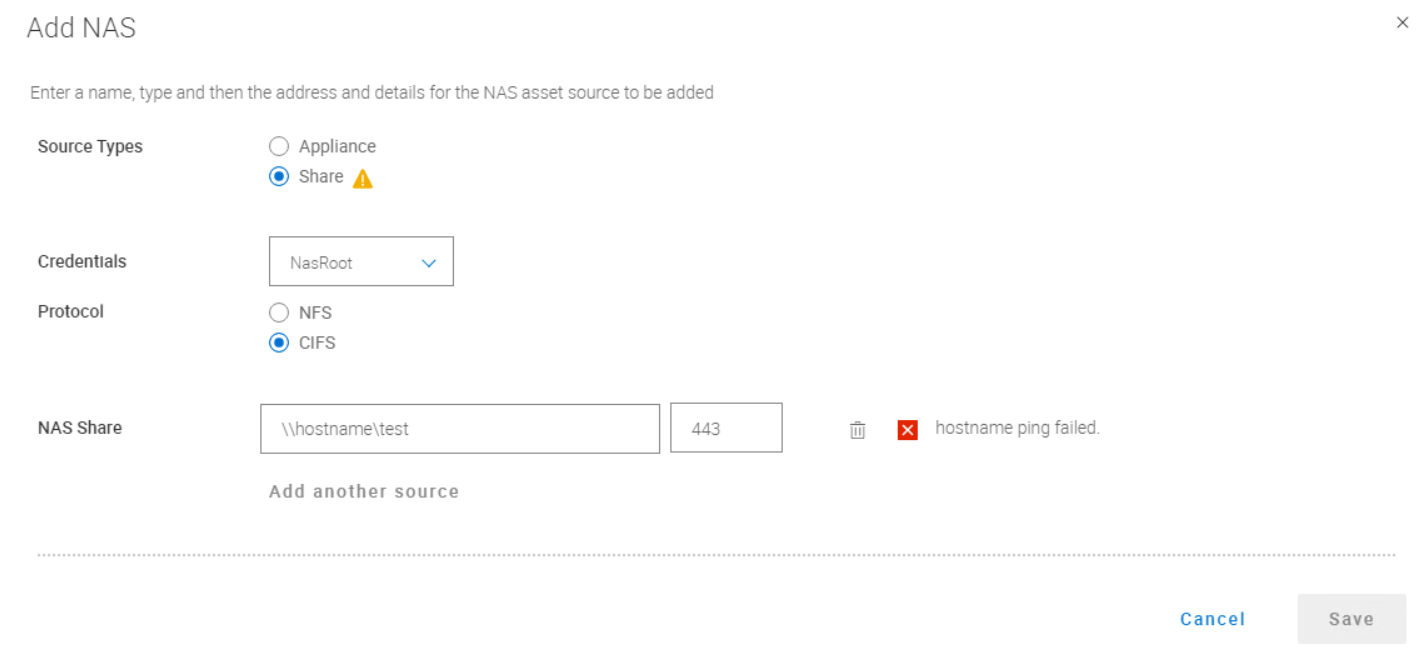
Figure 1. NAS Share UI
Cause
PowerProtect Data Manager is unable to communicate with the specified port of the NAS share.
In this example, 443 ports are used: curl -kv <hostname>: 443 failed from PowerProtect Data Manager
Somehow the customer can communicate with these 443 ports from other servers.
After disabling the PowerProtect Data Manager firewall (service SuSEfirewall2 stop), PowerProtect Data Manager can communicate with these 443 ports.
The NAS share was then successfully added.
If PowerProtect Data Manager can communicate with the port, no matter if it is a real NAS share or not, it would show <hostname> ping-successful.
Resolution
- Make sure PowerProtect Data Manager can communicate the port of the NAS share. Use
curl -kv <hostname>:<port>command to test. Shut down the PowerProtect Data Manager firewall (service SuSEfirewall2 stop) only if this PowerProtect Data Manager unable to communicate with the port. Engage the customer's network team to resolve the network issue if thecurl/telnetcommand also failed from other servers. - Use the Fully Qualified Domain Name (FQDN) instead of the short name for
<hostname>, otherwise after you click Save it might still fail to add the NAS share. - Make sure to use the correct port. The default port number is 443. Common port numbers include 139 and 445 for Common Internet File System (CIFS) and 2049 for Network File System (NFS). Some NAS shares may use different port numbers. Consult the documentation for your NAS to determine the port numbers in use.
Affected Products
PowerProtect Data Manager, PowerProtect SoftwareArticle Properties
Article Number: 000193324
Article Type: Solution
Last Modified: 17 مارس 2026
Version: 2
Find answers to your questions from other Dell users
Support Services
Check if your device is covered by Support Services.