VxRail: How to enable TRIM/UNMAP on vSAN for space reclamation
Summary: This KB article discusses how to enable TRIM/UNMAP on all ESXi hosts on the vSAN cluster to reclaim space on the vSAN datastore.
Instructions
What is TRIM/UNMAP?
In an attempt to be more efficient with storage space, modern guest operating system file systems could reclaim no longer used space using what are known as Trim/Unmap commands for the respective Advanced Technology Attachments (ATA) and SCSI protocols.
vSAN 6.7 U1 (and new versions) now have full awareness of the Trim/Unmap command sent from the guest operating system and can reclaim previously allocated storage as free space.
This is an opportunistic space efficiency feature that can deliver better storage capacity utilization in vSAN environments.
Why use the UNMAP feature?
One thin provisioning challenge is that Virtual Machine Disks (VMDKs), once grown, do not shrink when files within the guest operating system are deleted. This problem is amplified because many file systems always direct new writes into free space. A steady set of writes to the same block of a single small file eventually use more space at the VMDK level. Previous solutions required manual intervention and storage vMotion to external storage, or powering off a virtual machine. To solve this problem automated TRIM/UNMAP Space Reclamation was created for vSAN 6.7U1.
Important considerations at the Virtual Machine (VM) Level:
- A minimum of virtual machine hardware version 11 for Windows
- A minimum of virtual machine hardware version 13 for Linux
- The
disk.scsiUnmapAllowedflag is not set to false. The default is implied as true. This setting can be used as a"stop switch"at the virtual machine level should you want to disable this behavior on a per VM basis and do not want to use it in guest configurations to disable this behavior. VMX changes require a reboot to take effect. - The guest operating system must be able to identify the virtual disk as thin provisioned.
VMs which are already running before enabling the TRIM/UNMAP feature, require a power cycle to apply the setting. Enabling the TRIM/UNMAP feature on all VMs simultaneously can impact production performance, depending on the workload, and is not recommended. Power-cycling all VMs simultaneously should be avoided.
Before enabling TRIM/UNMAP, run the skyline health check to verify the vSAN is in a health state: About the vSAN Skyline Health
Steps to enable the TRIM/UNMAP feature on vSAN 8:
- In vSphere, select the Cluster > Configure > vSAN Services
- Under Advanced Options, click Edit:
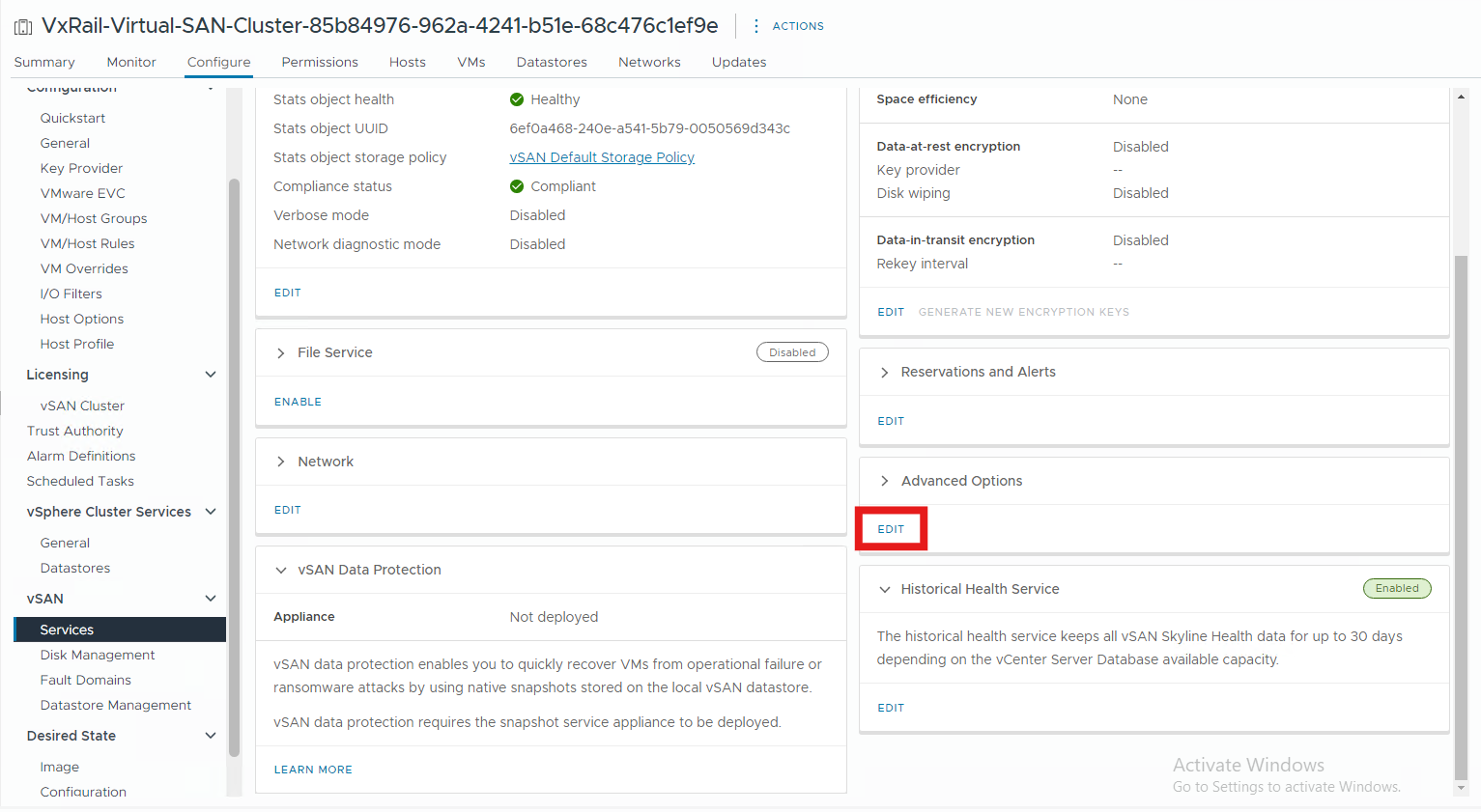 Figure 1. vSAN Services > Advanced Options > Edit
- In Advanced Options, select the toggle for
Guest Trim/Unmapand clickApply, green is enabled:
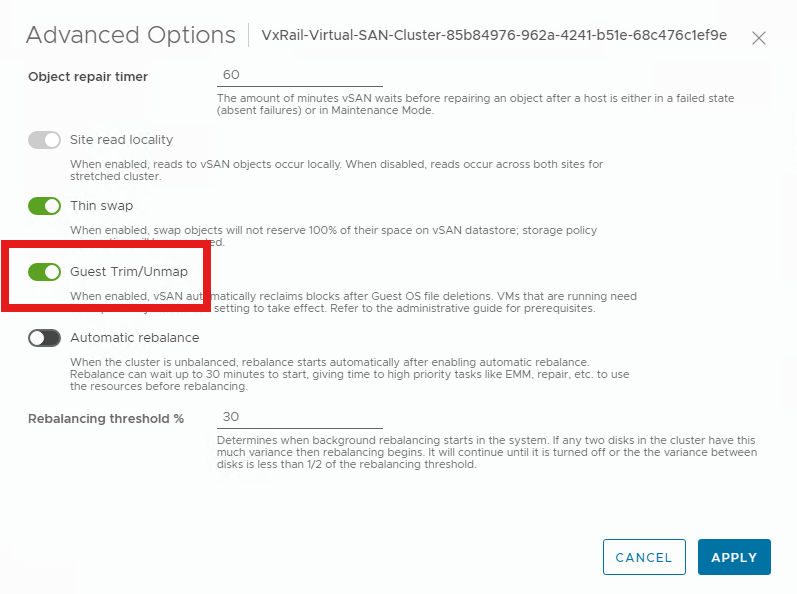
Figure 2. Select Guest Trim/Unmap
Additional Information
For additional information about checking TRIM/UNMAP status, enabling on vSAN 7.x, or monitoring TRIM/UNMAP performance, see: Procedure to Enable TRIM/UNMAP to reclaim space on vSAN datastore.