IDPA: Avamar Services with red exclamation "Avamar Services is/are down/disabled"
Summary: ACM alerts this in Avamar when it finds the NDMP configuration still exists. NDMP has not been supported in ACM since version 2.5. NDMP is still fully supported in Avamar, as part if IDPA. ...
This article applies to
This article does not apply to
This article is not tied to any specific product.
Not all product versions are identified in this article.
Symptoms
In ACM, Avamar Services are red with the exclamation: "Avamar Services [] is/are down/disabled"![Avamar Services [] is/are down/disabled](https://supportkb.dell.com/img/ka0Do000000T5WlIAK/ka0Do000000T5WlIAK_en_US_2.jpeg)
Cause
ACM is not able to properly communicate with the NDMP component.
From ACM server.log, ACM is attempting to run 'dpnctl status' to the Avamar NDMP. It is failing with [bash: dpnctl: command not found]:
2021-12-27 22:32:25,714 INFO  [Thread-2592]-util.SSHUtil: Remote command using SSH execution status: Host     : [10.2.250.32] User     : [admin] Password : [************] Command  : [dpnctl status] STATUS   : [127]
2021-12-27 22:32:25,714 INFO  [Thread-2592]-util.SSHUtil: Remote command using SSH execution status: Host     : [10.10.10.32] User     : [admin] Password : [************] Command  : [dpnctl status] STATUS   : [127]
2021-12-27 22:32:25,714 INFO  [Thread-2592]-util.SSHUtil: STDOUT   : []
2021-12-27 22:32:25,714 INFO  [Thread-2592]-util.SSHUtil: STDERR   : [bash: dpnctl: command not found]
2021-12-27 22:32:25,714 ERROR [Thread-2592]-util.SSHUtil: Failed to executed remote command using SSH.
2021-12-27 22:32:25,714 INFO  [Thread-2592]-dashboard.AvamarDashboard: Successfully executed: dpnctl status
2021-12-27 22:32:25,714 INFO  [Thread-2592]-dashboard.AvamarDashboard: Input dpnctl output:1
Confirm this is the NDMP IP from the /usr/local/dataprotection/var/configmgr/server_data/config/ndmpconfig.xml file:
<?xml version="1.0" encoding="UTF-8" standalone="yes"?>
<NDMPConfig>
<uneditable>false</uneditable>
<NDMPList>
<NDMPIpField>
<ndmpIp>10.10.10.32</ndmpIp>
<ndmpIpFlag>true</ndmpIpFlag>
</NDMPIpField>
</NDMPList>
</NDMPConfig>
Resolution
1. Rename ndmpconfig.xml file:
mv /usr/local/dataprotection/var/configmgr/server_data/config/ndmpconfig.xml /usr/local/dataprotection/var/configmgr/server_data/config/x-ndmpconfig.xml
2. Edit file /usr/local/dataprotection/var/configmgr/server_data/skuconfig/selskuconfig.xml and set NDMPCount 0 in tag "<Count>0</Count>" under <NDMP>
....
    </AVEVM>
</AvamarServer>
    <NDMP>
        <Physical>true</Physical>
        <Count>0</Count>
        <AvamarClientRPMName>AvamarClient-linux-rhel4-x86_64-7.3.101-125.rpm</AvamarClientRPMName>
        <AvamarNDMPRPMName>AvamarNDMP-linux-rhel4-x86_64-7.3.101-125.rpm</AvamarNDMPRPMName>
    </NDMP>
</Avamar>
....
3. Restart webapp service:
service dataprotection_webapp restart
ACM should now report as intended: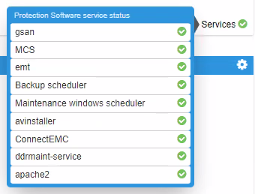
Should any services show otherwise, investigate accordingly.
Article Properties
Article Number: 000195172
Article Type: Solution
Last Modified: 04 ديسمبر 2025
Version: 3
Find answers to your questions from other Dell users
Support Services
Check if your device is covered by Support Services.