Avamar: Immutable Backup (aka Limited Backup Management) Feature
Summary: This knowledge article provides information relating to the Immutable Backup (aka Limited Backup Management) Feature.
Instructions
This feature allows a type of retention lock to be configured on all (both existing and new) Avamar backups.
After applying this one-way procedure, the backup metadata (such as expiration date, retention tag, and so forth) cannot be changed.
For replicated data, the remote backups are not locked if the remote grid does not have this feature enabled.
IDPA Avamar Immutable Backup Feature Supportability:
At the time of publication, the IDPA version of Avamar does not support Immutable Backup.
Immutable Backup requirements:
The immutable feature is inbuilt and available in Avamar version 19.8.
The feature can be enabled in older code versions by installing a hotfix:
The minimum requirement is Avamar version 19.4.0-116 with Management Console Server (MCS) hotfix 333200.
Immutable Backup Features:
-
-
Change the expiration date of local and remote backups while retiring clients.
-
Delete clients.
-
Change the expiration date of a backup.
-
Change the retention type of a backup.
-
Delete a backup.
-
How to enable and verify Immutable Backup:
To enable this feature, the following command must be run as admin on the Avamar Utility Node:
avmaint config immutablebackups=true --confirmthisisnotreversible --ava
To verify the Parameter is enabled:
avmaint config | grep immutablebackups
Expected output:
immutablebackups="true"
Immutable Backup behavior if an attempt is made to delete or change a backup:
Avamar Web Interface (AUI):
If an attempt is made to delete or change a backup in the Avamar AUI, the error "Error occurred while deleting backup :[object Object]" is displayed:
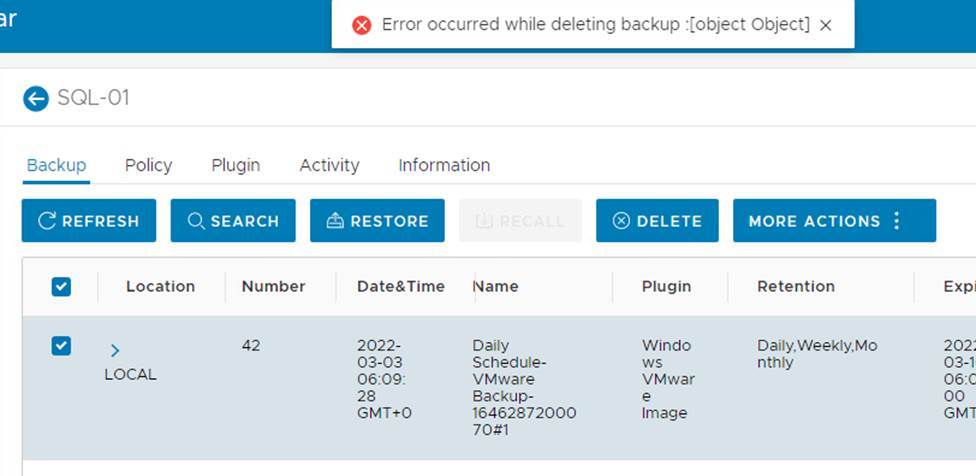
Avamar Command Line:
If an attempt is made to delete or change a backup in the Avamar command line, the error "ERROR! Exit Code 20: Insufficient Privileges" is displayed:
mccli backup delete --name=/clients/DB.SQL-01 --created=2022-03-03 --labelNum-42
1,22559,The backup has more than one retention tag.
mccli backup delete --name=/clients/DB.SQL-01 --created=2022-03-03 --labelNum-42 --force
1,22531,Unexpected exception occurred.
Attribute Value
--------- ------------------------------------------------
exception 0  ERROR!  Exit code 20: Insufficient privileges
Immutable Backup behavior if an attempt is made to revert the parameter:
If an attempt is made to revert the parameter, the error "server_expection(MSG_ERR_INVALID_PARAMETERS)" is displayed:
avmaint ocnfig immutablebackups=false --ava
ERROR: avmaint: config: server_exceptin(MSG_ERR_INVALID_PARAMETERS)
Rechecking the configuration confirms that the setting is true:
avmaint config | grep immutablebackups
immutablebackups="true"
It is not possible to unset or revert this feature once enabled.
Immutable Backup behavior with Data Domain:
Enabling Immutable Backup on Avamar DOES NOT enable the Data Domain Retention Lock feature. Any data on the Data Domain is not locked until data protection is configured.
-
-
-
19.4.0-124 + Hotfix Suite
-
19.7.0-82 + Hotfix Suite
- 19.8+
-
-
The following article provides the steps to enable Avamar Immutable Backup and Data Domain Compliance Mode Retention Lock: Avamar: Enabling Avamar Immutable Backup and Data Domain Compliance Mode Retention Lock.