VxRail: Errore di upgrade non riuscito a impostare depositi personalizzati
Summary: Errore di aggiornamento di VxRail "Impossibile caricare il pacchetto: Trigger set customized depot meets exception" con vlcm abilitato, l'URL del deposito online non è valido o non può essere raggiunto. ...
This article applies to
This article does not apply to
This article is not tied to any specific product.
Not all product versions are identified in this article.
Symptoms
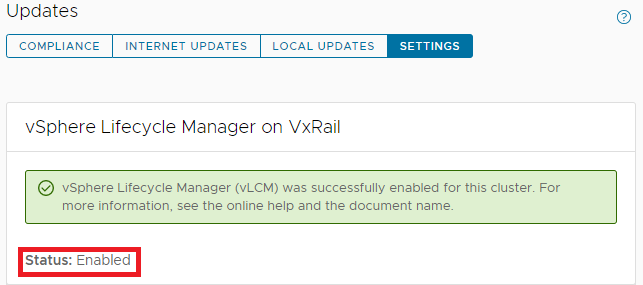
VxRail ha vLCM abilitato, prima dell'aggiornamento a VxRail 7.0.x.
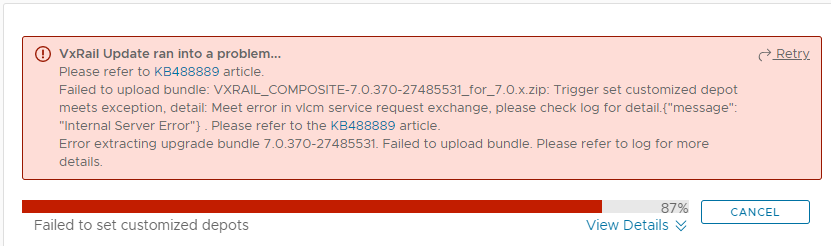
Quindi, durante l'esecuzione dell'aggiornamento a VxRail 7.0.x, l'operazione ha esito negativo con il seguente errore:
Failed to upload bundle: VxRail_COMPOSITE-XXXX.zip Trigger set customized depot
meets exception, detail: Meet error in vlcm service request exchange.....
lcm-web.log:
2022-05-17 02:49:13,848 ERROR [SURROGATE] [org.springframework.amqp.rabbit.RabbitListenerEndpointContainer#1-1] c.v.l.a.LCMServiceImpl [LCMServiceImpl.java:913] Trigger set customized depot meets exception, detail:
com.dellemc.vxrail.lcm.data.provider.out.VlcmServiceWriteException: Meet error in vlcm service request exchange, please check log for detail.{"message": "Internal Server Error"}

        at com.dellemc.vxrail.lcm.data.provider.utils.HttpUtilsForVlcm.postVlcmHttpResponse(HttpUtilsForVlcm.java:94)
        at com.dellemc.vxrail.lcm.data.provider.repositories.service.VlcmAPIService.setOnlineDepots(VlcmAPIService.java:164)
        at com.dellemc.vxrail.lcm.data.provider.out.VlcmServiceMicroWriter.setCustomizedOnlineDepots(VlcmServiceMicroWriter.java:95)
        at com.vce.lcm.api.LCMServiceImpl.vlcmCustomizedDepotProcess(LCMServiceImpl.java:890)
        at com.vce.lcm.api.LCMServiceImpl.uploadLocalCompositeBundle(LCMServiceImpl.java:828)
        at com.vce.lcm.api.LCMServiceImpl.resumeUploadCompositeBundle(LCMServiceImpl.java:1146)
        at com.vce.lcm.api.LCMServiceImpl.uploadAcgCompositeBundle(LCMServiceImpl.java:1134)
        at com.vce.lcm.api.LCMServiceImpl.uploadACGUpgradeBundle(LCMServiceImpl.java:362)
        at com.emc.mystic.manager.upgrade.service.VirtualApplianceServiceImpl.startUploadOfUpgradeBundle(VirtualApplianceServiceImpl.java:775)
        at com.emc.mystic.manager.upgrade.service.VirtualApplianceServiceImpl.triggerUploadOfUpgradeBundleFromDeployMessage(VirtualApplianceServiceImpl.java:557)
        at com.emc.mystic.manager.upgrade.service.VirtualApplianceServiceImpl.processUploadOfUpgradeBundle(VirtualApplianceServiceImpl.java:495)
short.term.log:
2022-05-16-07:12:08 microservice.do-cluster "2022-05-16 07:12:08,275 [ERROR] <Dummy-1149:140446016676424> request.py log_response() (131): [REQUEST END] The request could not be understood by the server due to malformed syntax. Response status: 400 BAD REQUEST, Response body: ['{""error_type"": ""INVALID_ARGUMENT"", ""messages"": [{""args"": [""https://<vxm_ip_or_fqdn>/vlcm/depot/vlcm/components/ESXi-7.0.3_19482537-8f99f6c1/index.xml""], ""default_message"": ""Online Depot URL \'https://<vxm_ip_or_fqdn>/vlcm/depot/vlcm/components/ESXi-7.0.3_19482537-8f99f6c1/index.xml\' is not valid or cannot be reached now."", ""localized"": ""Online Depot URL \'https://<vxm_ip_or_fqdn>/vlcm/depot/vlcm/components/ESXi-7.0.3_19482537-8f99f6c1/index.xml\' is not valid or cannot be reached now."", ""id"": ""com.vmware.vcIntegrity.lifecycle.depots.online.Invalid""}]}']"
2022-05-16-07:12:08 microservice.vlcm "2022-05-16 07:12:08,276 - DEBUG - connectionpool(461) - http://api-gateway:8080 ""POST /rest/vxm/internal/do/v1/vc/api/esx/settings/depots/online HTTP/1.1"" 400 556"
2022-05-16-07:12:08 microservice.vlcm "2022-05-16 07:12:08,278 - INFO - do(112) - Call do response status code: 400. "
2022-05-16-07:12:08 microservice.vlcm "2022-05-16 07:12:08,278 - INFO - online_depot_service(42) - INVALID_ARGUMENT"
2022-05-16-07:12:08 microservice.vlcm "2022-05-16 07:12:08,278 - ERROR - app(1892) - Exception on /vlcm/v1/depot/online [POST]"
2022-05-16-07:12:08 microservice.vlcm "Traceback (most recent call last):"
2022-05-16-07:12:08 microservice.vlcm "  File ""/usr/local/venv/lib64/python3.6/site-packages/flask/app.py"", line 1950, in full_dispatch_request"
2022-05-16-07:12:08 microservice.vlcm "    rv = self.dispatch_request()"
2022-05-16-07:12:08 microservice.vlcm "  File ""/usr/local/venv/lib64/python3.6/site-packages/flask/app.py"", line 1936, in dispatch_request"
2022-05-16-07:12:08 microservice.vlcm "    return self.view_functions[rule.endpoint](**req.view_args)"
2022-05-16-07:12:08 microservice.vlcm "  File ""/usr/local/venv/lib64/python3.6/site-packages/flask_restplus/api.py"", line 325, in wrapper"
2022-05-16-07:12:08 microservice.vlcm "    resp = resource(*args, **kwargs)"
2022-05-16-07:12:08 microservice.vlcm "  File ""/usr/local/venv/lib64/python3.6/site-packages/flask/views.py"", line 89, in view"
2022-05-16-07:12:08 microservice.vlcm "    return self.dispatch_request(*args, **kwargs)"
2022-05-16-07:12:08 microservice.vlcm "  File ""/usr/local/venv/lib64/python3.6/site-packages/flask_restplus/resource.py"", line 44, in dispatch_request"
2022-05-16-07:12:08 microservice.vlcm "    resp = meth(*args, **kwargs)"
2022-05-16-07:12:08 microservice.vlcm "  File ""/home/app/api/vlcm_api.py"", line 64, in post"
2022-05-16-07:12:08 microservice.vlcm "    depot_service.add_depot(depot_url)"
2022-05-16-07:12:08 microservice.vlcm "  File ""/home/app/services/online_depot_service.py"", line 46, in add_depot"
2022-05-16-07:12:08 microservice.vlcm "    raise Exception(response.content)"
2022-05-16-07:12:08 microservice.vlcm "Exception: b'{""error_type"":""INVALID_ARGUMENT"",""messages"":[{""args"":[""https://<vxm_ip_or_fqdn>/vlcm/depot/vlcm/components/ESXi-7.0.3_19482537-8f99f6c1/index.xml""],""default_message"":""Online Depot URL \'https://<vxm_ip_or_fqdn>/vlcm/depot/vlcm/components/ESXi-7.0.3_19482537-8f99f6c1/index.xml\' is not valid or cannot be reached now."",""localized"":""Online Depot URL \'https://<vxm_ip_or_fqdn>/vlcm/depot/vlcm/components/ESXi-7.0.3_19482537-8f99f6c1/index.xml\' is not valid or cannot be reached now."",""id"":""com.vmware.vcIntegrity.lifecycle.depots.online.Invalid""}]}'"
Cause
Il certificato SSL di VxRail Manager è stato rigenerato dopo l'abilitazione di vLCM. vCenter Server non può considerare attendibile il certificato di VxRail Manager.
In genere, il certificato SSL di VxRail Manager viene sostituito con un certificato autofirmato.
In genere, il certificato SSL di VxRail Manager viene sostituito con un certificato autofirmato.
Resolution
Seguire la procedura riportata di seguito per sostituire il certificato SSL di VxRail Manager firmato da VMCA.
- Rigenerare il certificato SSL di VxRail Manager eseguendo lo script riportato di seguito su VxRail Manager:
vCenter interno:
python /etc/vmware-marvin/scripts/lcm/scripts/import_vc_generated_vxm_cert_enhance.py -c <vc_fqdn> -u <vc_mgmt_account> -p <vc_mgmt_passwd> -s root -t <vc_root_passwd> -x <vxm_ip> -n <vxm_fqdn>
Note: Add a ' at the beginning and end of the passwords IF you have special characters in the password.
vCenter esterno:
python /etc/vmware-marvin/scripts/lcm/scripts/import_vc_generated_vxm_cert_enhance.py -c <vc_fqdn> -u <vc_mgmt_account> -p <vc_mgmt_passwd> -s root -t <vc_root_passwd> -x <vxm_ip> -n <vxm_fqdn> -v
Note: Add a ' at the beginning and end of the passwords IF you have special characters in the password.
python /etc/vmware-marvin/scripts/lcm/scripts/import_vc_generated_vxm_cert_enhance.py -h

Usage: import_vc_generated_vxm_cert_enhance.py [options]

Options:
  -h, --help            show this help message and exit
  -c ADDRESS, --address=ADDRESS
                        Address of VC to connect to
  -u MGT_USERNAME, --management-username=MGT_USERNAME
                        user name to use when connecting to VC
  -p MGT_PASSWORD, --management-password=MGT_PASSWORD
                        Password to use when connecting to VC
  -s GUEST_USERNAME, --guest-username=GUEST_USERNAME
                        user name to use when running guest OS operation on VC
  -t GUEST_PASSWORD, --guest-password=GUEST_PASSWORD
                        Password to use when running guest OS operation to VC
  -x VXM_IP, --vxm-ip=VXM_IP
                        The VXM IP, must provide it when this script is not
                        running on VXM server
  -n VXM_FQDN, --vxm-fqdn=VXM_FQDN
                        The VXM fqdn, must provide it when this script is not
                        running on VXM server
  -v, --external-vc     The external vc flag, must set true if VC is external.
  -e, --encrypted-auth  The flag to claim provided auth are encrypted, need to
                        decrypt when script running.
  -m, --m2m-enabled     The flag to claim if hosts enable m2m
Di seguito è riportato un esempio di output in un laboratorio con un vCenter interno:
vxm:/home/mystic # python /etc/vmware-marvin/scripts/lcm/scripts/import_vc_generated_vxm_cert_enhance.py -c vcluster101-vcsa.vv009.local -u administrator@vsphere.local -p 'Testvxrail123!' -s root -t Testvxrail123! -x 172.16.10.200 -n vcluster101-vxm.vv009.local
Nota: Aggiungere un ' all'inizio e alla fine della password SE sono presenti caratteri speciali nella password.
Di seguito è riportato l'output dello script:
Start to connect VC: vcluster101-vcsa.vv009.local

Succeed to connect VC

VXM ip: 172.16.10.200, VXM fqdn: vcluster101-vxm.vv009.local, VC fqdn: vcluster101-vcsa.vv009.local


Getting VM via ip: vcluster101-vcsa.vv009.local

VC VM: vcluster101-vcsa.vv009.local 172.16.10.201

Create temporary SSL cert folder on VC: /tmp/ssl_cert-172.16.10.200-5203

Generate private key for vxm cert

Generate certtool config file

Generate vxm cert

Backup root cert

Generate import ssl cert API script

 #!/bin/sh
# Import cert
get_cert_data() {
  while read -r line; do
  # first line and not empty line
    if [[ -z $x ]] && [[ -n $line ]]; then
      x=$x"$line"
  # other line and not empty line
    elif [[ ! -z $line ]]; then
      x=$x"\n""$line"
    fi
  done <$1
  echo $x
}

generate_post_data() {
cat <<EOF
{"cert":"${vxm_cert}","primary_key":"${vxm_private_key}","root_cert_chain":"${root_cert}","password":"testpassword"}
EOF
}

vxm_key_file=$1
vxm_crt_file=$2
root_crt_file=$3
vxm_key_filter_file=$4


cat $vxm_key_file | sed -n -e "/BEGIN RSA PRIVATE KEY/, $"p >$vxm_key_filter_file

vxm_cert=$(get_cert_data $vxm_crt_file)
echo "vxm cert: $vxm_cert"
echo ""

root_cert=$(get_cert_data $root_crt_file)
echo "root cert: $root_cert"
echo ""

vxm_private_key=$(get_cert_data $vxm_key_filter_file)
echo "vxm private key: $vxm_private_key"
echo ""

echo $(generate_post_data)

i=1
while [[ $i -le 5 ]]; do
  result=`curl -k -X POST -H "Content-Type:application/json" -H "Authorization: Basic $5" https://$6/rest/vxm/$7/certificates/import-vxm --data "$(generate_post_data)"`

  echo "result: $result"
  echo ""

  message=$(echo $result | grep "message")

  if [[ $message =~ "successfully" ]]; then
    echo "Successfully"
    exit 0
  else
    echo "Import cert retry: $i"
    echo ""
    let i++
    sleep 60
  fi
done

if [[ $i -eq 5 ]]; then
  echo "Fail"
  exit 1
fi

Run import SSL cert API script

Finish to import VC generated cert to VXM.
- Nuovo tentativo di aggiornamento
Affected Products
VxRail, VxRail Appliance Series, VxRail SoftwareArticle Properties
Article Number: 000199795
Article Type: Solution
Last Modified: 04 أغسطس 2026
Version: 7
Find answers to your questions from other Dell users
Support Services
Check if your device is covered by Support Services.