VxRail: 업그레이드 오류 맞춤 구성 저장소를 설정하지 못함
Summary: VxRail 업그레이드 오류 "번들 업로드 실패: 트리거 세트 맞춤 구성 서비스 센터가 예외를 충족함" 오류 메시지가 표시되고 vLCM이 활성화된 경우 온라인 서비스 센터 URL이 유효하지 않거나 지금은 연결할 수 없습니다.
This article applies to
This article does not apply to
This article is not tied to any specific product.
Not all product versions are identified in this article.
Symptoms
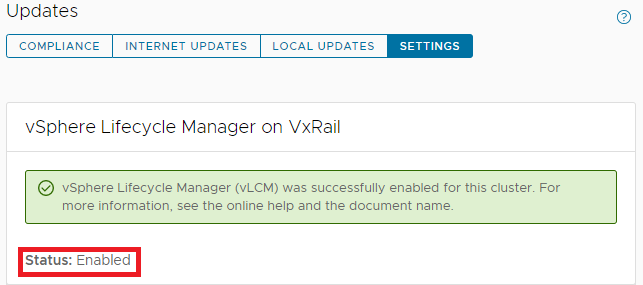
VxRail 7.0.x로 업그레이드하기 전에 VxRail에는 vLCM이 활성화되어 있습니다.
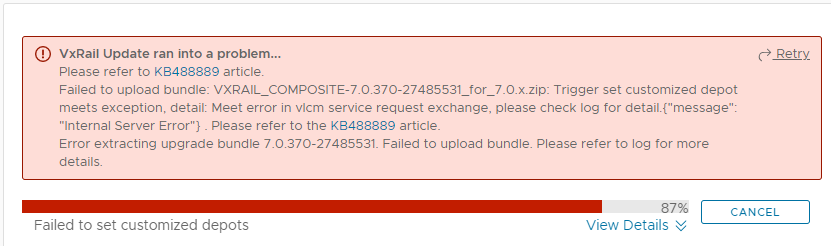
그런 다음 VxRail 7.0.x로 업그레이드를 수행하는 동안 아래 오류와 함께 실패합니다.
Failed to upload bundle: VxRail_COMPOSITE-XXXX.zip Trigger set customized depot
meets exception, detail: Meet error in vlcm service request exchange.....
lcm-web.log:
2022-05-17 02:49:13,848 ERROR [SURROGATE] [org.springframework.amqp.rabbit.RabbitListenerEndpointContainer#1-1] c.v.l.a.LCMServiceImpl [LCMServiceImpl.java:913] Trigger set customized depot meets exception, detail:
com.dellemc.vxrail.lcm.data.provider.out.VlcmServiceWriteException: Meet error in vlcm service request exchange, please check log for detail.{"message": "Internal Server Error"}

        at com.dellemc.vxrail.lcm.data.provider.utils.HttpUtilsForVlcm.postVlcmHttpResponse(HttpUtilsForVlcm.java:94)
        at com.dellemc.vxrail.lcm.data.provider.repositories.service.VlcmAPIService.setOnlineDepots(VlcmAPIService.java:164)
        at com.dellemc.vxrail.lcm.data.provider.out.VlcmServiceMicroWriter.setCustomizedOnlineDepots(VlcmServiceMicroWriter.java:95)
        at com.vce.lcm.api.LCMServiceImpl.vlcmCustomizedDepotProcess(LCMServiceImpl.java:890)
        at com.vce.lcm.api.LCMServiceImpl.uploadLocalCompositeBundle(LCMServiceImpl.java:828)
        at com.vce.lcm.api.LCMServiceImpl.resumeUploadCompositeBundle(LCMServiceImpl.java:1146)
        at com.vce.lcm.api.LCMServiceImpl.uploadAcgCompositeBundle(LCMServiceImpl.java:1134)
        at com.vce.lcm.api.LCMServiceImpl.uploadACGUpgradeBundle(LCMServiceImpl.java:362)
        at com.emc.mystic.manager.upgrade.service.VirtualApplianceServiceImpl.startUploadOfUpgradeBundle(VirtualApplianceServiceImpl.java:775)
        at com.emc.mystic.manager.upgrade.service.VirtualApplianceServiceImpl.triggerUploadOfUpgradeBundleFromDeployMessage(VirtualApplianceServiceImpl.java:557)
        at com.emc.mystic.manager.upgrade.service.VirtualApplianceServiceImpl.processUploadOfUpgradeBundle(VirtualApplianceServiceImpl.java:495)
short.term.log:
2022-05-16-07:12:08 microservice.do-cluster "2022-05-16 07:12:08,275 [ERROR] <Dummy-1149:140446016676424> request.py log_response() (131): [REQUEST END] The request could not be understood by the server due to malformed syntax. Response status: 400 BAD REQUEST, Response body: ['{""error_type"": ""INVALID_ARGUMENT"", ""messages"": [{""args"": [""https://<vxm_ip_or_fqdn>/vlcm/depot/vlcm/components/ESXi-7.0.3_19482537-8f99f6c1/index.xml""], ""default_message"": ""Online Depot URL \'https://<vxm_ip_or_fqdn>/vlcm/depot/vlcm/components/ESXi-7.0.3_19482537-8f99f6c1/index.xml\' is not valid or cannot be reached now."", ""localized"": ""Online Depot URL \'https://<vxm_ip_or_fqdn>/vlcm/depot/vlcm/components/ESXi-7.0.3_19482537-8f99f6c1/index.xml\' is not valid or cannot be reached now."", ""id"": ""com.vmware.vcIntegrity.lifecycle.depots.online.Invalid""}]}']"
2022-05-16-07:12:08 microservice.vlcm "2022-05-16 07:12:08,276 - DEBUG - connectionpool(461) - http://api-gateway:8080 ""POST /rest/vxm/internal/do/v1/vc/api/esx/settings/depots/online HTTP/1.1"" 400 556"
2022-05-16-07:12:08 microservice.vlcm "2022-05-16 07:12:08,278 - INFO - do(112) - Call do response status code: 400. "
2022-05-16-07:12:08 microservice.vlcm "2022-05-16 07:12:08,278 - INFO - online_depot_service(42) - INVALID_ARGUMENT"
2022-05-16-07:12:08 microservice.vlcm "2022-05-16 07:12:08,278 - ERROR - app(1892) - Exception on /vlcm/v1/depot/online [POST]"
2022-05-16-07:12:08 microservice.vlcm "Traceback (most recent call last):"
2022-05-16-07:12:08 microservice.vlcm "  File ""/usr/local/venv/lib64/python3.6/site-packages/flask/app.py"", line 1950, in full_dispatch_request"
2022-05-16-07:12:08 microservice.vlcm "    rv = self.dispatch_request()"
2022-05-16-07:12:08 microservice.vlcm "  File ""/usr/local/venv/lib64/python3.6/site-packages/flask/app.py"", line 1936, in dispatch_request"
2022-05-16-07:12:08 microservice.vlcm "    return self.view_functions[rule.endpoint](**req.view_args)"
2022-05-16-07:12:08 microservice.vlcm "  File ""/usr/local/venv/lib64/python3.6/site-packages/flask_restplus/api.py"", line 325, in wrapper"
2022-05-16-07:12:08 microservice.vlcm "    resp = resource(*args, **kwargs)"
2022-05-16-07:12:08 microservice.vlcm "  File ""/usr/local/venv/lib64/python3.6/site-packages/flask/views.py"", line 89, in view"
2022-05-16-07:12:08 microservice.vlcm "    return self.dispatch_request(*args, **kwargs)"
2022-05-16-07:12:08 microservice.vlcm "  File ""/usr/local/venv/lib64/python3.6/site-packages/flask_restplus/resource.py"", line 44, in dispatch_request"
2022-05-16-07:12:08 microservice.vlcm "    resp = meth(*args, **kwargs)"
2022-05-16-07:12:08 microservice.vlcm "  File ""/home/app/api/vlcm_api.py"", line 64, in post"
2022-05-16-07:12:08 microservice.vlcm "    depot_service.add_depot(depot_url)"
2022-05-16-07:12:08 microservice.vlcm "  File ""/home/app/services/online_depot_service.py"", line 46, in add_depot"
2022-05-16-07:12:08 microservice.vlcm "    raise Exception(response.content)"
2022-05-16-07:12:08 microservice.vlcm "Exception: b'{""error_type"":""INVALID_ARGUMENT"",""messages"":[{""args"":[""https://<vxm_ip_or_fqdn>/vlcm/depot/vlcm/components/ESXi-7.0.3_19482537-8f99f6c1/index.xml""],""default_message"":""Online Depot URL \'https://<vxm_ip_or_fqdn>/vlcm/depot/vlcm/components/ESXi-7.0.3_19482537-8f99f6c1/index.xml\' is not valid or cannot be reached now."",""localized"":""Online Depot URL \'https://<vxm_ip_or_fqdn>/vlcm/depot/vlcm/components/ESXi-7.0.3_19482537-8f99f6c1/index.xml\' is not valid or cannot be reached now."",""id"":""com.vmware.vcIntegrity.lifecycle.depots.online.Invalid""}]}'"
Cause
vLCM을 활성화한 후 VxRail Manager SSL 인증서가 재생성되었습니다. vCenter Server가 VxRail Manager의 인증서를 신뢰할 수 없습니다.
일반적으로 VxRail Manager의 SSL 인증서는 자체 서명된 인증서로 대체됩니다.
일반적으로 VxRail Manager의 SSL 인증서는 자체 서명된 인증서로 대체됩니다.
Resolution
VMCA에서 서명한 VxRail Manager SSL 인증서를 교체하려면 다음 단계를 따르십시오.
- VxRail Manager에서 아래 스크립트를 실행하여 VxRail Manager SSL 인증서를 다시 생성합니다.
내부 vCenter:
python /etc/vmware-marvin/scripts/lcm/scripts/import_vc_generated_vxm_cert_enhance.py -c <vc_fqdn> -u <vc_mgmt_account> -p <vc_mgmt_passwd> -s root -t <vc_root_passwd> -x <vxm_ip> -n <vxm_fqdn>
Note: Add a ' at the beginning and end of the passwords IF you have special characters in the password.
외부 vCenter:
python /etc/vmware-marvin/scripts/lcm/scripts/import_vc_generated_vxm_cert_enhance.py -c <vc_fqdn> -u <vc_mgmt_account> -p <vc_mgmt_passwd> -s root -t <vc_root_passwd> -x <vxm_ip> -n <vxm_fqdn> -v
Note: Add a ' at the beginning and end of the passwords IF you have special characters in the password.
python /etc/vmware-marvin/scripts/lcm/scripts/import_vc_generated_vxm_cert_enhance.py -h

Usage: import_vc_generated_vxm_cert_enhance.py [options]

Options:
  -h, --help            show this help message and exit
  -c ADDRESS, --address=ADDRESS
                        Address of VC to connect to
  -u MGT_USERNAME, --management-username=MGT_USERNAME
                        user name to use when connecting to VC
  -p MGT_PASSWORD, --management-password=MGT_PASSWORD
                        Password to use when connecting to VC
  -s GUEST_USERNAME, --guest-username=GUEST_USERNAME
                        user name to use when running guest OS operation on VC
  -t GUEST_PASSWORD, --guest-password=GUEST_PASSWORD
                        Password to use when running guest OS operation to VC
  -x VXM_IP, --vxm-ip=VXM_IP
                        The VXM IP, must provide it when this script is not
                        running on VXM server
  -n VXM_FQDN, --vxm-fqdn=VXM_FQDN
                        The VXM fqdn, must provide it when this script is not
                        running on VXM server
  -v, --external-vc     The external vc flag, must set true if VC is external.
  -e, --encrypted-auth  The flag to claim provided auth are encrypted, need to
                        decrypt when script running.
  -m, --m2m-enabled     The flag to claim if hosts enable m2m
다음은 내부 vCenter를 사용하는 랩의 샘플 출력입니다.
vxm:/home/mystic # python /etc/vmware-marvin/scripts/lcm/scripts/import_vc_generated_vxm_cert_enhance.py -c vcluster101-vcsa.vv009.local -u administrator@vsphere.local -p 'Testvxrail123!' -s root -t Testvxrail123! -x 172.16.10.200 -n vcluster101-vxm.vv009.local
참고: 암호에 특수 문자가 있는 경우 암호의 시작과 끝에 '를 추가합니다.
다음은 스크립트 출력입니다.
Start to connect VC: vcluster101-vcsa.vv009.local

Succeed to connect VC

VXM ip: 172.16.10.200, VXM fqdn: vcluster101-vxm.vv009.local, VC fqdn: vcluster101-vcsa.vv009.local


Getting VM via ip: vcluster101-vcsa.vv009.local

VC VM: vcluster101-vcsa.vv009.local 172.16.10.201

Create temporary SSL cert folder on VC: /tmp/ssl_cert-172.16.10.200-5203

Generate private key for vxm cert

Generate certtool config file

Generate vxm cert

Backup root cert

Generate import ssl cert API script

 #!/bin/sh
# Import cert
get_cert_data() {
  while read -r line; do
  # first line and not empty line
    if [[ -z $x ]] && [[ -n $line ]]; then
      x=$x"$line"
  # other line and not empty line
    elif [[ ! -z $line ]]; then
      x=$x"\n""$line"
    fi
  done <$1
  echo $x
}

generate_post_data() {
cat <<EOF
{"cert":"${vxm_cert}","primary_key":"${vxm_private_key}","root_cert_chain":"${root_cert}","password":"testpassword"}
EOF
}

vxm_key_file=$1
vxm_crt_file=$2
root_crt_file=$3
vxm_key_filter_file=$4


cat $vxm_key_file | sed -n -e "/BEGIN RSA PRIVATE KEY/, $"p >$vxm_key_filter_file

vxm_cert=$(get_cert_data $vxm_crt_file)
echo "vxm cert: $vxm_cert"
echo ""

root_cert=$(get_cert_data $root_crt_file)
echo "root cert: $root_cert"
echo ""

vxm_private_key=$(get_cert_data $vxm_key_filter_file)
echo "vxm private key: $vxm_private_key"
echo ""

echo $(generate_post_data)

i=1
while [[ $i -le 5 ]]; do
  result=`curl -k -X POST -H "Content-Type:application/json" -H "Authorization: Basic $5" https://$6/rest/vxm/$7/certificates/import-vxm --data "$(generate_post_data)"`

  echo "result: $result"
  echo ""

  message=$(echo $result | grep "message")

  if [[ $message =~ "successfully" ]]; then
    echo "Successfully"
    exit 0
  else
    echo "Import cert retry: $i"
    echo ""
    let i++
    sleep 60
  fi
done

if [[ $i -eq 5 ]]; then
  echo "Fail"
  exit 1
fi

Run import SSL cert API script

Finish to import VC generated cert to VXM.
- 업그레이드 재시도
Affected Products
VxRail, VxRail Appliance Series, VxRail SoftwareArticle Properties
Article Number: 000199795
Article Type: Solution
Last Modified: 04 أغسطس 2026
Version: 7
Find answers to your questions from other Dell users
Support Services
Check if your device is covered by Support Services.