ML3 磁带库:驱动器和模块编号指南
Summary: 更换 ML3 机箱中的磁带机时,没有任何指示或标签来告知驱动器顺序或模块顺序。
This article applies to
This article does not apply to
This article is not tied to any specific product.
Not all product versions are identified in this article.
Symptoms
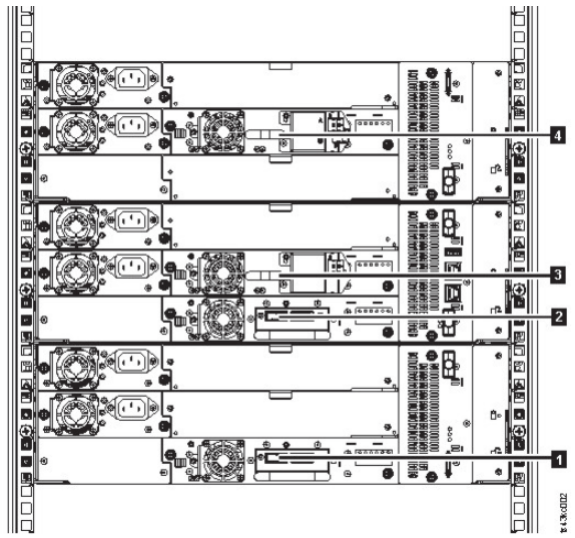
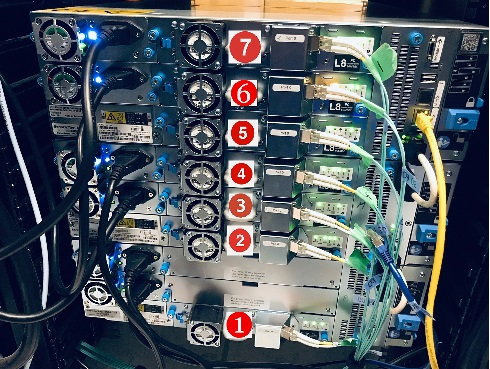
ML3 磁带库驱动器和模块从下往上编号。
Cause
在故障处理和驱动器更换过程中,将在 ML3 中从下到上枚举驱动器。
Resolution
所有驱动器和模块的物理编号均为自下而上。此信息显示在管理用户界面的 drives 页面上,也可以在 ML3 用户指南中找到。
此外,可以打开驱动器标识符以使用 ML3 管理 GUI 标识驱动器:
步骤:
1.从库 > 作 > 打开或关闭标识符指示灯屏幕激活 UID LED。
此作将点亮基本模块正面和背面的蓝色 LED,以标识包含故障模块或组件的库。
2.识别库中包含故障组件的模块。
一个。在主屏幕的左上角,找到指示错误的模块。
b.单击或点按模块,以获取有关故障组件的信息。
Additional Information
Dell EMC ML3 磁带库用户指南
图 22.驱动器的物理编号
图 22.驱动器的物理编号
Affected Products
Dell EMC ML3Article Properties
Article Number: 000202335
Article Type: Solution
Last Modified: 14 أغسطس 2025
Version: 3
Find answers to your questions from other Dell users
Support Services
Check if your device is covered by Support Services.