PowerEdge: OMIMSWAC의 간헐적인 "데이터 가져오는 중" 알림
Summary: Azure Stack HCI 환경에서 OMIMSWAC 플러그인의 "클러스터"를 클릭하면 "데이터 가져오기 중"과 함께 오류 알림이 발생합니다.
This article applies to
This article does not apply to
This article is not tied to any specific product.
Not all product versions are identified in this article.
Symptoms
OMIMSWAC 플러그인 버전은 2.3.0입니다.
클러스터를 클릭한 후 대시보드 정보
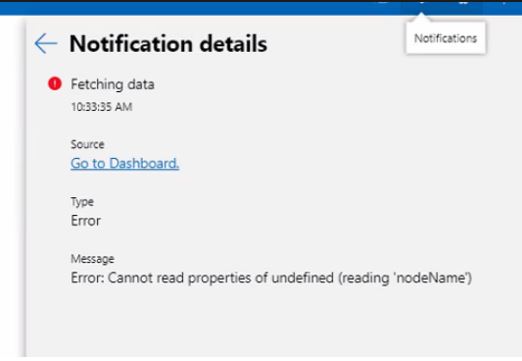
오류를 표시하기 전에 발생하는 문제: 정의되지 않은 속성을 읽을 수 없습니다('nodeName)
캡처된 이미지:
Cause
이 문제는 여러 가지 이유로 발생할 수 있습니다.
그러나 문제가 간헐적으로 발생하고 모든 기능이 제대로 작동하는 경우 OMIMSWAC에서는 문제가 되지 않습니다.
이 문제는 호스트의 네트워크 구성 오류가 원인입니다.
따라서 모든 네트워크 구성이 올바르게 설정되었는지 확인해야 합니다. (DNS/NIC 티밍/스위치)
Resolution
Azure Stack HCI 클러스터의 각 노드에서 네트워크 티밍이 잘못 구성되어 있기 때문입니다.
이 문제는 네트워크 티밍 구성을 수정한 후 해결되었습니다.
Affected Products
OpenManage Integration with Microsoft Windows Admin Center, OpenManage Integration with Microsoft Windows Admin Center, PowerEdge R440, PowerEdge R450, PowerEdge R540, PowerEdge R550, PowerEdge R640, PowerEdge R6415, PowerEdge R650, PowerEdge R650xs
, PowerEdge R6515, PowerEdge R6525, PowerEdge R660, PowerEdge R660xs, PowerEdge R6615, PowerEdge R6625, PowerEdge R740, PowerEdge R740XD, PowerEdge R740XD2, PowerEdge R7415, PowerEdge R7425, PowerEdge R750, PowerEdge R7515, PowerEdge R7525, PowerEdge R760, PowerEdge R760XA, PowerEdge R760xd2, PowerEdge R760xs, PowerEdge R7615, PowerEdge R7625, PowerEdge R840, PowerEdge R860, PowerEdge R940, PowerEdge R960
...
Article Properties
Article Number: 000202990
Article Type: Solution
Last Modified: 15 مايو 2026
Version: 3
Find answers to your questions from other Dell users
Support Services
Check if your device is covered by Support Services.