ECS Dial Home: Data Movement Sync Failed Alert - Symptom ID: 1906
Summary: This KB article describes Symptom ID 1906 introduced in ECS 3.8.0.0.
This article applies to
This article does not apply to
This article is not tied to any specific product.
Not all product versions are identified in this article.
Symptoms
| Symptom Code | Severity |
| 1906 | Critical |
Dial Home Example:
SymptomCode: 1906
Category: Configuration
Severity: CRITICA
Status: Unknown
Component: Dmsvc
SubComponent:
CallHome: true
FirstTime:
LastTime:
Description: Datamovent policy is failed to pass the policy validation, normally which means the policy or policy update is invalid.
Cause
The alert appears when the Data movement policy fails to pass the policy validation. This means that the policy or policy update is invalid. This can also be reported if there is a temporary network outage.
Resolution
Check the alert to find out which policy has failed:
For Example:
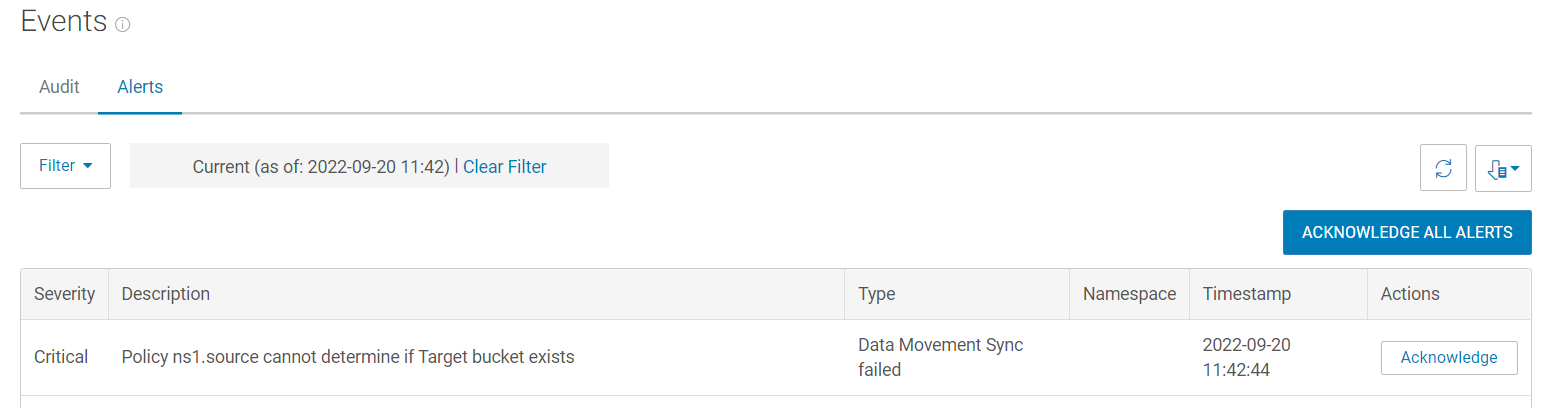
- The detailed reason why the policy is failed (the target bucket exists) is known, as the above image shows. Revise the policy details and ensure those are valid.
- If additional assistance is required, open a Service Request to the ECS technical support team.
Additional Information
Temporary network outages can also cause this alert to appear.
Affected Products
ECS, ECS Appliance Software with EncryptionArticle Properties
Article Number: 000205442
Article Type: Solution
Last Modified: 19 مايو 2026
Version: 4
Find answers to your questions from other Dell users
Support Services
Check if your device is covered by Support Services.