NVP vProxy:NetWorker nsrvim 程序每 15 分鐘執行一次,導致 vCenter Server 工作負載過高,且可能發生 VPXD 不可用性
Summary: VMware vCenter Server 觀察到 VPXD 服務無法使用,或因為 NetWorker 伺服器的高工作負荷而沒有回應。本 KB 提供如何調整 NetWorker vCenter 清查探索程序 (nsrvim) 的詳細資料。
This article applies to
This article does not apply to
This article is not tied to any specific product.
Not all product versions are identified in this article.
Symptoms
- NetWorker 伺服器已經過設定,以保護 vCenter 伺服器。
- vCenter 伺服器會觀察到 VMware Virtual Provisioning X Daemon (VPXD) 服務可用性或一般高工作負載的問題。
Cause
NetWorker 的 vCenter 清查程序 (nsrvim) 在服務啟動期間啟動,然後每 15 分鐘執行一次 (預設值)。每當 VMware 保護工作針對 vCenter 執行時,此程序也會執行。取決於連線至 vCenter 的 NetWorker 伺服器數量,以及 VMware 保護原則作業的數量或頻率。這會導致在短時間內針對 vCenter 伺服器提出數個清查查詢要求。
此工作在 NetWorker 伺服器上的daemon.log中觀察到為:
106637 MM/DD/YYY HH:MM:SS AM/PM  1 3 0 15204 8080 0 NSR_HOSTNAME nsrdisp_nwbg RAP notice job 'nsrvim' progress message: nsrvim starting on NSR_HOSTNAME (process 10852).
106637 MM/DD/YYY HH:MM:SS AM/PM  1 3 0 15204 8080 0 NSR_HOSTNAME nsrdisp_nwbg RAP notice job 'nsrvim' progress message: Connecting to NetWorker on 'NSR_HOSTNAME'.
106637 MM/DD/YYY HH:MM:SS AM/PM  1 3 0 15204 8080 0 NSR_HOSTNAME nsrdisp_nwbg RAP notice job 'nsrvim' progress message: Querying NSR hypervisor resource 'VC_HOSTNAME'
106637 MM/DD/YYY HH:MM:SS AM/PM  1 3 0 15204 8080 0 NSR_HOSTNAME nsrdisp_nwbg RAP notice job 'nsrvim' progress message: Connecting to service at https://VC_HOSTNAME/sdk
106637 MM/DD/YYY HH:MM:SS AM/PM  1 3 0 15204 8080 0 NSR_HOSTNAME nsrdisp_nwbg RAP notice job 'nsrvim' progress message: Starting session with infrastructure services daemon.
106637 MM/DD/YYY HH:MM:SS AM/PM  1 3 0 15204 8080 0 NSR_HOSTNAME nsrdisp_nwbg RAP notice job 'nsrvim' progress message: Querying for inventory at https://VC_HOSTNAME/sdk
106637 MM/DD/YYY HH:MM:SS AM/PM  1 3 0 15204 8080 0 NSR_HOSTNAME nsrdisp_nwbg RAP notice job 'nsrvim' progress message: Querying for categories from infrastructure services daemon.
106637 MM/DD/YYY HH:MM:SS AM/PM  1 3 0 15204 8080 0 NSR_HOSTNAME nsrdisp_nwbg RAP notice job 'nsrvim' progress message: Updating NSR hypervisor resource 'VC_HOSTNAME'
106637 MM/DD/YYY HH:MM:SS AM/PM  1 3 0 15204 8080 0 NSR_HOSTNAME nsrdisp_nwbg RAP notice job 'nsrvim' progress message: Finished updating NSR hypervisor resource 'VC_HOSTNAME'
106637 MM/DD/YYY HH:MM:SS AM/PM  1 3 0 15204 8080 0 NSR_HOSTNAME nsrdisp_nwbg RAP notice job 'nsrvim' progress message: nsrvim exiting on NSR_HOSTNAME (process 10852).
VMware 保護原則執行時,也會出現相同的訊息。
Resolution
建立 NSRVIM_TIME_INTERVAL NetWorker 伺服器上的環境變數,以調整 nsrvim 時程表。新增或變更此變數需要 NetWorker 伺服器 (nsrd) 精靈重新啟動。若要建立環境變數,請根據 NetWorker 伺服器的作業系統執行下列步驟:
注意:能夠調整
nsrvim interval 已在 NetWorker 19.10 中新增。NetWorker 19.9 (及更早版本) 已終止支援壽命 (EOSL)。NetWorker 伺服器必須為 19.10.x 或更新版本,才能使用此功能。
Linux:
1.修改(或建立)檔案
/nsr/nsrrc:
sudo vi /nsr/nsrrc
2.將以下行新增到檔案中:
NSRVIM_TIME_INTERVAL=60
export NSRVIM_TIME_INTERVAL
注意:最大時間間隔為 60 分鐘;如果指定的值超過 60 分鐘,則使用 60 分鐘。最短間隔為 15 分鐘;如果指定的值小於 15 分鐘,則使用 15 分鐘。
3.重新啟動 NetWorker 伺服器服務:
sudo systemctl restart networker
Microsoft Windows:
請使用下列其中一種方法。
Windows 命令列
- 開啟系統管理員 PowerShell 提示。
- 執行下列命令
setx /m NSRVIM_TIME_INTERVAL 60
注意:最大時間間隔為 60 分鐘;如果指定的值超過 60 分鐘,則使用 60 分鐘。最短間隔為 15 分鐘;如果指定的值小於 15 分鐘,則使用 15 分鐘。
- 在新的 PowerShell 提示中,執行:
echo $env:NSRVIM_TIME_INTERVAL
這應返回步驟 2 中設置的值。
- 將伺服器重新開機。
Windows 使用者介面
- 開啟控制台,然後按一下系統與安全性,然後按一下系統 。
- 按 一下進階系統設定。
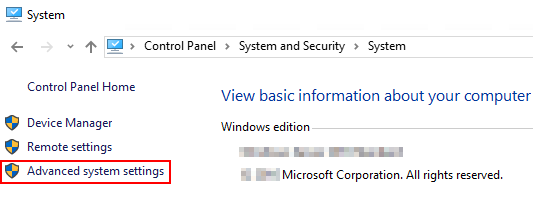
- 從系統屬性中, 按一下環境變數。
- 在 「System Variables」下, click New:
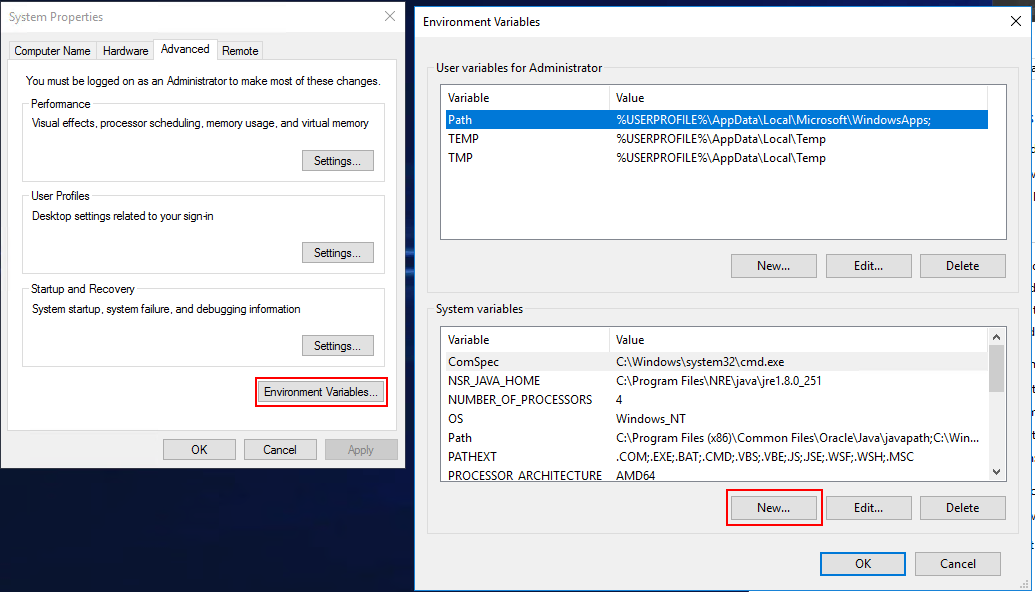
- 在變數名稱欄位中,輸入:NSRVIM_TIME_INTERVAL
- 在 變數值 欄位中,輸入一個介於 15 到 60 之間的數位(此數字對應於分鐘)。
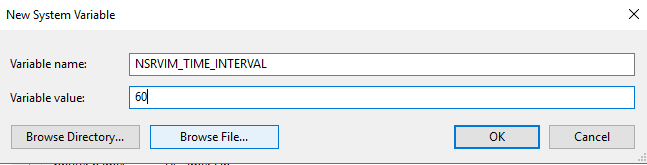
注意:最大時間間隔為 60 分鐘;如果指定的值超過 60 分鐘,則使用 60 分鐘。最短間隔為 15 分鐘;如果指定的值小於 15 分鐘,則使用 15 分鐘。
注意:此變更只會影響排程的
nsrvim 行動。每當 VMware 保護工作流程開始時,使用者會開啟新的 NMC 工作階段,或從 NMC 啟動 VMware 還原,當系統啟動 nsrvim 程序已啟動,且每個 Hypervisor 均已清查。
Additional Information
Affected Products
NetWorkerProducts
NetWorker Family, NetWorker SeriesArticle Properties
Article Number: 000206095
Article Type: Solution
Last Modified: 04 يونيو 2026
Version: 7
Find answers to your questions from other Dell users
Support Services
Check if your device is covered by Support Services.