「Data Domain:外部キー マネージャーのキー ローテーションでキーを作成できませんでした
Summary: ファイル システムがダウンしている場合は、外部キー マネージャーのキー ローテーション(警告:EVT-ENCRYPTION-00008)がキーの作成に失敗します。また、SMS(Storage Management Service)またはKMIPD(Key Management Interoperability Protocol)デーモンのプロセスがダウンしている場合、または外部マネージャーにアクセスできない場合にも発生します。コマンドライン インターフェイス(CLI)またはユーザー インターフェイス(UI)を使用して新しい暗号化キーを手動で作成して解決し、次のローテーション日が更新されていることを確認します。 ...
This article applies to
This article does not apply to
This article is not tied to any specific product.
Not all product versions are identified in this article.
Symptoms
キー ローテーション障害インジケーター
キー ローテーション ポリシーがアクティブな場合、システムは定義された間隔で暗号化キーのローテーションを試みます。
「 filesys encryption key-manager show コマンドは、次に予定されているローテーション日を表示します。
Example:

# filesys encryption key-manager show
The current key-manager configuration is:
Key Manager:                                Enabled
Server Type:                                CipherTrust
Server:                                     xx.xxx.xx.xxx
Port:                                       5696
Status:                                     Online
Key-class:                                  test_doc
KMIP-user:                                  user1
Key rotation period:                        1 weeks
Last key rotation date:                     01:01:12 12/14 2022
Next key rotation date:                     01:01:00 12/21 2022
自動ローテーションが成功しない場合、システムは次のアラートを生成します。
WARNING Filesystem EVT-ENCRYPTION-00008: External key manager key rotation failed to create key- 警告
EVT-ENCRYPTION-00008システムログに表示されます。 - 暗号化キーがスケジュールされた時刻に作成されません。
- 失敗したローテーションの後、次のキー ローテーションの日付は変更されません。
Cause
キー ローテーションの失敗の理由
システムは警告をログに記録します EVT-ENCRYPTION-00008 外部キー マネージャーが新しいキーを作成できない場合。
- スケジュール設定されたローテーション時間にファイル システムがダウンしている。
- サービスSMSまたは
kmipdは、ローテーション中に実行されていません。 - 外部キー マネージャーにアプライアンスからアクセスできません。
警告: これらの条件のいずれかが発生すると、自動キー ローテーションは停止します。
Resolution
暗号化キーを手動でローテーションするか、次のキー ローテーションの日付まで待ちます。

Example:  コマンド ラインの使用
 # filesys encryption key-manager keys create
This command requires authorization by a user having a 'security' role.
Please present credentials for such a user below.
        Username: secadmin
        Password:
New encryption key was successfully created.

sysadmin@ddve4# filesys encryption key-manager show
The current key-manager configuration is:
Key Manager:                                Enabled
Server Type:                                CipherTrust
Server:                                     xx.xxx.xx.xxx
Port:                                       5696
Status:                                     Online
Key-class:                                  test_doc
KMIP-user:                                  user1
Key rotation period:                        1 weeks
Last key rotation date:                     20:27:47 12/20 2022
Next key rotation date:                     01:01:00 12/27 2022
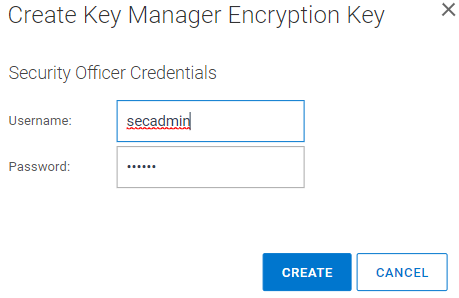
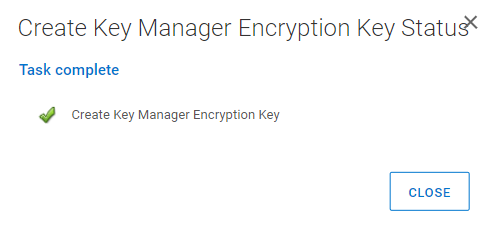
注: 次回の鍵ローテーション期間は適宜更新されます。手動でのキー作成が試行されない場合は、次に設定された間隔でキーのローテーションが再試行されます。Example: UIを使用して、PowerProtect DD System Manager UIにログインし 、[Data Management] = > File System => DD ENCRYPION = > Key Manager Encryption Keysに移動します。[Add]を選択セキュリティ ユーザー名とパスワードを入力します。[CREATE]を選択します。
Affected Products
Data DomainArticle Properties
Article Number: 000206765
Article Type: Solution
Last Modified: 05 فبراير 2026
Version: 3
Find answers to your questions from other Dell users
Support Services
Check if your device is covered by Support Services.