Data Domain:外部金鑰管理程式金鑰輪替無法建立金鑰
Summary: 檔案系統關閉時,外部金鑰管理器金鑰輪替無法建立金鑰 (警告 EVT-ENCRYPTION-00008)。如果存儲管理服務 (SMS) 或金鑰管理互操作性協定守護程式 (KMIPD) 進程關閉,或者無法訪問外部管理員,也會發生這種情況。通過使用命令行介面 (CLI) 或使用者介面 (UI) 手動創建新的加密金鑰來解決,並驗證下一個輪換日期是否已更新。
This article applies to
This article does not apply to
This article is not tied to any specific product.
Not all product versions are identified in this article.
Symptoms
金鑰輪換失敗指示器
當金鑰輪換策略處於活動狀態時,系統會嘗試按定義的間隔輪換加密密鑰。
可使用 filesys encryption key-manager show 命令顯示下一個計劃的輪換日期。
Example:

# filesys encryption key-manager show
The current key-manager configuration is:
Key Manager:                                Enabled
Server Type:                                CipherTrust
Server:                                     xx.xxx.xx.xxx
Port:                                       5696
Status:                                     Online
Key-class:                                  test_doc
KMIP-user:                                  user1
Key rotation period:                        1 weeks
Last key rotation date:                     01:01:12 12/14 2022
Next key rotation date:                     01:01:00 12/21 2022
當自動旋轉不成功時,系統會產生以下警報:
WARNING Filesystem EVT-ENCRYPTION-00008: External key manager key rotation failed to create key- 警示
EVT-ENCRYPTION-00008出現在系統日誌中。 - 加密金鑰不會在排定的時間建立。
- 錯過輪換后,下一個密鑰輪換日期保持不變。
Cause
金鑰輪替失敗的原因
系統記錄警告 EVT-ENCRYPTION-00008 當外部金鑰管理員無法建立新金鑰時。
- 檔案系統在排定的旋轉時間關閉。
- 服務簡訊或
kmipd在輪換期間不運行。 - 無法從裝置連接外部金鑰管理員。
警告: 當發生上述任何情況時,自動金鑰輪替會停止。
Resolution
手動輪換加密金鑰或等待下一個金鑰輪換日期。

範例:  使用命令列
 # filesys encryption key-manager keys create
This command requires authorization by a user having a 'security' role.
Please present credentials for such a user below.
        Username: secadmin
        Password:
New encryption key was successfully created.

sysadmin@ddve4# filesys encryption key-manager show
The current key-manager configuration is:
Key Manager:                                Enabled
Server Type:                                CipherTrust
Server:                                     xx.xxx.xx.xxx
Port:                                       5696
Status:                                     Online
Key-class:                                  test_doc
KMIP-user:                                  user1
Key rotation period:                        1 weeks
Last key rotation date:                     20:27:47 12/20 2022
Next key rotation date:                     01:01:00 12/27 2022
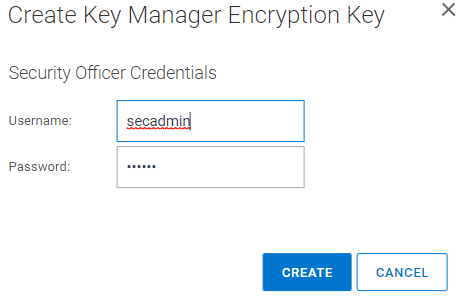
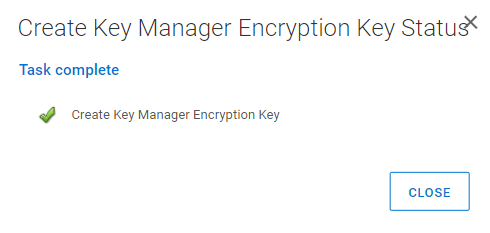
注意: 下一個金鑰輪換週期會適當更新。如果未嘗試手動創建金鑰,則會在下一個設置的時間間隔重試密鑰輪換。範例:使用 UI登入 PowerProtect DD System Manager UI前往 「資料管理 => 檔案系統 => DD ENCRYPION => Key Manager 加密金鑰」。選取「Add」輸入安全性使用者名稱和密碼選取「建立」
Affected Products
Data DomainArticle Properties
Article Number: 000206765
Article Type: Solution
Last Modified: 05 فبراير 2026
Version: 3
Find answers to your questions from other Dell users
Support Services
Check if your device is covered by Support Services.