VxRail: Aggiornamento del nodo non riuscito con messaggio No space left on device
Summary: Questo articolo della Knowledge Base descrive una situazione in cui l'aggiornamento di un nodo non riesce con un messaggio di errore "No space left on device".
Symptoms
L'aggiornamento della gestione del ciclo di vita (LCM) non riusciva in ogni nodo con il seguente messaggio di errore:
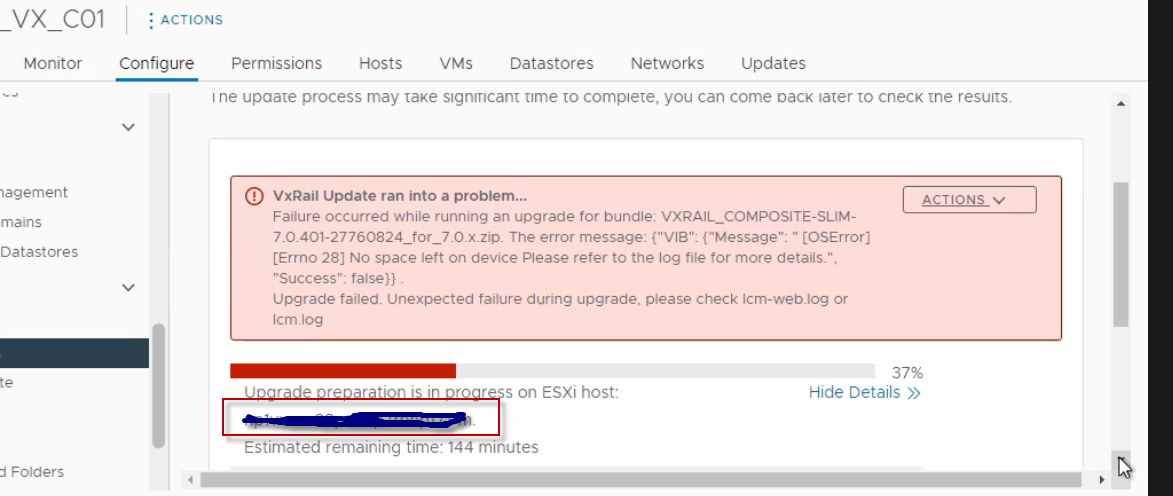 Figura 1. Messaggio di errore di aggiornamento di VxRail
Dal comando lcm-web.log:
2022-12-23 10:15:36,156 INFO [LCM] [lcm-node-0] c.e.m.m.e.DynamicReloadableResourceBundleMessageSource [DynamicReloadableResourceBundleMessageSource.java:17] Try to translate message: VxRail Platform Service upgrade failed on target: <Node FQDN> due to Failure in parsing script result: {"Message": " [LockFileError] Error unlocking file /tmp/_tmp_stagebootbank.lck: [Errno 28] No space left on device Please refer to the log file for more details.", "Success": false}
.. Failure occurred in the middle of upgrading. If you want to resume, make sure the failed component has recovered to its pre-upgrade state and then click Resume.
2022-12-23 10:15:36,156 INFO [LCM] [lcm-node-0] c.e.m.m.e.DynamicReloadableResourceBundleMessageSource [DynamicReloadableResourceBundleMessageSource.java:19] Succeeded to translate message: VxRail Platform Service upgrade failed on target: <Node FQDN> due to Failure in parsing script result: {"Message": " [LockFileError] Error unlocking file /tmp/_tmp_stagebootbank.lck: [Errno 28] No space left on device Please refer to the log file for more details.", "Success": false}
.. Failure occurred in the middle of upgrading. If you want to resume, make sure the failed component has recovered to its pre-upgrade state and then click Resume. -> VxRail Platform Service upgrade failed on target: <Node FQDN> due to Failure in parsing script result: {"Message": " [LockFileError] Error unlocking file /tmp/_tmp_stagebootbank.lck: [Errno 28] No space left on device Please refer to the log file for more details.", "Success": false}
.. Failure occurred in the middle of upgrading. If you want to resume, make sure the failed component has recovered to its pre-upgrade state and then click Resume.
2022-12-23 10:15:36,156 ERROR [LCM] [lcm-node-0] c.v.l.c.u.e.ESXiVIBUpgrader [ESXiVIBUpgrader.java:337]  [LockFileError] Error unlocking file /tmp/_tmp_stagebootbank.lck: [Errno 28] No space left on device Please refer to the log file for more details.
2022-12-23 10:16:25,730 ERROR [LCM] [lcm-node-0] c.v.l.c.b.BatchUpgrade [BatchUpgrade.java:1384] Attempt 2/3 of vSAN access exception. but failed with error:
com.vce.lcm.exception.LCMInternalException:  [LockFileError] Error unlocking file /tmp/_tmp_stagebootbank.lck: [Errno 28] No space left on device Please refer to the log file for more details.
    at com.vce.lcm.core.upgrade.esxi.ESXiVIBUpgrader.resultAnalysis(ESXiVIBUpgrader.java:345)
    at com.vce.lcm.core.upgrade.esxi.ESXiVIBUpgrader.performHostUpgrade(ESXiVIBUpgrader.java:178)
    at com.vce.lcm.core.upgrade.esxi.AbstractESXiHostUpgrader.runUpgradeOnHost(AbstractESXiHostUpgrader.java:635)
    at com.vce.lcm.core.batch.BatchUpgrade.componentUpgrade(BatchUpgrade.java:1526)
    at com.vce.lcm.core.batch.BatchUpgrade.componentUpgradePerHostRecursive(BatchUpgrade.java:515)
    at com.vce.lcm.core.batch.BatchUpgrade.componentUpgradePerHostRecursive(BatchUpgrade.java:453)
    at com.vce.lcm.core.batch.BatchUpgrade.lambda$upgradeHost$9(BatchUpgrade.java:1638)
    at org.springframework.retry.support.RetryTemplate.doExecute(RetryTemplate.java:329)
    at org.springframework.retry.support.RetryTemplate.execute(RetryTemplate.java:209)
    at com.vce.lcm.core.batch.BatchUpgrade.upgradeHost(BatchUpgrade.java:1622)
    at com.vce.lcm.core.batch.BatchUpgrade.performBatchUpgrade(BatchUpgrade.java:1058)
    at com.vce.lcm.core.batch.BatchUpgrade.performBatchUpgrade(BatchUpgrade.java:1366)
    at com.vce.lcm.core.upgrade.NodeUpgradeServiceImpl.performUpgrade(NodeUpgradeServiceImpl.java:102)
    at com.emc.mystic.manager.upgrade.executor.LcmNodeLegacyUpgradeExecutor.executeUpgrade(LcmNodeLegacyUpgradeExecutor.java:72)
    at com.emc.mystic.manager.upgrade.service.LcmNodeUpgradeServiceImpl$1.run(LcmNodeUpgradeServiceImpl.java:80)
    at java.base/java.util.concurrent.Executors$RunnableAdapter.call(Executors.java:515)
    at java.base/java.util.concurrent.FutureTask.run(FutureTask.java:264)
    at java.base/java.util.concurrent.ThreadPoolExecutor.runWorker(ThreadPoolExecutor.java:1128)
    at java.base/java.util.concurrent.ThreadPoolExecutor$Worker.run(ThreadPoolExecutor.java:628)
    at java.base/java.lang.Thread.run(Thread.java:829)
2022-12-23 10:16:25,730 ERROR [LCM] [lcm-node-0] c.v.l.c.b.BatchUpgrade [BatchUpgrade.java:1719] Set the parent upgrade component VxRail Platform Service status as failed.

2022-12-23 12:19:55,704 INFO [LCM] [lcm-node-0] c.e.m.m.e.DynamicReloadableResourceBundleMessageSource [DynamicReloadableResourceBundleMessageSource.java:17] Try to translate message: Failure in parsing script result: {"VIB": {"Message": " [OSError] [Errno 28] No space left on device Please refer to the log file for more details.", "Success": false}}
.
2022-12-23 12:19:55,705 INFO [LCM] [lcm-node-0] c.e.m.m.e.DynamicReloadableResourceBundleMessageSource [DynamicReloadableResourceBundleMessageSource.java:19] Succeeded to translate message: Failure in parsing script result: {"VIB": {"Message": " [OSError] [Errno 28] No space left on device Please refer to the log file for more details.", "Success": false}}
. -> Failure in parsing script result: {"VIB": {"Message": " [OSError] [Errno 28] No space left on device Please refer to the log file for more details.", "Success": false}}
.

2022-12-23 12:20:24,393 ERROR [LCM] [lcm-node-0] c.v.l.c.b.BatchUpgrade [BatchUpgrade.java:1384] Attempt 2/3 of vSAN access exception. but failed with error:
com.vce.lcm.exception.LCMInternalException: {"VIB": {"Message": " [OSError] [Errno 28] No space left on device Please refer to the log file for more details.", "Success": false}}
Cause
ramdisk è pieno, con conseguente errore di aggiornamento di vSphere Installation Bundle (VIB).
Dal comando vobd.log:
2022-12-23T10:15:34.030Z: [VisorfsCorrelator] 13537797115176us: [vob.visorfs.ramdisk.full] Cannot extend visorfs file /tmp/_tmp_stagebootbank.lck because its ramdisk (tmp) is full.
2022-12-23T10:15:34.030Z: [VisorfsCorrelator] 13538280543495us: [esx.problem.visorfs.ramdisk.full] The ramdisk 'tmp' is full.  As a result, the file /tmp/_tmp_stagebootbank.lck could not be written.
2022-12-23T10:15:34.030Z: [VisorfsCorrelator] 13537797115607us: [vob.visorfs.ramdisk.full] Cannot extend visorfs file /tmp/_tmp_stagebootbank.lck because its ramdisk (tmp) is full.
2022-12-23T10:15:34.030Z: [VisorfsCorrelator] 13537797115643us: [vob.visorfs.ramdisk.full] Cannot extend visorfs file /tmp/_tmp_stagebootbank.lck because its ramdisk (tmp) is full.
2022-12-23T10:15:34.044Z: [UserLevelCorrelator] 13538280557560us: [vob.user.esximage.install.error] Could not install image profile: Error unlocking file /tmp/_tmp_stagebootbank.lck: [Errno 28] No space left on device
2022-12-23T10:15:34.044Z: [GenericCorrelator] 13538280557560us: [vob.user.esximage.install.error] Could not install image profile: Error unlocking file /tmp/_tmp_stagebootbank.lck: [Errno 28] No space left on device
2022-12-23T10:15:34.045Z: [UserLevelCorrelator] 13538280557765us: [esx.problem.esximage.install.error] Could not install image profile: Error unlocking file /tmp/_tmp_stagebootbank.lck: [Errno 28] No space left on device
2022-12-23T10:15:35.728Z: [VisorfsCorrelator] 13537798812878us: [vob.visorfs.ramdisk.full] Cannot extend visorfs file /tmp/.vsanConfigurationLock.lock.LOCK.2101652 because its ramdisk (tmp) is full.
2022-12-23T10:15:40.740Z: [VisorfsCorrelator] 13537803825329us: [vob.visorfs.ramdisk.full] Cannot extend visorfs file /tmp/.vsanConfigurationLock.lock.LOCK.2101652 because its ramdisk (tmp) is full.
L'output del comando mostra vsantraces ramdisk sembra essere pieno o quasi pieno sull'ESXi:
#esxcli system visorfs ramdisk list
#vdf -h
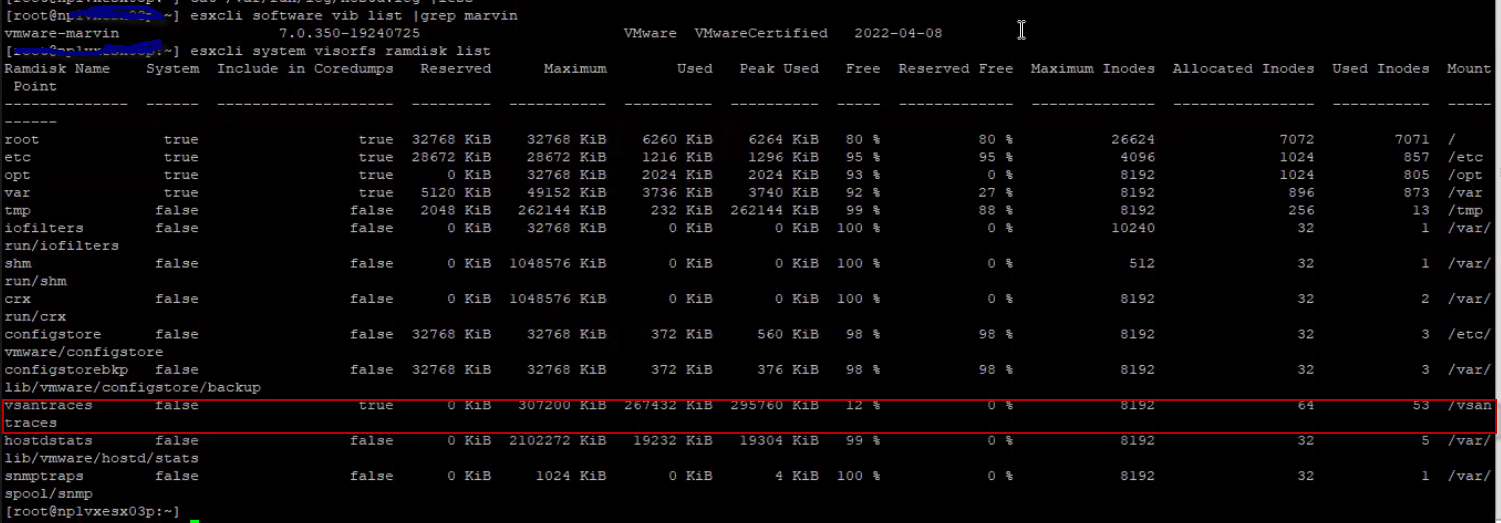
Figura 2. Le tracce e le vsantrace vengono visualizzate come false
Resolution
Dai un'occhiata: https://kb.vmware.com/s/article/2147956?lang=en_US (Link esterno)
Eliminare o spostare i file vsantraces correnti dalla cartella vsantraces /vsantraces/:
vsantraces--*.gzvsanObserver--*.gzvsanObserver--*.gzvsantracesUrgent--*.gz
Le modifiche hanno effetto immediato; non è necessario riavviare l'host ESXi.
Inoltre, fare riferimento a https://kb.vmware.com/s/article/1003564 (Link esterno) per la risoluzione dei problemi di spazio.