Avamar: VM backup fails on ESXI 5.x due to VIXDISKLIB_QUERYALLOCATEDBLOCKS API failure
Summary: Virtual machine (VM) ESXi) 5.x failure; logs show ESXi VixDiskLib_QueryAllocatedBlocks errors (NBD_ERR_GENERIC) caused by Application Programming Interface (API) compliance reason.
Symptoms
VM image backups fail when Changed Block Tracking (CBT) is enabled on an unsupported ESXi version 5.x.
- The backup log shows the following line indicating that the target VM is running on an unsupported VMware version:
avvcbimage Info <40638>: VM Host Name=esxi.example.com(5.5 build-2068190)
- The backup log shows that CBT is enabled, but the backup is a full CBT level zero backup:
avvcbimage Info <11988>: A reference to a valid prior backup is not available so this will be a full level zero backup.
OR
avvcbimage Info <14681>: Change block tracking (CTK) is supported for this VM but has been declined. This will increase proxy CPU and IOP consumption.
- The backup log shows that a successful snapshot can be created:
avvcbimage Info <14632>: Snapshot 'Avamar-16763996243af4ead6dea4e3e0d24ea86d327bebed43a19e42' creation for VM '[datastore1] vmname/vmname.vmx' task completed, moref=snapshot-91273
- The backup log shows the disk connected using
hotaddor Network Block Device (NBD).
For example:
avvcbimage Info <40634>: Connected with hotadd transport to virtual disk [datastore1] vmname/vmname-000001.vmdk. Time to connect: 16300 msecs
OR
avvcbimage Info <40634>: Connected with nbd transport to virtual disk [datastore)] vmname/vmname-000001.vmdk. Time to connect: 1025 msecs
- The backup log shows that the
VixDiskLib_QueryAllocatedBlocksAPI call is made and fails withIllegal messageandNBD_ERR_GENERICerrors:
avvcbimage Info <16041>: VDDK:VixDiskLib: VixDiskLib_QueryAllocatedBlocks: Query allocated blocks.
avvcbimage Warning <16041>: VDDK:[NFC ERROR]NfcFssrvrProcessErrorMsg: received NFC error 2 from server: Illegal message during fssrvr session, id = 49
avvcbimage Info <16041>: VDDK:DISKLIB-LIB_MISC   : DiskLibGetAllocatedSectorChunksInRangeInt: failed to get allocated sector bitmap with 'NBD_ERR_GENERIC' (290).
avvcbimage Info <16041>: VDDK:VixDiskLib: Detected DiskLib error 290 (NBD_ERR_GENERIC).
avvcbimage Info <16041>: VDDK:VixDiskLib: VixDiskLibQueryBlockList: Fail to query blocks (offset 0, chunkSize 128, chunkNumber 524288). Error 1 (Unknown error) (DiskLib error 290: NBD_ERR_GENERIC) at 591.
- The backup log shows graceful termination due to
VixDiskLib_Readfailure from Step 5.
avvcbimage Error <0000>: [IMG0008] VixDiskLib_Read() (datastore)] vmname/vmname.vmdk) at offset 0 length 128 sectors returned (1) (1)Unknown error
avvcbimage Info <9772>: Starting graceful (staged) termination, VixDiskLib_Read returned an error (wrap-up stage)
Cause
The VMware ESXi version is unsupported. Avamar 19.2 and later versions use a new API called VixDiskLib_QueryAllocatedBlocks to query for in-use blocks of a virtual disk.
However, this API is not backwards compatible with ESXi 5.x versions.
Resolution
The VMware server should be upgraded to a supported version. ESXi 5.5 is not supported.
As a workaround, set the advanced flag '--enable_query_allocated_block' to false.
Here are two methods to do this:
Method 1 (over CMD file)
On the Proxy, edit the following file: /usr/local/avamarclient/var/avvcbimageAll.cmd and modify or add these lines:
# If enabled, use QueryAllocatedBlock instead of QueryChangedDiskAreas for full backup/in-use query
#    Default is true.
--enable_query_allocated_block=false
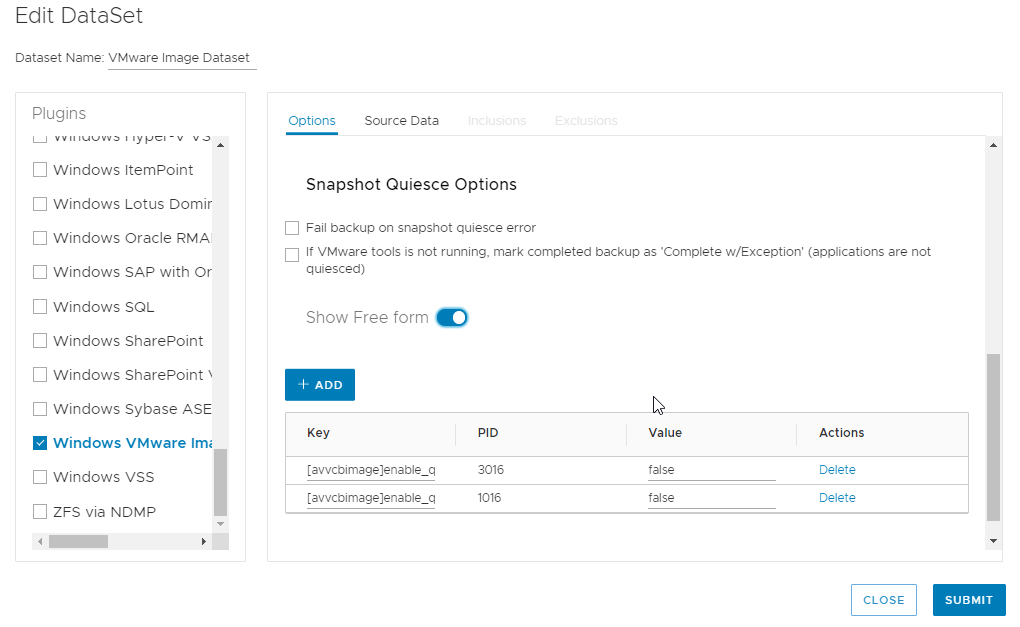
Method 2 (by dataset in the Avamar User Interface)
- Edit Dataset being used for by the backup policy.
- Select the Windows VMware Image plug-in > Show Free form > ADD
Key:
[avvcbimage]enable_query_allocated_block
Value:
False - Select Linux VMware Image plug-in > Show Free form > ADD
Key:
[avvcbimage]enable_query_allocated_block
Value:
False
See Example below: