VxRail: Event Code VXR0140A2
Summary: Event VXR0140A2 is reported when the Log disk reaches 90% capacity.
This article applies to
This article does not apply to
This article is not tied to any specific product.
Not all product versions are identified in this article.
Symptoms
A VxRail event VXR0140A2 occurs, and a red alarm appears in the vCenter portal.
Cause
The storage of the Log disk (/stroage/log/) on vCenter has reached 90% capacity.
Resolution
Please log in to the vCenter Server Appliance as root using SSH or the vCenter virtual machine Console.
If SSH is not enabled on your vCenter server, follow these steps to enable it:
- Go to
https://[vCenter_url]:5480(the vCenter Server Management UI) and log in as root. - Click Access," then click Edit to enable vCenter SSH.

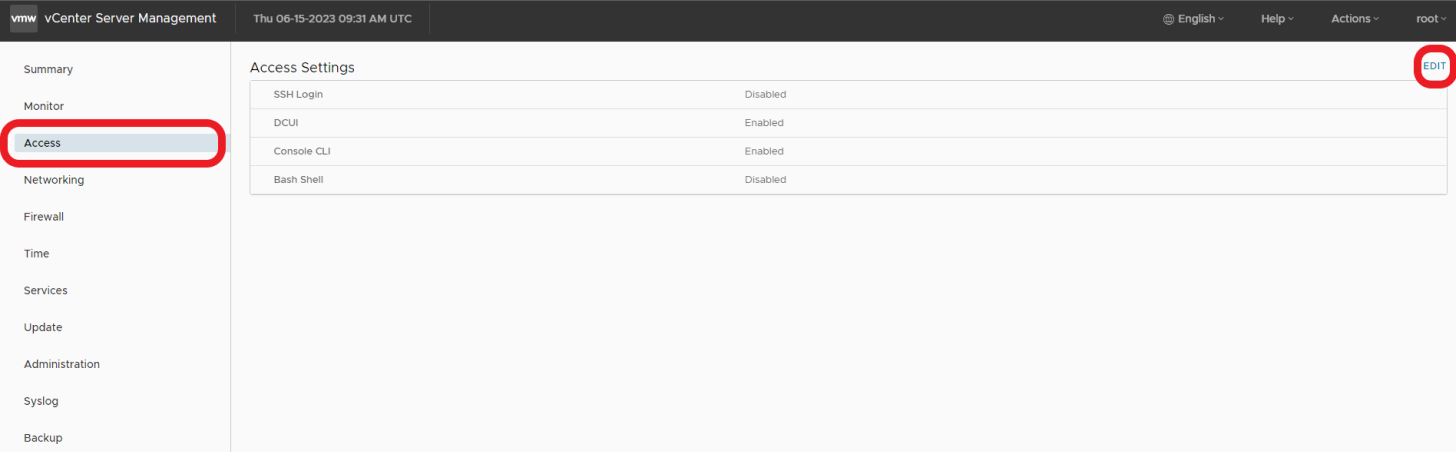
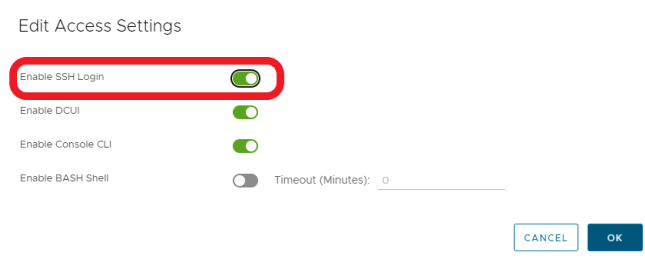

- SSH to vCenter
ssh root@[vcenter ip or fqdn]
To resolve the issue, please follow the steps outlined in these VMware KB articles.

Affected Products
VxRailProducts
VxRail, VxRail Appliance Series, VxRail SoftwareArticle Properties
Article Number: 000214539
Article Type: Solution
Last Modified: 22 مايو 2026
Version: 2
Find answers to your questions from other Dell users
Support Services
Check if your device is covered by Support Services.