「VxRail:イベント コードVXR0140A4
Summary: コアおよびインベントリー ディスクの容量が90%に達すると、イベントVXR0140A4が報告されます。
This article applies to
This article does not apply to
This article is not tied to any specific product.
Not all product versions are identified in this article.
Symptoms
Severity: エラー
VxRailイベント VXR0140A4が発生し、vCenterポータルに赤色のアラームが表示されます。
VxRailイベント VXR0140A4が発生し、vCenterポータルに赤色のアラームが表示されます。
Cause
vCenterのコアおよびインベントリー ディスク(/storage/db/)のストレージ容量が90%に達しました。
Resolution
SSHまたはvCenter仮想マシン コンソールを使用して、rootとしてvCenter Server Applianceにログインします。
vCenter ServerでSSHが有効になっていない場合は、次の手順に従って有効にします。
- 次のリンクにアクセスする:
https://[vCenter_url]:5480(vCenter Server管理UI)をクリックし、rootとしてログインします。 - アクセスをクリックし、編集をクリックしてvCenter SSHを有効にします。

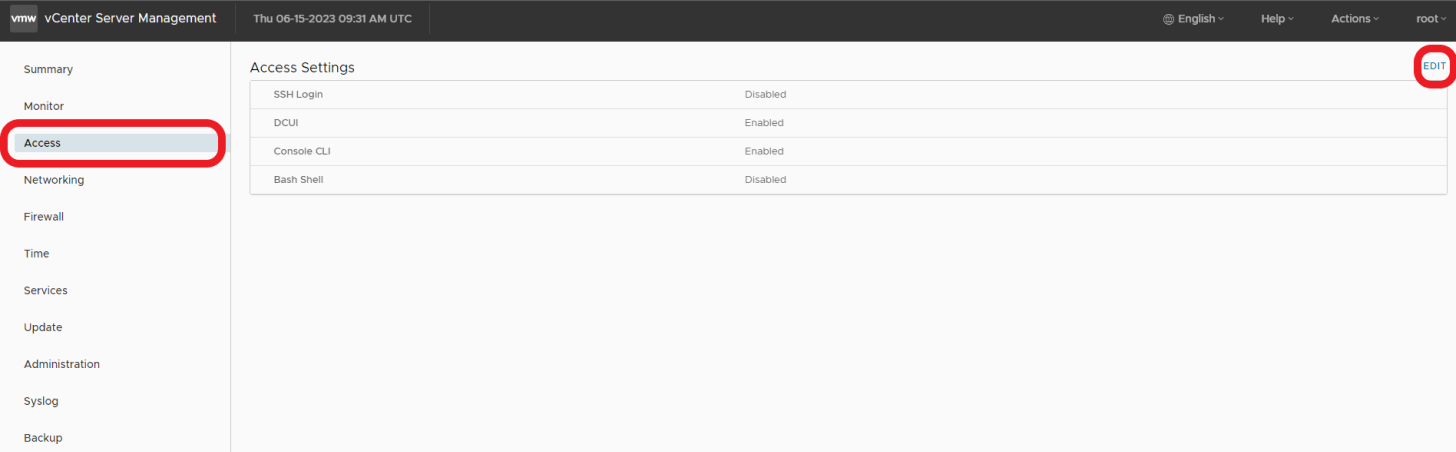

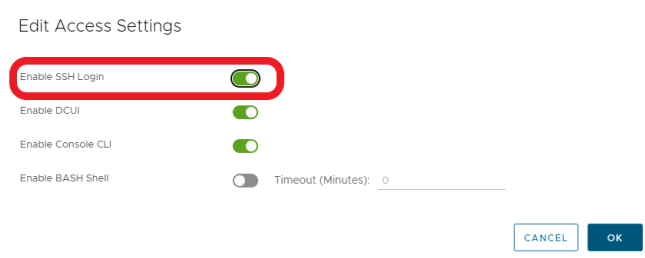
- vCenterにSSH接続します
ssh root@[vcenter ip or fqdn]
この問題を解決するには、次のVMWare KB記事に記載されている手順に従ってください。

Affected Products
VxRail, VxRail Appliance Series, VxRail SoftwareArticle Properties
Article Number: 000214541
Article Type: Solution
Last Modified: 22 مايو 2026
Version: 2
Find answers to your questions from other Dell users
Support Services
Check if your device is covered by Support Services.