VxRail: Gebeurteniscode VXR0140A4
Summary: Gebeurtenis VXR0140A4 wordt gerapporteerd wanneer de core- en inventarisschijf 90% van de capaciteit bereikt.
This article applies to
This article does not apply to
This article is not tied to any specific product.
Not all product versions are identified in this article.
Symptoms
Severity: Fout
Er treedt VXR0140A4 een VxRail-gebeurtenis op en er wordt een rood alarm weergegeven in de vCenter-portal.
Er treedt VXR0140A4 een VxRail-gebeurtenis op en er wordt een rood alarm weergegeven in de vCenter-portal.
Cause
De storage van de core- en inventarisschijf (/storage/db/) op vCenter heeft 90% van de capaciteit bereikt.
Resolution
Meld u aan bij de vCenter Server Appliance als root via SSH of de vCenter Virtual Machine Console.
Als SSH niet is ingeschakeld op uw vCenter server, volgt u deze stappen om dit in te schakelen:
- Ga naar:
https://[vCenter_url]:5480(de vCenter Server Management-UI) en meld u aan als root. - Klik op Access en vervolgens op Edit om vCenter SSH in te schakelen.

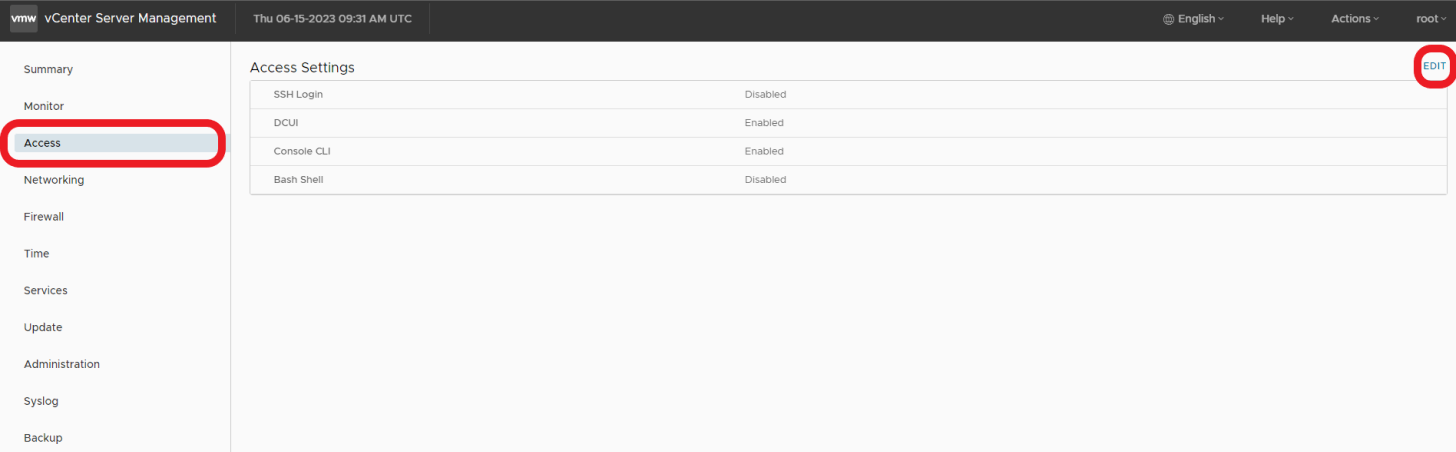

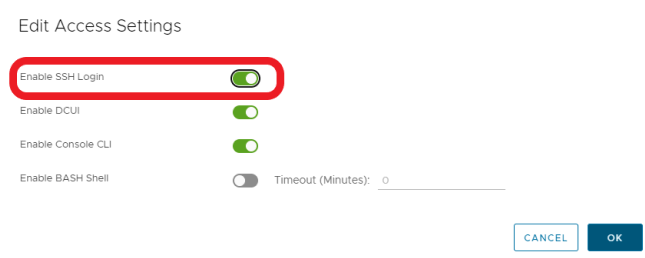
- SSH naar vCenter
ssh root@[vcenter ip or fqdn]
Volg de stappen in deze VMware KB-artikelen om het probleem op te lossen.

Affected Products
VxRail, VxRail Appliance Series, VxRail SoftwareArticle Properties
Article Number: 000214541
Article Type: Solution
Last Modified: 22 مايو 2026
Version: 2
Find answers to your questions from other Dell users
Support Services
Check if your device is covered by Support Services.