VxRail:事件代码 VXR0140A4
Summary: 当核心和清单磁盘达到 90% 的容量时,将报告事件VXR0140A4。
This article applies to
This article does not apply to
This article is not tied to any specific product.
Not all product versions are identified in this article.
Symptoms
Severity:错误
:发生 VxRail 事件VXR0140A4,并且 vCenter 门户中显示红色警报。
:发生 VxRail 事件VXR0140A4,并且 vCenter 门户中显示红色警报。
Cause
vCenter 上的核心磁盘和清单磁盘 (/storage/db/) 的存储已达到 90% 的容量。
Resolution
通过 SSH 或 vCenter 虚拟机控制台以 root 用户身份登录 vCenter Server Appliance。
如果您的 vCenter Server 上未启用 SSH,请按照以下步骤启用它:
- 请转至
https://[vCenter_url]:5480(vCenter Server 管理 UI),然后以 root 用户身份登录。 - 单击访问,然后单击 编辑 以启用 vCenter SSH。

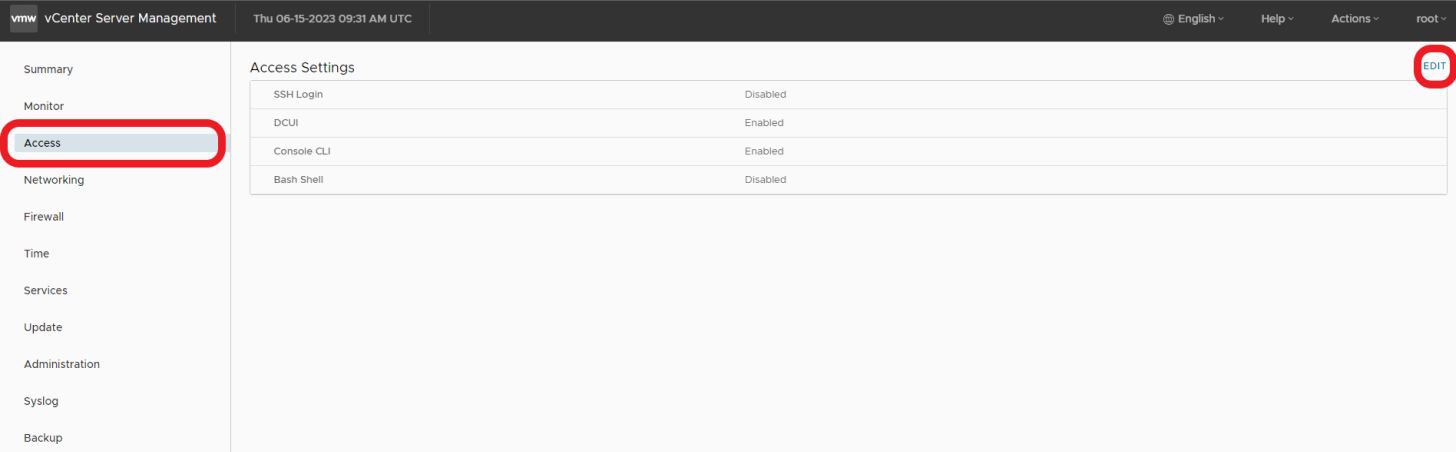

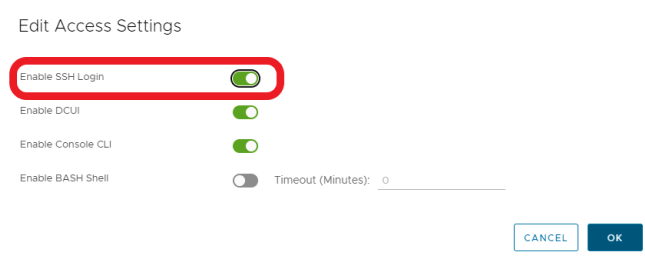
- 通过 SSH 连接到 vCenter
ssh root@[vcenter ip or fqdn]
要解决此问题,请按照这些 VMWare 知识库文章中概述的步骤进行操作。

Affected Products
VxRail, VxRail Appliance Series, VxRail SoftwareArticle Properties
Article Number: 000214541
Article Type: Solution
Last Modified: 22 مايو 2026
Version: 2
Find answers to your questions from other Dell users
Support Services
Check if your device is covered by Support Services.