VxRail: 이벤트 코드 VXR0140A4
Summary: 이벤트 VXR0140A4는 코어 및 인벤토리 디스크 용량이 90%에 도달하면 보고됩니다.
This article applies to
This article does not apply to
This article is not tied to any specific product.
Not all product versions are identified in this article.
Symptoms
Severity: 오류
: VxRail 이벤트가 VXR0140A4 발생하고 vCenter 포털에 빨간색 경보가 표시됩니다.
: VxRail 이벤트가 VXR0140A4 발생하고 vCenter 포털에 빨간색 경보가 표시됩니다.
Cause
vCenter의 코어 및 인벤토리 디스크(/storage/db/)의 스토리지가 90% 용량에 도달했습니다.
Resolution
SSH 또는 vCenter 가상 머신 콘솔을 통해 vCenter Server Appliance에 루트로 로그인합니다.
SSH가 vCenter Server에서 활성화되지 않은 경우 다음 단계에 따라 SSH를 활성화합니다.
- Dell 컴퓨터용
https://[vCenter_url]:5480(vCenter Server Management UI)를 클릭하고 root로 로그인합니다. - Access를 클릭한 다음 Edit를 클릭하여 vCenter SSH를 활성화합니다.

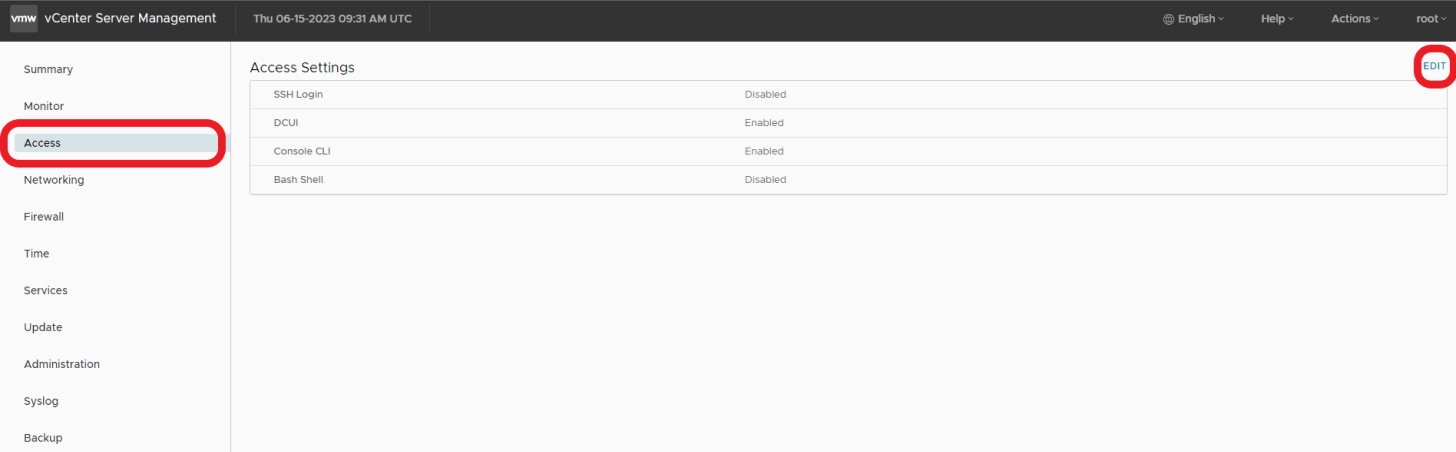

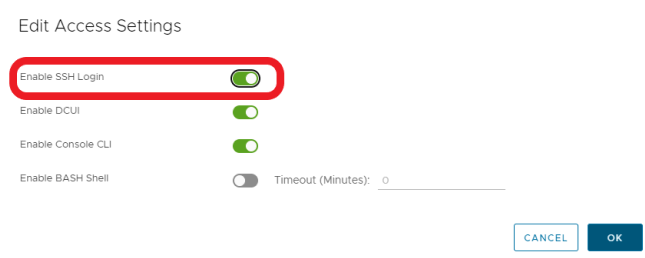
- SSH를 통해 vCenter로 연결
ssh root@[vcenter ip or fqdn]
이 문제를 해결하려면 이러한 VMware KB 문서에 설명된 단계를 따르십시오.

Affected Products
VxRail, VxRail Appliance Series, VxRail SoftwareArticle Properties
Article Number: 000214541
Article Type: Solution
Last Modified: 22 مايو 2026
Version: 2
Find answers to your questions from other Dell users
Support Services
Check if your device is covered by Support Services.