VxRail:事件代碼VXR0140A4
Summary: 當核心和清查磁碟達到 90% 容量時,會回報事件VXR0140A4。
This article applies to
This article does not apply to
This article is not tied to any specific product.
Not all product versions are identified in this article.
Symptoms
Severity: 錯誤:
發生 VxRail 事件VXR0140A4,且 vCenter 入口網站中出現紅色警報。
發生 VxRail 事件VXR0140A4,且 vCenter 入口網站中出現紅色警報。
Cause
vCenter 上的核心和清查磁碟 (/storage/db/) 的儲存容量已達 90%。
Resolution
透過 SSH 或 vCenter 虛擬機器主控台,以根身分登入 vCenter Server Appliance。
如果 vCenter Server 上未啟用 SSH,請遵循這些步驟予以啟用:
- 前往
https://[vCenter_url]:5480(vCenter Server 管理 UI) 並以「root」身分登入。 - 按一下存取,然後按一下 編輯 以啟用 vCenter SSH。

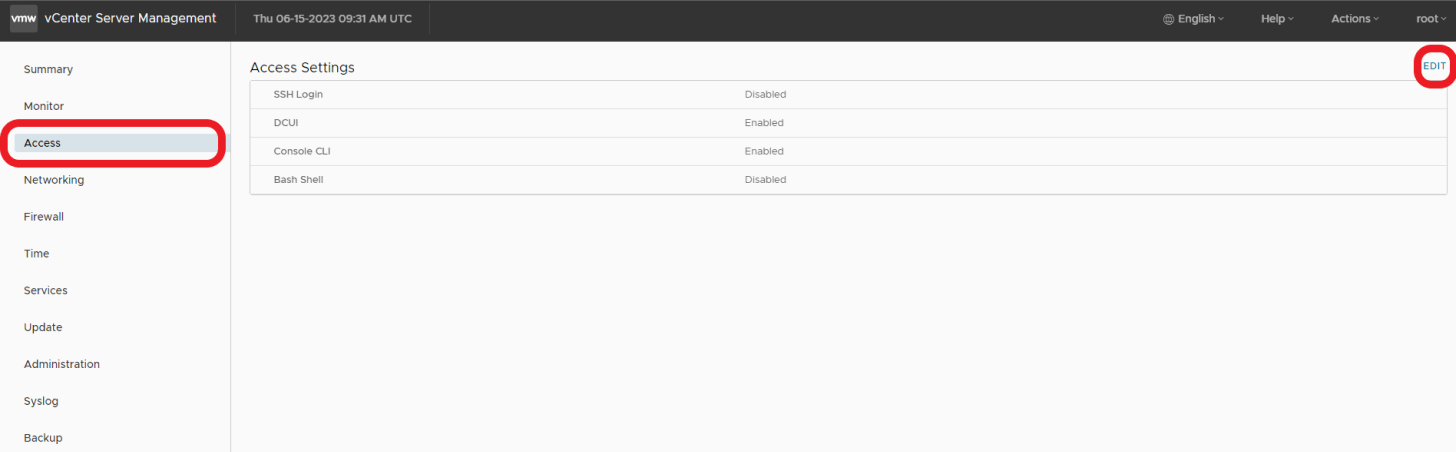

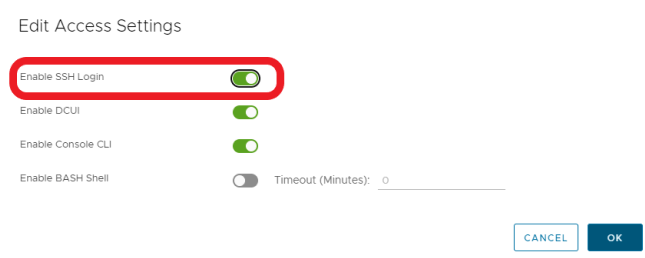
- SSH 至 vCenter
ssh root@[vcenter ip or fqdn]
若要解決此問題,請依照以下 VMWare KB 文章中概述的步驟操作。

Affected Products
VxRail, VxRail Appliance Series, VxRail SoftwareArticle Properties
Article Number: 000214541
Article Type: Solution
Last Modified: 22 مايو 2026
Version: 2
Find answers to your questions from other Dell users
Support Services
Check if your device is covered by Support Services.