Windows Server: Memory Speed in Windows Server 2019 does not Match BIOS and iDRAC
Summary: This article discusses memory speed display in Task Manger in Windows Server 2019 which does not match the display in the BIOS or what is displayed in the iDRAC web interface.
This article applies to
This article does not apply to
This article is not tied to any specific product.
Not all product versions are identified in this article.
Symptoms
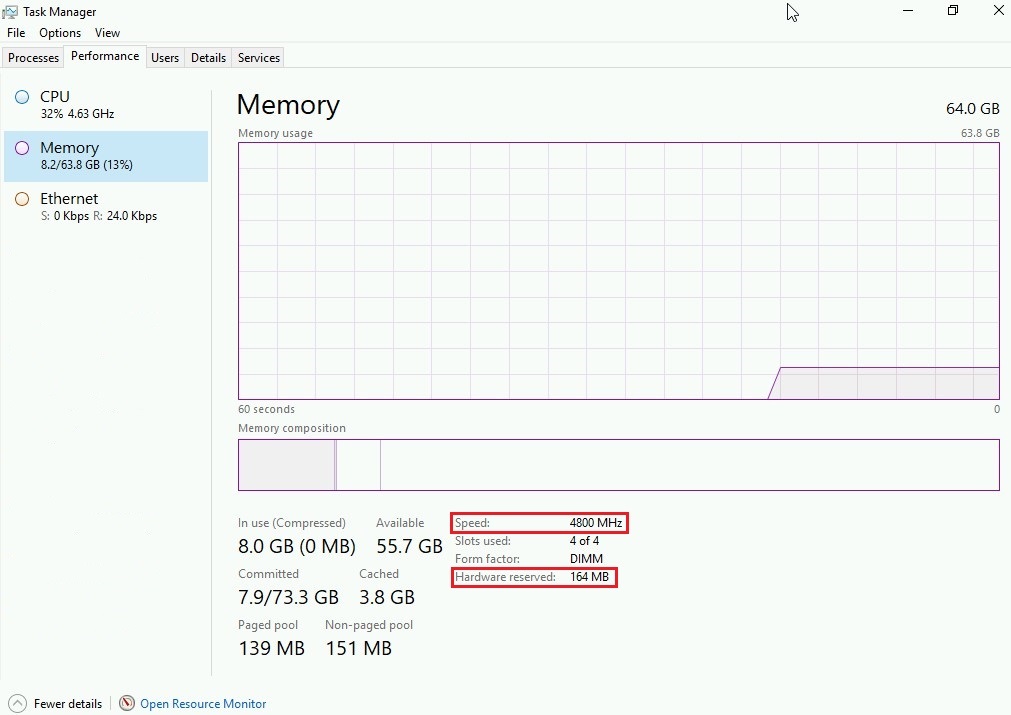
In Windows Task Manager, under Memory, the values displayed for Hardware reserved and Speed may differ from what is reported in BIOS and iDRAC.
Affected PowerEdge Platforms:
14G, 15G, and 16G
Affected Operating System:
Windows Server 2019
Affected PowerEdge Platforms:
14G, 15G, and 16G
Affected Operating System:
Windows Server 2019
Cause
This issue occurs because Task Manager parses the SMBIOS memory data incorrectly.
Resolution
Review Microsoft article:

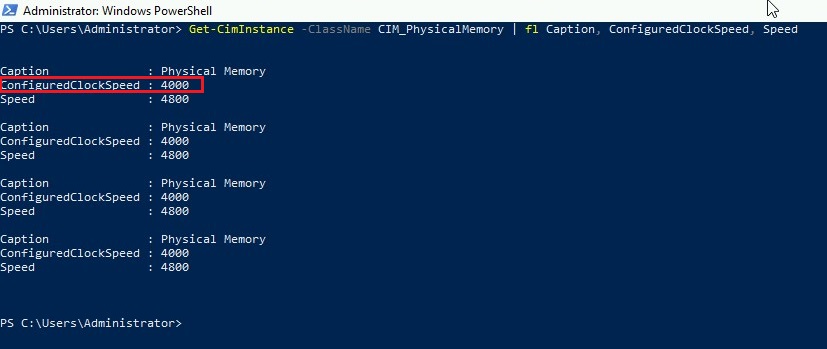
Use the following PowerShell command to retrieve the correct output.
Get-CIMInstance -Class CIM_PhysicalMemory
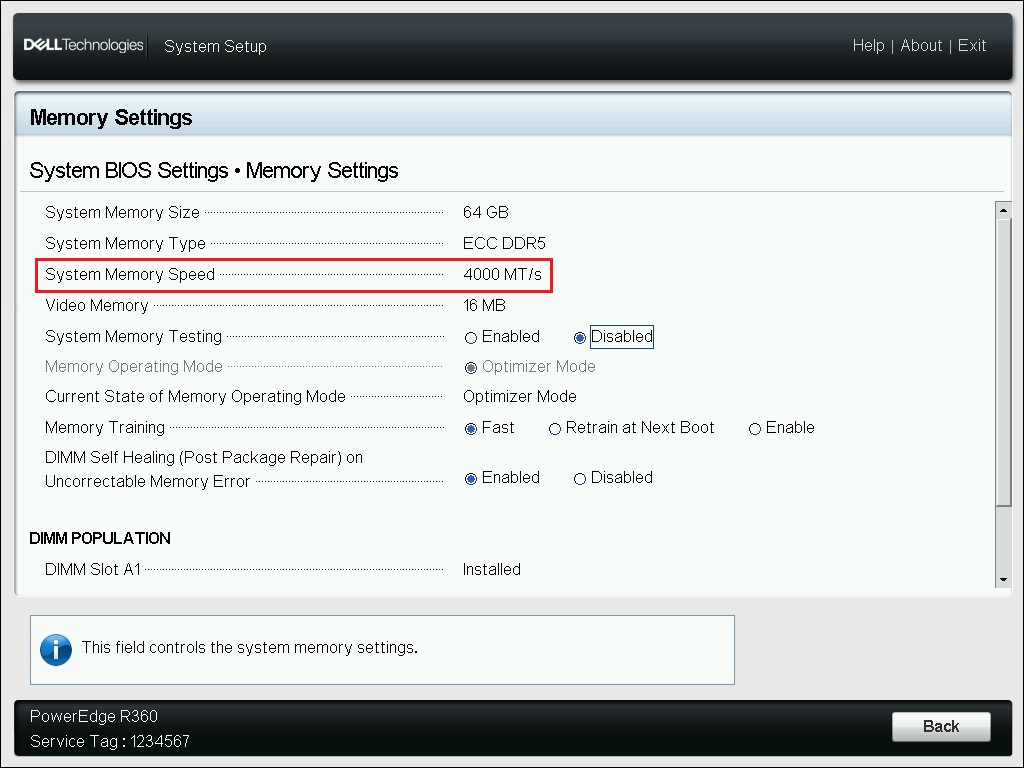
ConfiguredClockSpeed matches the speed displayed in BIOS and in iDRAC.
In the below example, the PowerShell command is modified to only show the Caption, ConfiguredClockSpeed, and Speed.
Memory Speed in iDRAC

Memory Speed in BIOS
Affected Products
Microsoft Windows Server 2019, Poweredge C4140, PowerEdge C6400, PowerEdge C6420, PowerEdge C6520, PowerEdge C6525, PowerEdge C6600, PowerEdge C6615, PowerEdge C6620, PowerEdge FC640Products
PowerEdge XR2, PowerEdge HS5610, PowerEdge HS5620, PowerEdge M640, PowerEdge M640 (for PE VRTX), PowerEdge MX740C, PowerEdge MX750c, PowerEdge MX760c, PowerEdge MX840C, PowerEdge R240, PowerEdge R250, PowerEdge R260, PowerEdge R340, PowerEdge R350
, PowerEdge R360, PowerEdge R440, PowerEdge R450, PowerEdge R540, PowerEdge R550, PowerEdge R640, PowerEdge R6415, PowerEdge R650, PowerEdge R650xs, PowerEdge R6515, PowerEdge R6525, PowerEdge R660, PowerEdge R660xs, PowerEdge R6615, PowerEdge R6625, PowerEdge R740, PowerEdge R740XD, PowerEdge R740XD2, PowerEdge R7415, PowerEdge R7425, PowerEdge R750, PowerEdge R750XA, PowerEdge R750xs, PowerEdge R7515, PowerEdge R7525, PowerEdge R760, PowerEdge R760XA, PowerEdge R760xd2, PowerEdge R760xs, PowerEdge R7615, PowerEdge R7625, PowerEdge R840, PowerEdge R860, PowerEdge R940, PowerEdge R940xa, PowerEdge R960, PowerEdge T140, PowerEdge T150, PowerEdge T160, PowerEdge T340, PowerEdge T350, PowerEdge T360, PowerEdge T40, PowerEdge T440, PowerEdge T550, PowerEdge T560, PowerEdge T640, PowerEdge XE8545, PowerEdge XE8640, PowerEdge XE9640, PowerEdge XE9680, PowerEdge XR11, PowerEdge XR12, PowerEdge XR5610, PowerEdge XR7620
...
Article Properties
Article Number: 000217433
Article Type: Solution
Last Modified: 18 مايو 2026
Version: 5
Find answers to your questions from other Dell users
Support Services
Check if your device is covered by Support Services.