OpenShift Virtualization: Failed to clone VM if the VM has disks with "hotpluggable" option enabled
Summary: Due to OpenShift Virtualization limitation, VM cannot be cloned if it has disks with "hotpluggable" option enabled.
This article applies to
This article does not apply to
This article is not tied to any specific product.
Not all product versions are identified in this article.
Symptoms
If a VM has disks with "hotpluggable" option enabled, clone the VM will fail.
The newly cloned VM will stay at "WaitingForVolumeBinding" state.
The newly cloned VM will stay at "WaitingForVolumeBinding" state.
The VM "hotpluggable" option will be enabled in the following scenarios:
- The user adds a new disk (from an existing PVC) with interface type "SCSI" to an existing and running VM.
- The user creates a VM via YAML and sets "hotpluggable: true" explicitly.
Cause
It is an OpenShift Virtualization limitation.
Resolution
Disable "hotpluggable" option before VM clone operation.
Two options to disable it:
- Edit the YAML of VM and set "hotpluggable: false" for the disks explicitly.
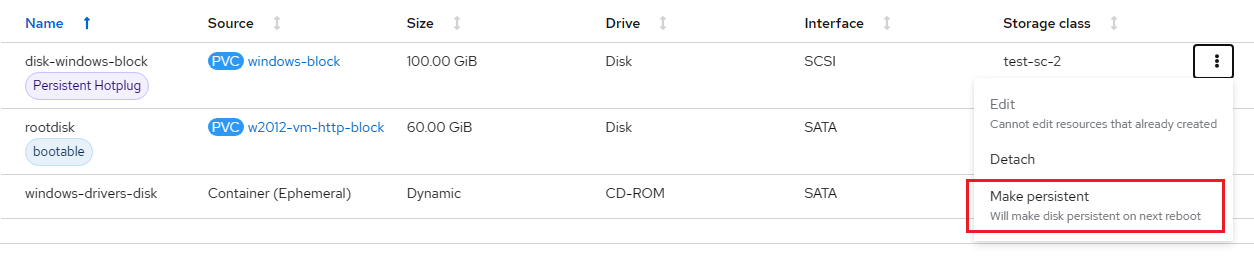
- On OpenShift Virtualization UI, select the "Hotplug" disk and click the "Make persistent" button.
For example:
Affected Products
APEX Cloud Platform for Red Hat OpenShiftArticle Properties
Article Number: 000217670
Article Type: Solution
Last Modified: 20 فبراير 2026
Version: 3
Find answers to your questions from other Dell users
Support Services
Check if your device is covered by Support Services.