Openshift: Cluster LCM failed during node reboot
Summary: LCM failed during node reboot due to CSI controller pod and depot manager pod run into deadlock.
This article applies to
This article does not apply to
This article is not tied to any specific product.
Not all product versions are identified in this article.
Symptoms
LCM failed during OCP upgrade or node reboot, the update UI lost access.
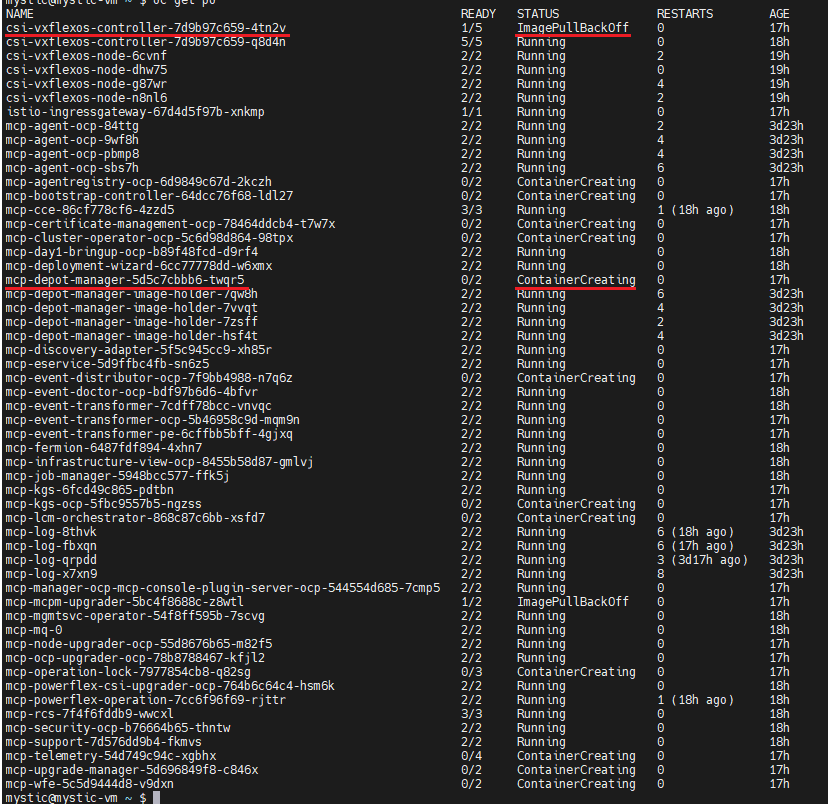
Log in OCP run "oc get pods -n dell-acp" command to check pods status, find one csi-vxflexos-controller pod is in ImagePullBackOff status and one mcp-depot-manager pod is in ContainerCreating status. For example:
Run "oc logs <pod_name> -n dell-acp -c driver" command to check the pod logs.
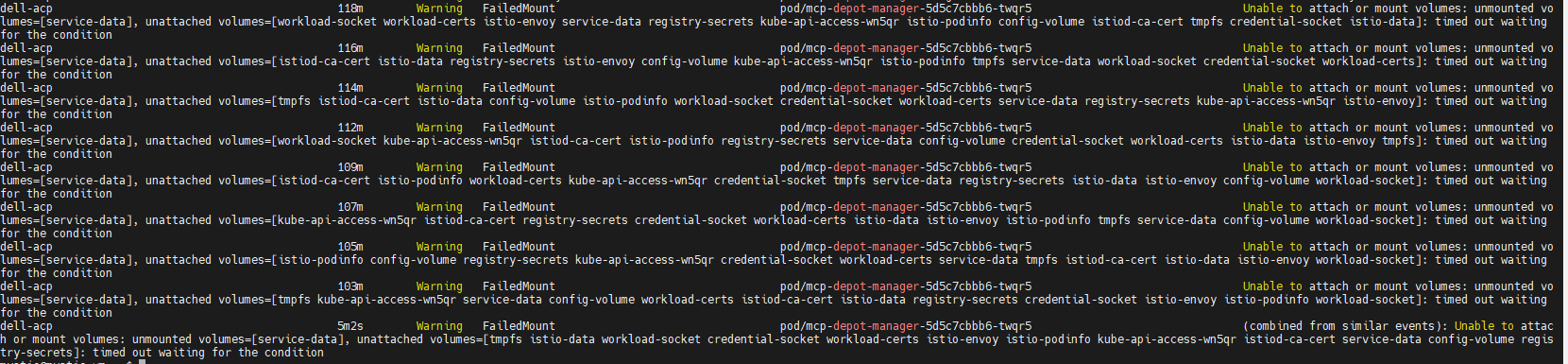
Run "oc describe pod <pod_name> -n dell-acp" command to check the ContainerCreating mcp-depot-manager (in the example screenshot above, the pod name is mcp-depot-manager-5d5c7cbbb6-twqr5), it reports FailedMount warning as below:
Run "oc get nodes" command to check node status, there is one node in SchedulingDisabled status, for example:

Log in OCP run "oc get pods -n dell-acp" command to check pods status, find one csi-vxflexos-controller pod is in ImagePullBackOff status and one mcp-depot-manager pod is in ContainerCreating status. For example:
Run "oc logs <pod_name> -n dell-acp -c driver" command to check the pod logs.
- In the Running csi-vxflexos-controller pod, log shows it is attempting to acquire leader lease, for example:
mystic@mystic-vm:~$ oc logs csi-vxflexos-controller-7d9b97c659-q8d4n -n dell-acp -c driver
I0918 08:33:23.460955 1 leaderelection.go:248] attempting to acquire leader lease dell-acp/driver-csi-vxflexos-dellemc-com...
I0918 08:33:23.460955 1 leaderelection.go:248] attempting to acquire leader lease dell-acp/driver-csi-vxflexos-dellemc-com...
- In the ImagePullBackOff csi-vxflexos-controller pod, log shows it successfully acquired leader lease, for example:
mystic@mystic-vm:~$ oc logs csi-vxflexos-controller-7d9b97c659-4tn2v -n dell-acp -c driver
I0918 09:07:30.076298 1 leaderelection.go:248] attempting to acquire leader lease dell-acp/driver-csi-vxflexos-dellemc-com...
I0918 09:07:46.074524 1 leaderelection.go:258] successfully acquired lease dell-acp/driver-csi-vxflexos-dellemc-com
time="2023-09-18T09:07:46Z" level=info msg="configured 69de1f95f50e390f" allSystemNames= endpoint="https://dellpowerflex.h01.com" isDefault=true nasName=0xc000489950 nfsAcls= password="********" skipCertificateValidation=false systemID=69de1f95f50e390f user=admin
time="2023-09-18T09:07:46Z" level=info msg="driver configuration file " file=/vxflexos-config-params/driver-config-params.yaml
time="2023-09-18T09:07:46Z" level=info msg="Read CSI_LOG_FORMAT from log configuration file" format=text
time="2023-09-18T09:07:46Z" level=info msg="Read CSI_LOG_LEVEL from log configuration file" fields.level=debug
time="2023-09-18T09:07:46Z" level=info msg="array configuration file" file=/vxflexos-config/config
time="2023-09-18T09:07:46Z" level=info msg="Probing all arrays. Number of arrays: 1"
time="2023-09-18T09:07:46Z" level=info msg="default array is set to array ID: 69de1f95f50e390f"
time="2023-09-18T09:07:46Z" level=info msg="69de1f95f50e390f is the default array, skipping VolumePrefixToSystems map update. \n"
time="2023-09-18T09:07:46Z" level=info msg="array 69de1f95f50e390f probed successfully"
time="2023-09-18T09:07:46Z" level=info msg="configured csi-vxflexos.dellemc.com" IsApproveSDCEnabled=false IsHealthMonitorEnabled=false IsQuotaEnabled=false IsSdcRenameEnabled=false MaxVolumesPerNode=0 allowRWOMultiPodAccess=false autoprobe=true externalAccess= mode=controller nfsAcls= privatedir=/dev/disk/csi-vxflexos sdcGUID= sdcPrefix= thickprovision=false
time="2023-09-18T09:07:46Z" level=info msg="identity service registered"
time="2023-09-18T09:07:46Z" level=info msg="controller service registered"
time="2023-09-18T09:07:46Z" level=info msg="Registering additional GRPC servers"
time="2023-09-18T09:07:46Z" level=info msg=serving endpoint="unix:///var/run/csi/csi.sock"
I0918 09:07:30.076298 1 leaderelection.go:248] attempting to acquire leader lease dell-acp/driver-csi-vxflexos-dellemc-com...
I0918 09:07:46.074524 1 leaderelection.go:258] successfully acquired lease dell-acp/driver-csi-vxflexos-dellemc-com
time="2023-09-18T09:07:46Z" level=info msg="configured 69de1f95f50e390f" allSystemNames= endpoint="https://dellpowerflex.h01.com" isDefault=true nasName=0xc000489950 nfsAcls= password="********" skipCertificateValidation=false systemID=69de1f95f50e390f user=admin
time="2023-09-18T09:07:46Z" level=info msg="driver configuration file " file=/vxflexos-config-params/driver-config-params.yaml
time="2023-09-18T09:07:46Z" level=info msg="Read CSI_LOG_FORMAT from log configuration file" format=text
time="2023-09-18T09:07:46Z" level=info msg="Read CSI_LOG_LEVEL from log configuration file" fields.level=debug
time="2023-09-18T09:07:46Z" level=info msg="array configuration file" file=/vxflexos-config/config
time="2023-09-18T09:07:46Z" level=info msg="Probing all arrays. Number of arrays: 1"
time="2023-09-18T09:07:46Z" level=info msg="default array is set to array ID: 69de1f95f50e390f"
time="2023-09-18T09:07:46Z" level=info msg="69de1f95f50e390f is the default array, skipping VolumePrefixToSystems map update. \n"
time="2023-09-18T09:07:46Z" level=info msg="array 69de1f95f50e390f probed successfully"
time="2023-09-18T09:07:46Z" level=info msg="configured csi-vxflexos.dellemc.com" IsApproveSDCEnabled=false IsHealthMonitorEnabled=false IsQuotaEnabled=false IsSdcRenameEnabled=false MaxVolumesPerNode=0 allowRWOMultiPodAccess=false autoprobe=true externalAccess= mode=controller nfsAcls= privatedir=/dev/disk/csi-vxflexos sdcGUID= sdcPrefix= thickprovision=false
time="2023-09-18T09:07:46Z" level=info msg="identity service registered"
time="2023-09-18T09:07:46Z" level=info msg="controller service registered"
time="2023-09-18T09:07:46Z" level=info msg="Registering additional GRPC servers"
time="2023-09-18T09:07:46Z" level=info msg=serving endpoint="unix:///var/run/csi/csi.sock"
Run "oc describe pod <pod_name> -n dell-acp" command to check the ContainerCreating mcp-depot-manager (in the example screenshot above, the pod name is mcp-depot-manager-5d5c7cbbb6-twqr5), it reports FailedMount warning as below:
Run "oc get nodes" command to check node status, there is one node in SchedulingDisabled status, for example:
Cause
If the active csi-controller pod and mcp-depot-manager are on the same node, when LCM reboots the node, csi-controller and depot-manager will be rescheduled to new nodes. During pod boot up, csi-controller and depot-manager run into deadlock and cannot boot up.
Resolution
1. Run "oc get pods -n dell-acp |grep csi" command to identify the pod name of the bad status CSI controller pod.
2. Run "oc delete pod <pod_name> -n dell-acp" command to delete the identified pod/pods.
For example:

3. Wait for several minutes and run "oc get pods -n dell-acp" command to make sure all pods are in Running status. If there are still csi-controller pod or mcp-depot-manager not running, retry above step again.
4. Until all pods are in Running status, retry LCM to proceed the cluster upgrade.
2. Run "oc delete pod <pod_name> -n dell-acp" command to delete the identified pod/pods.
For example:
3. Wait for several minutes and run "oc get pods -n dell-acp" command to make sure all pods are in Running status. If there are still csi-controller pod or mcp-depot-manager not running, retry above step again.
4. Until all pods are in Running status, retry LCM to proceed the cluster upgrade.
Affected Products
APEX Cloud Platform for Red Hat OpenShiftArticle Properties
Article Number: 000217992
Article Type: Solution
Last Modified: 18 سبتمبر 2026
Version: 4
Find answers to your questions from other Dell users
Support Services
Check if your device is covered by Support Services.