PowerFlex: How to Use System Configuration Reporter SCR for Configuration and Health Assessment
Summary: System Configuration Reporter (SCR) for PowerFlex provides reports, health readiness assessments for 3.x‑to‑4.x upgrades, and logs for troubleshooting, downloadable from the PowerFlex portal. ...
This article applies to
This article does not apply to
This article is not tied to any specific product.
Not all product versions are identified in this article.
Instructions
What is SCR?
- The System Configuration Reporter (SCR) is designed to provide an in-depth view into the configuration for the following PowerFlex systems:
- Rack
- Appliance
- Software Only
- Custom Node
- Ready Node
What information does SCR generate?
- Configuration Reporting:
- Produce detailed PowerFlex configuration reports available using UI and downloadable as Excel spreadsheets.
- Health Assessment:
- Based on the configuration data collected for the components in each profile, PowerFlex SCR includes a "Health Assessment" feature to assess the health and configuration of each component according to a pre-defined ruleset.
- Readiness Assessment:
- For PowerFlex 3.x collections, PowerFlex SCR includes a "Readiness Assessment" feature to assess PowerFlex 3.x implementations for readiness to upgrade to PowerFlex 4.x (SW only).
- The Readiness Assessment feature is based on a pre-defined ruleset of checks that are recommended by satisfied to declare "readiness" to upgrade to PowerFlex 4.x.
- The Readiness Assessment is specific to PowerFlex SW-only implementations (i.e., PowerFlex 3.x to 4.x).
- PowerFlex Log Collection:
- PowerFlex SCR includes the ability to generate logs (
getInfo) for PowerFlex Gateway, PowerFlex Nodes, and the PowerFlex Management Platform (4.x) to assist with troubleshooting and remediation.
- PowerFlex SCR includes the ability to generate logs (
Links to download and documentation:
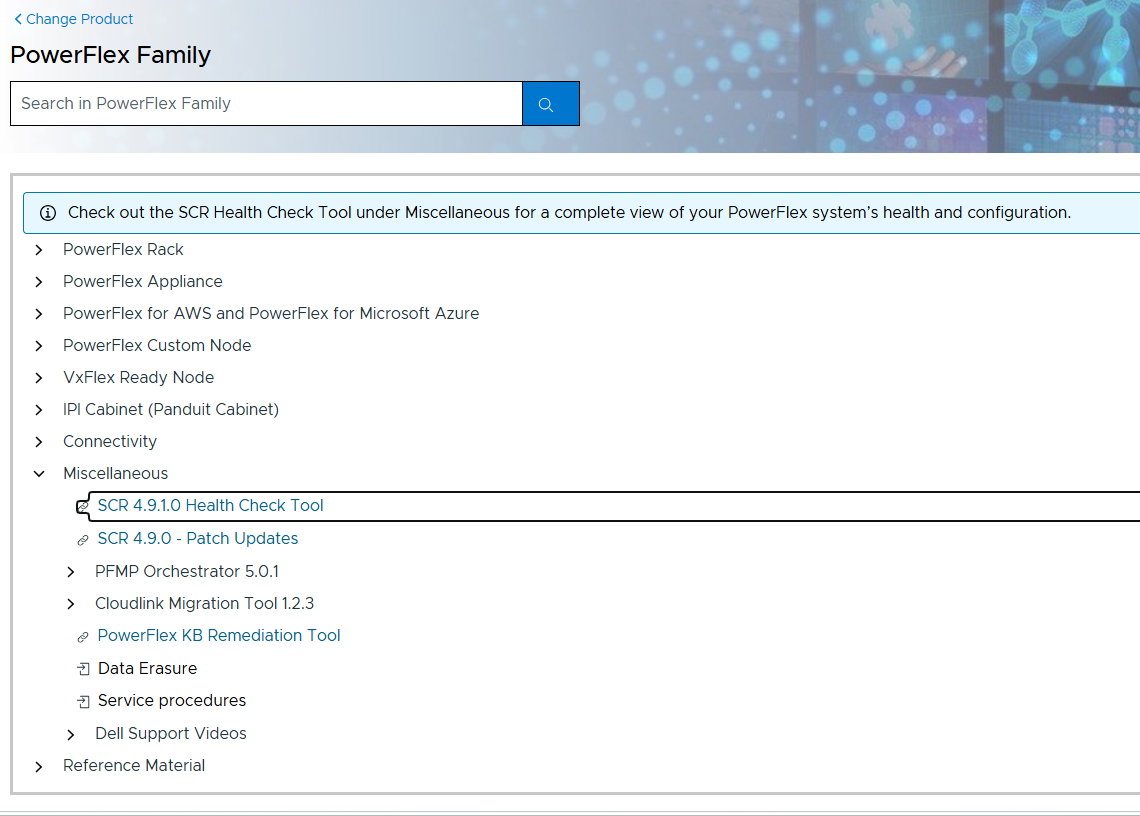
Go to SolVe - PowerFlex Family(Needs Customer Login) to download the SCR application and user guide:
- Select the PowerFlex Family from the offerings
- Go to Miscellaneous for the 'SCR Health Check Tool' link
- Once clicked, it downloads and within the download will be a user guide with more details
Affected Products
PowerFlex rack, ScaleIOArticle Properties
Article Number: 000218973
Article Type: How To
Last Modified: 26 يونيو 2026
Version: 5
Find answers to your questions from other Dell users
Support Services
Check if your device is covered by Support Services.