Dell Unity: Controllo integrità prima dell'aggiornamento: check_if_user_root_fs_has_enough_space_1 (correggibile da Dell)
Summary: Quando si esegue un controllo integrità pre-aggiornamento (PUHC) sul codice Unity OE 5.1 o versione successiva, potrebbe essere visualizzato un errore: dm::check_if_user_root_fs_has_enough_space_1 ...
This article applies to
This article does not apply to
This article is not tied to any specific product.
Not all product versions are identified in this article.
Symptoms
L'esecuzione di un PUHC sul codice Unity OE 5.1 o versione successiva potrebbe non riuscire con errore:
check_if_user_root_fs_has_enough_space_1
Nella primary_sp/nas/log/check_health.<data>.log file, sono presenti due errori noti:
1) host sconosciuto:
Data Movers: Check if user root fs has enough space
Command failed:
     * Command: /nas/bin/.server_config nas server -v "df"
     * Command output: Error 4023: nas : unknown host
     * Command exit code: 2
Action : Escalate this issue through your support organization.
     Provide this output in the escalation.
ERROR_CODE=dm::check_if_user_root_fs_has_enough_space_1|Error|/nas/bin/.server_config  nas server  -v  "df"|Error 4023: nas : unknown host
|2
2) Errore di analisi XML:
-------------------------------------Errors-------------------------------------
Data Movers: Check if user root fs has enough space
Command failed:
         * Command: /nas/bin/.server_config MMCSMKPACS -v "df"
         * Command output: MMCSMKPACS : commands processed: 1
Action : Escalate this issue through your support organization.
Provide this output in the escalation.
ERROR_CODE=dm::check_if_user_root_fs_has_enough_space_1|Error|/nas/bin/.server_config nasserver -v "df"|nasserver : commands processed: 1 <<<
XML parsing error: EOF looking for CDATA section end [Ln: 99, Col: 15]
XML::Simple called at /nas/lib/DartCmd.pm line 366.
for the document:
<?xml version="1.0"?>
<MAC_RESPONSE ID="client: 1" REQUEST_ID="1">
<MAC_COMMAND_RESPONSE COMMAND_ID="1" VDM="3">
<CFGCMD COMMAND="df">
<RAW_OUTPUT>
Cause
Prima del codice Unity OE 5.1, uno spazio di caratteri " " era un carattere valido nel nome del server NAS.
I nomi dei server NAS contenenti uno spazio caratteri superano il controllo PUHC sulle versioni di Unity OE precedenti alla 5.1.
Per il codice Unity OE 5.1 e versioni successive, uno spazio nel nome del server NAS è considerato un carattere non valido e non è supportato.
I nomi dei server NAS contenenti uno spazio caratteri superano il controllo PUHC sulle versioni di Unity OE precedenti alla 5.1.
Per il codice Unity OE 5.1 e versioni successive, uno spazio nel nome del server NAS è considerato un carattere non valido e non è supportato.
L'esecuzione di PUHC su codice Unity OE 5.1 o versione successiva avrà esito negativo con errore: <pre class="> check_if_user_root_fs_has_enough_space_1 se un server NAS corrente ha uno spazio nel nome.
Il tentativo di creare un server NAS con uno spazio nel nome avrà esito negativo su Unity OE 5.1 e codice più recente.
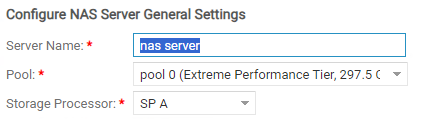
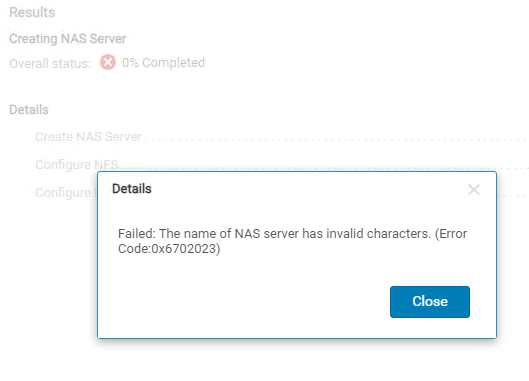
 XML parsing error: EOF looking for CDATA section end [Ln: 99, Col: 15]
A CDATA section starts with "<![CDATA[" and ends with "]]>".
<![CDATA[......]]>
Looks like CDATA EOF parsing issue.
Resolution
Nell'esempio precedente, il nome del server NAS "nas server" non è valido e il controllo integrità pre-aggiornamento avrà esito negativo. Rinominare il server NAS per rimuovere lo spazio non valido, quindi eseguire nuovamente il controllo integrità prima dell'aggiornamento.
Se il problema persiste dopo aver rinominato il server NAS, aprire una richiesta di assistenza e fare riferimento a questo articolo della KB.
Affected Products
Dell EMC Unity, Dell EMC Unity XT 380, Dell EMC Unity XT 380F, Dell EMC Unity XT 480, Dell EMC Unity XT 480F, Dell EMC Unity XT 680, Dell EMC Unity XT 680F, Dell EMC Unity XT 880, Dell EMC Unity XT 880F
, Dell EMC Unity Family |Dell EMC Unity All Flash, Dell EMC Unity Family, Dell EMC Unity Hybrid
...
Article Properties
Article Number: 000219186
Article Type: Solution
Last Modified: 12 ديسمبر 2025
Version: 4
Find answers to your questions from other Dell users
Support Services
Check if your device is covered by Support Services.