Dell Unity:升级前运行状况检查:check_if_user_root_fs_has_enough_space_1(戴尔可纠正)
Summary: 在 Unity OE 5.1 或更高版本代码上执行升级前运行状况检查 (PUHC) 时,可能会报告错误:dm::check_if_user_root_fs_has_enough_space_1
This article applies to
This article does not apply to
This article is not tied to any specific product.
Not all product versions are identified in this article.
Symptoms
在 Unity OE 5.1 或更高版本代码上执行 PUHC 可能会失败,并显示错误:
check_if_user_root_fs_has_enough_space_1
在 primary_sp/nas/log/check_health.<date>.log 文件中,则存在两个已知错误:
1) unknown host:
Data Movers: Check if user root fs has enough space
Command failed:
     * Command: /nas/bin/.server_config nas server -v "df"
     * Command output: Error 4023: nas : unknown host
     * Command exit code: 2
Action : Escalate this issue through your support organization.
     Provide this output in the escalation.
ERROR_CODE=dm::check_if_user_root_fs_has_enough_space_1|Error|/nas/bin/.server_config  nas server  -v  "df"|Error 4023: nas : unknown host
|2
2) XML 解析错误:
-------------------------------------Errors-------------------------------------
Data Movers: Check if user root fs has enough space
Command failed:
         * Command: /nas/bin/.server_config MMCSMKPACS -v "df"
         * Command output: MMCSMKPACS : commands processed: 1
Action : Escalate this issue through your support organization.
Provide this output in the escalation.
ERROR_CODE=dm::check_if_user_root_fs_has_enough_space_1|Error|/nas/bin/.server_config nasserver -v "df"|nasserver : commands processed: 1 <<<
XML parsing error: EOF looking for CDATA section end [Ln: 99, Col: 15]
XML::Simple called at /nas/lib/DartCmd.pm line 366.
for the document:
<?xml version="1.0"?>
<MAC_RESPONSE ID="client: 1" REQUEST_ID="1">
<MAC_COMMAND_RESPONSE COMMAND_ID="1" VDM="3">
<CFGCMD COMMAND="df">
<RAW_OUTPUT>
Cause
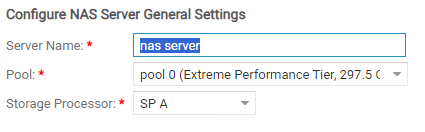
在 Unity OE 5.1 代码之前,字符空格“ ”是 NAS 服务器名称中的有效字符。
在低于 5.1 的 Unity OE 版本上,包含字符空格的 NAS 服务器名称将通过 PUHC 检查。
对于 Unity OE 5.1 代码及更高版本,NAS 服务器名称中的空格被视为无效字符,不受支持。
在低于 5.1 的 Unity OE 版本上,包含字符空格的 NAS 服务器名称将通过 PUHC 检查。
对于 Unity OE 5.1 代码及更高版本,NAS 服务器名称中的空格被视为无效字符,不受支持。
在 Unity OE 5.1 或更高版本代码上运行 PUHC 将会失败,并显示错误: <pre class=“> check_if_user_root_fs_has_enough_space_1当前 NAS 服务器名称中包含空格。
在 Unity OE 5.1 和更高版本的代码中,尝试创建名称中包含空格的 NAS 服务器将失败。

 XML parsing error: EOF looking for CDATA section end [Ln: 99, Col: 15]
A CDATA section starts with "<![CDATA[" and ends with "]]>".
<![CDATA[......]]>
Looks like CDATA EOF parsing issue.
Resolution
在上面的示例中,NAS 服务器名称“nas server”无效,将导致升级前运行状况检查失败。重命名 NAS 服务器以删除无效的空格字符,然后重新运行升级前运行状况检查。
如果重命名 NAS 服务器后问题仍然存在,请创建支持案例并引用此知识库文章。
Affected Products
Dell EMC Unity, Dell EMC Unity XT 380, Dell EMC Unity XT 380F, Dell EMC Unity XT 480, Dell EMC Unity XT 480F, Dell EMC Unity XT 680, Dell EMC Unity XT 680F, Dell EMC Unity XT 880, Dell EMC Unity XT 880F
, Dell EMC Unity Family |Dell EMC Unity All Flash, Dell EMC Unity Family, Dell EMC Unity Hybrid
...
Article Properties
Article Number: 000219186
Article Type: Solution
Last Modified: 12 ديسمبر 2025
Version: 4
Find answers to your questions from other Dell users
Support Services
Check if your device is covered by Support Services.