ECS: OBS: Bucket Deletion Failed
Summary: Alert for a Failure of Simplified Bucket Deletion. Alert - Symptom ID: 15000
Symptoms
Event/ Symptom ID: 15000
The event string is seen in the UI and in the dial home:
Background bucket deletion failed for <bucket-id>. Deleted <entriesDeleted> FailedDueToRetention <failedToDeleteRetention> FailedDueToDangling <failedToDeleteDangling> FailedDueToOther <failedToDeleteOther>
ECS bucket management UI can show details of bucket deletion failure.
Cause
The alert is raised if the bucket deletion task failed.
Bucket deletions can fail for several reasons. Some of the most common reasons are object retention and dangling LS entries.
Resolution
The status of the task may be FAILED or ABORTED: (the status is encoded in the alert string)
If the task is ABORTED, it means that the task is canceled by the user due to willingness to stop, or by the ECS due to unsupported state such as PSO. If needed, ask the user to retry the bucket deletion task when the ECS is back to a normal state.
If the task is FAILED, the task status contains stats related to failure reasons:
-
failed_to_delete_due_to_retention > 0 indicates that the bucket contains content under retention or object lock. These contents are not deletable by the bucket deletion feature and is expected to cause the overall deletion to fail. Retry will not solve these failures. Instruct the user that the bucket deletion cannot delete these objects unless the retention expires or the retention hold is removed.
Some retention causes can be bypassed while others cannot- Bucket level retention can be bypassed once the deletion fails
Once the deletion fails, navigate to the bucket management UI to remove or reduce the retention
(Dashboard >> Manage >> Buckets >> Choose a namespace >> Edit the selected bucket)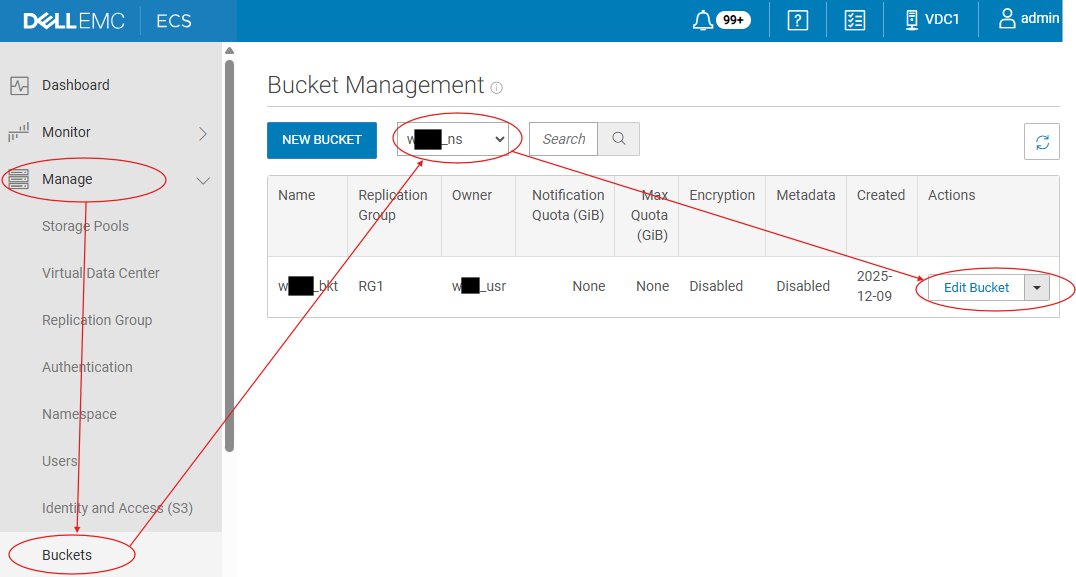
(Click 'Next' through the first two windows, find and set the retention at the bottom of the page before Saving, and retry the deletion)
- Object Lock would need to be removed by the application or expire
- Object level retention could be bypassed using Privileged Delete operation from the application, with the expectation that the bucket and namespace are not Compliance Enabled. Object retention cannot be modified within a Compliant namespace
- Bucket level retention can be bypassed once the deletion fails
-
failed_to_delete_due_to_other > 0 indicates that the bucket deletion encountered some transient error and some content were not able to be deleted. Retry the bucket deletion operation helps make these failures go away. A special exception for this failure is the upgrade handling case when the task is initially created in 3.8 and the ECS is upgraded to 3.8.1. Such a task could contain failures due to permission which will be converted to failed_to_delete_due_to_other in the response. A retry with the same user permission fails the bucket deletion operation in 3.8.1 as we have a different permission evaluation model.
-
If retry has been attempted for several times and the task still contains retrievable errors, and the user repeatedly cannot delete the object or version or cannot cancel the MPU through S3, reach out to Dell technical support for further assistance.