PowerFlex 4.X, Dynamic Direct Path I/O causes errors in vCenter and PowerFlex Manager
Summary: When performing PCI Passthrough in vCenter for an SVM with Dynamic Direct Path I/O enabled in a manual HCI deployment, an error occurs if the VM's VMX level is below 13. This issue will also propagate to PowerFlex Manager during future upgrade attempts. ...
Symptoms
When adding the PCI device to the SVM, you will have the option to select either Direct Path I/O and Dynamic DirectPath I/O. When Dynamic DirectPath I/O is selected and saved and the VMs VMX version is 13 or below you will receive this error:
If the VM's VMX version is higher than VMX-13, you can successfully map the PCI device to the VM and add the HCI hosts to PowerFlex Manager. However, when attempting an upgrade, the following errors will appear in the deployment logs during the task:
ERROR [2024-08-23T23:10:21.011646] 9920: service_deployment.rb:6080:in `process_firmware_update': Encountered an error during firmware update: RuntimeError: env --unset=RUBYOPT --unset=GEM_HOME --unset=RUBYLIB --unset=GEM_PATH --unset=BUNDLE_BIN_PATH RUBYLIB=/opt/service/lib:/opt/asm-deployer/lib:/opt/puppetlabs/puppet/lib:/opt/dependencies/dell-asm-util/lib PATH=/usr/local/sbin:/usr/local/bin:/usr/sbin:/usr/bin:/sbin:/bin:/opt/puppetlabs/puppet/bin:/opt/puppetlabs/bin puppet asm process_node --debug --trace --filename /opt/Dell/ASM/deployments/Job-aee702a5-f8c9-426f-a005-530dcdf59f2b/resources/vm-xx03xxxx03.yaml --run_type apply --statedir /opt/Dell/ASM/deployments/Job-aee702a5-f8c9-426f-a005-530dcdf59f2b/resources --always-override vm-xx03xxxx03.yaml failed; output in /opt/Dell/ASM/deployments/Job-aee702a5-f8c9-426f-a005-530dcdf59f2b-0-2/vm-xx03xxxx03.out
When reviewing the vm-xx03xxxx03.out file you should see this:
Error: /Stage[main]/Asm::Resource_wrapper/Vc_vm_pci_passthru[VA03PAVC0003]: Could not evaluate: undefined method `id' for #<RbVmomi::VIM::VirtualDeviceDeviceBackingInfo:0x00007fa8fc865e78>
/etc/puppetlabs/puppet/modules/vcenter/lib/puppet/provider/vc_vm_pci_passthru/default.rb:91:in `block in vm_pci_device'
|
Dynamic DirectPath I/O will cause future HCI Resource Group upgrades to fail. |
Cause
|
Using Dynamic DirectPath I/O alters the VMX file from its expected default configuration, leading to downstream errors when attempting to parse the VMX file for VM details during PowerFlex Manager upgrade tasks. This ultimately results in automation failures as mentioned above Dynamic DirectPath I/O is not supported by PFxM. |
Resolution
To resolve this issue:
1.Place the SDS into PMM - (DO NOT place the ESXi node in maintenance mode)
a. Log in to scli:
scli --login --management_system_ip <Ingress IP> --username adminb. Query all SDSs to get the SDS ID for the SVM that you will place into PMM:
scli --query_all_sdsc. Use the following command syntax to enter PMM or IMM (Customer's choice):
scli --enter_protected_maintenance_mode --sds_id xxxxxxxxxxxxxxxxxxOR
scli --enter_maintenance_mode --sds_id xxxxxxxxxxxxxxxxxx
2. Navigate to vCenter to locate the SVM that is using Dynamic DirectPath I/O
3. Power off the VM (ESXi node MUST NOT BE in maintenance mode)
4. Right-click the VM
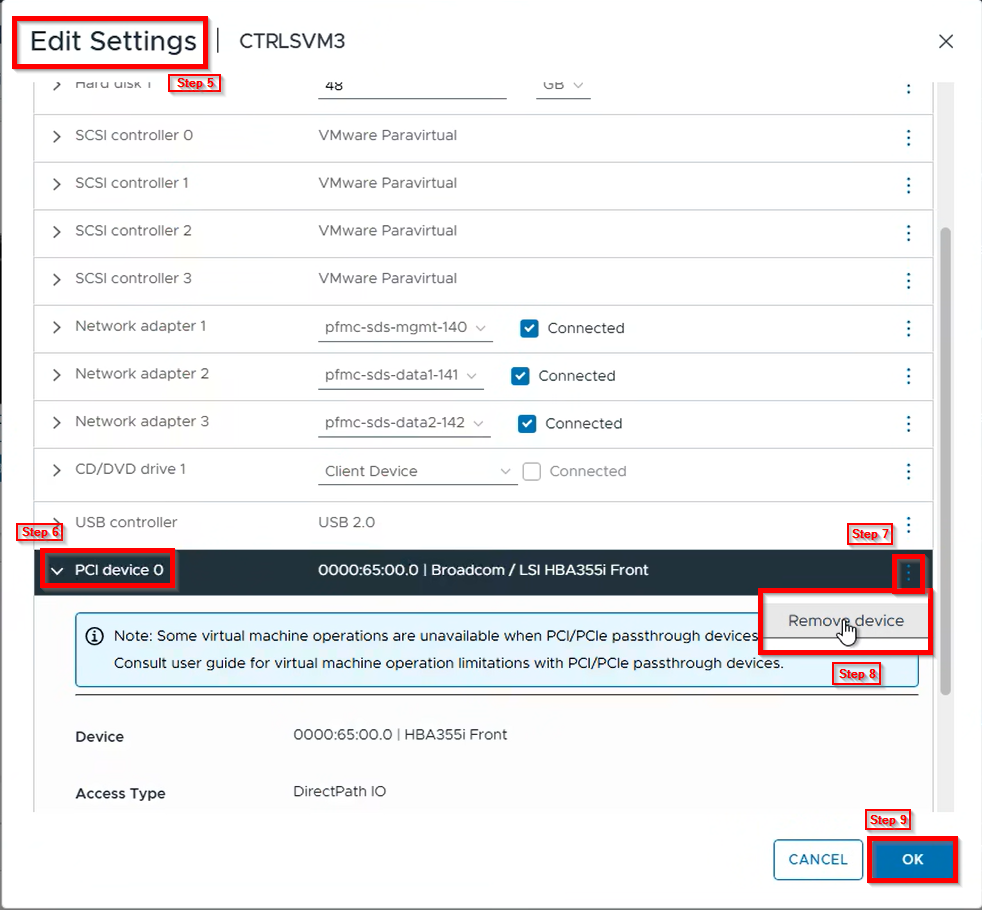
5. Click on Edit Settings
6. Click on the "PCI device"
7. Click on the three dots on the far right
8. Click on Remove device
9. Click OK
10. Right-click the VM
11. Click on Edit Settings
12. Click on Add New Device
13. Under Other Devices, choose PCI Device
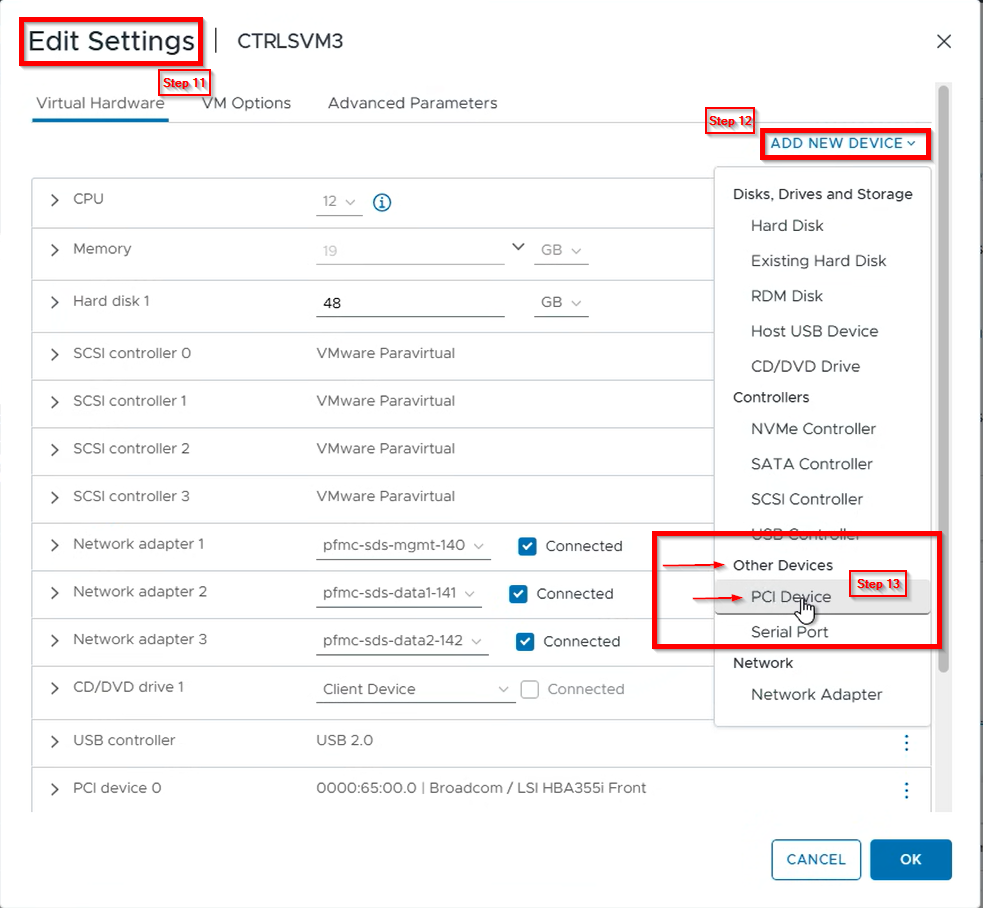
14. Choose the PCI Passthrough Device's Access Type as DirectPath I/O
15. Click OK
16. Power on VM
17. Place the SDS out of PMM
18. Repeat steps 1 through 17 for all VMs that need to be converted to DirectPath I/O from Dynamic DirectPath I/O