Aggiornamento ERoT GPU PowerEdge XE8640 non riuscito
Summary: Aggiornamento ERoT GPU PowerEdge XE8640 non riuscito
This article applies to
This article does not apply to
This article is not tied to any specific product.
Not all product versions are identified in this article.
Symptoms
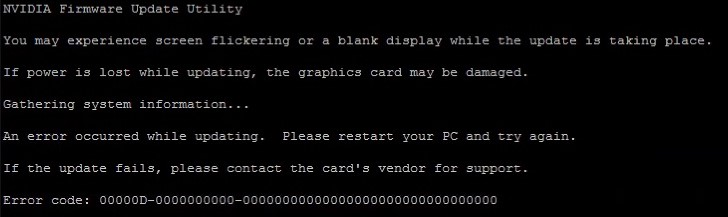
Quando si tenta di aggiornare la radice di attendibilità integrata (ERoT) GPU PowerEdge XE8640: H100_SXM5_EROT_cec1736-ecfw-0002.0178.0000-n00-installer, seguendo la guida all'installazione, l'aggiornamento non è riuscito con messaggi di errore come di seguito:
Cause
Controllare i registri del sistema operativo se sono presenti messaggi di errore come quelli riportati di seguito:
Ciò è dovuto all'attivazione di "secure boot".
Oct 11 22:05:32 supportlive kernel: Lockdown: H100_SXM5_EROT_: Direct PCI access is restricted; see man kernel_lockdown.7
Ciò è dovuto all'attivazione di "secure boot".
Resolution
Disabilitare "Secure boot" nella configurazione del BIOS.
Dopo aver aggiornato correttamente ERoT, abilitare "Secure boot" nella configurazione del BIOS.
Dopo aver aggiornato correttamente ERoT, abilitare "Secure boot" nella configurazione del BIOS.
Affected Products
PowerEdge XE8640Article Properties
Article Number: 000239198
Article Type: Solution
Last Modified: 21 مايو 2026
Version: 4
Find answers to your questions from other Dell users
Support Services
Check if your device is covered by Support Services.