PowerEdge: 16G - 0V Reading On CPU VCCD Voltage Regulators
Summary: Some Dell PowerEdge 16th Generation (16G) servers may exhibit a 0V reading for Central Processing Unit (CPU) Voltage Regulator sensors within the Integrated Dell Remote Access Controller 9 (iDRAC9) user interfaces. ...
Symptoms
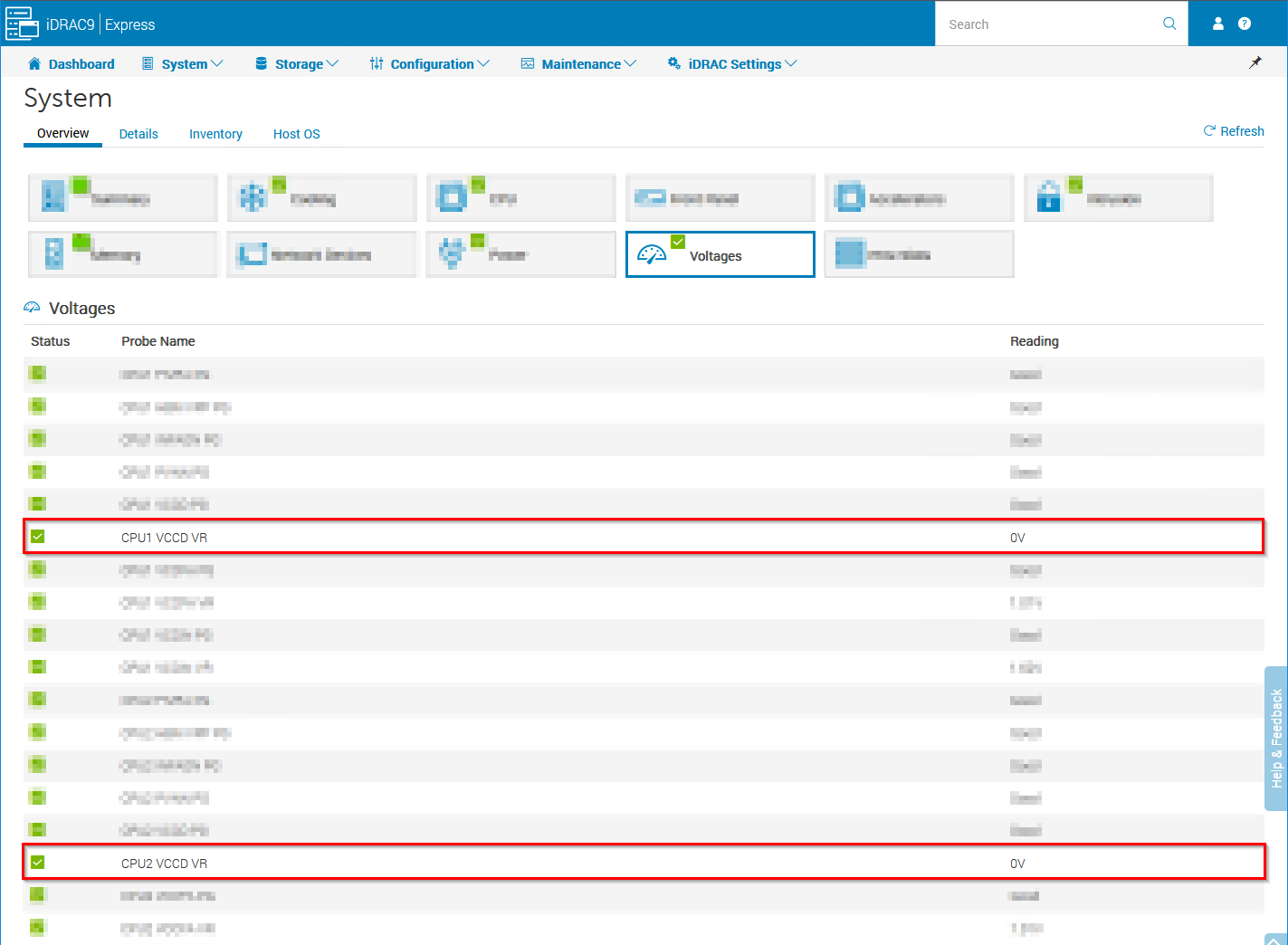
Some Dell PowerEdge 16th Generation (16G) servers may exhibit a 0V reading for CPU VCCD Voltage Regulator sensors within the iDRAC9 user interfaces.
The 0V value can be read through all iDRAC9 management interfaces.
iDRAC9 UI >> System >> Overview >> Voltages Example:
REDFISH GET Example:
GET redfish/v1/Chassis/System.Embedded.1/Sensors/CPU1VCCDVR

{
    "@odata.context": "/redfish/v1/$metadata#Sensor.Sensor",
    "@odata.id": "/redfish/v1/Chassis/System.Embedded.1/Sensors/CPU1VCCDVR",
    "@odata.type": "#Sensor.v1_9_0.Sensor",
    "Name": "CPU1 VCCD VR",
    "Id": "CPU1VCCDVR",
    "Description": "Instance of Sensor Id",
    "ReadingType": "Voltage",
    "ReadingUnits": "V",
    "Status": {
        "Health": "OK",
        "State": "Enabled"
    },
    "Reading": 0.0,
    "PhysicalContext": "CPU",
    "Oem": {
        "Dell": {
            "@odata.type": "#DellOemSensor.v1_0_0.DellOemSensor",
            "CurrentState": "Normal",
            "DeviceID": "iDRAC.Embedded.1#CPU1VCCDVR",
Cause
The root cause of the 0V reading on CPU VCCD voltage regulators is due to some 16G systems planners being equipped with alternate supplier voltage regulators that do not support the I2C protocol that iDRAC leverages for these readings.
iDRAC9 cannot differentiate between voltage regulator vendors to support multiple I2C protocols, resulting in the 0V reading.
Resolution
This 0V reading is a cosmetic sighting with no impact to the function of the voltage regulator (VR).
iDRAC9 cannot provide reading for the VR when this alternate vendor part is present and cannot offer a method to confirm which vendor's VR is present.