PowerStore: Health Checks to identify a system with drives not covered by DriveDB.json v0.6.6.0
Summary: This KB article discusses Health Checks to identify systems with drives not covered by DriveDB.json v0.6.6.0.
Instructions
Health checks verify that the Three-Letter Acronym (TLA) of all installed drives is present in the system’s DriveDB.json file. On clusters running PowerStoreOS 3.x, 4.0.x, or 4.1, the off_release_unsupported_drive_check Pre‑Upgrade Health Check (PUHC) prevents upgrades if an unsupported drive is detected, and the unsupported_drive_check System Health Check (SHC) fails for the same condition. On PowerStoreOS 4.x systems installed with the latest RxDefinitions, the issue generates an alert.
System Check Failure:
When the issue is identified through an SHC, the appliance shows Unsupported Drive check failure with a Found unsupported drives in the appliance message.
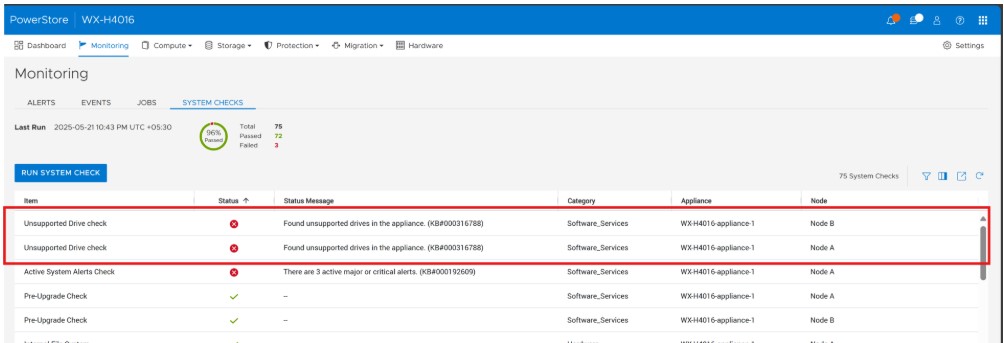
Figure 1. Found unsupported drives in the appliance
The SHC can be run from the Service Container command-line interface (CLI):
[BSC:cyc@ABCD123-A ~]$ svc_health_check run -rhc unsupported_drive_check
Name                               Location  Status     Description
Unsupported Drive check            node_a    Failed     Found unsupported drives in the appliance. (KB#000316788)
Unsupported Drive check            node_b    Failed     Found unsupported drives in the appliance. (KB#000316788)


SUMMARY Status: Failed
   Passed:      0
   Failed:      2
   Total:       2
PUHC Failure:
When the issue is identified through a PUHC, the test displays the message Found unsupported drive(s) and PUHC blocks the PowerStore upgrade.
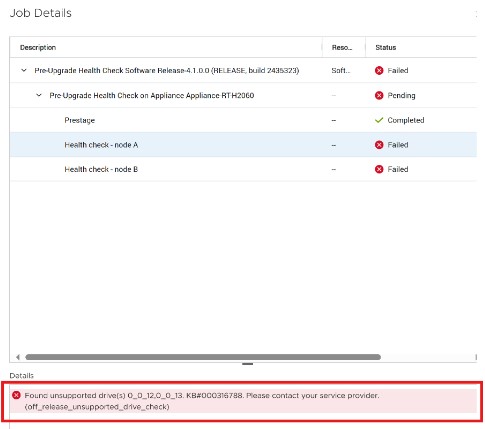
Figure 2. Found unsupported drive(s)
System Alert:
An appliance running PowerStoreOS version 4.x installed with the latest RxDefinitions presents an alert with the message One or more unsupported drives were found in the system.
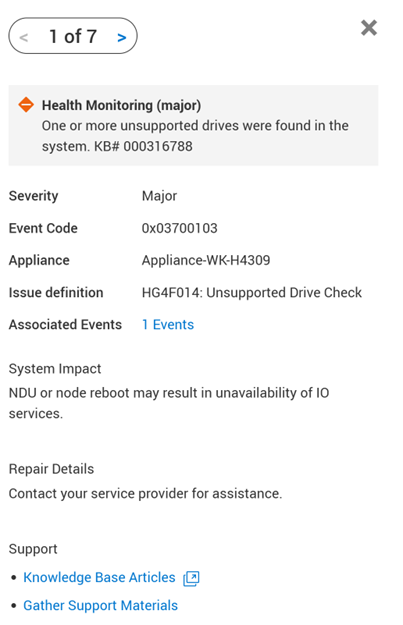
Figure 3. One or more unsupported drives were found in the system.
For more information about this condition, see KB article: PowerStore: in use drives may report as failed and unsupported due to stale DriveDB
If this condition is detected or encountered, administrators can manually update the persistent DriveDB.json either before an NDU or to avoid or resolve a Data Unavailable (DU) event.
Self-service options are available for both proactive and recovery use cases.
Refer to the following knowledge base articles for detailed guidance:
- General Installation Instructions: PowerStore: How To Install svc_injectable service scripts
- DriveDB Update Procedure: PowerStore: How to use the injectable script "svc_update_drive_db" to update DriveDB.json
If necessary, contact technical support for assistance. Reference this KB article for expedited attention and resolution.
Additional Information
Additional KB articles: