PowerProtect Data Manager: PowerProtect 인터페이스 계정 잠금 구성
Summary: PowerProtect UI(User Interface) 계정은 5회 시도할 수 있으며 그 이후에는 5분 동안 잠깁니다. 사용자는 5분 후에 자동으로 잠금이 해제되며 올바른 비밀번호로 인증할 수 있습니다.
This article applies to
This article does not apply to
This article is not tied to any specific product.
Not all product versions are identified in this article.
Instructions
PowerProtect 19.19.0-15 이하에서는 계정 잠금 설정을 수정할 수 없습니다. 로그인 시도가 5회 실패하면 5분 잠금으로 고정됩니다. PowerProtect 19.20.0-11부터 관리자는 AdministrationAccess > ControlPassword > Policy로 이동하여 사용자 인터페이스에서 이러한 설정을 맞춤 구성할 수 있습니다.
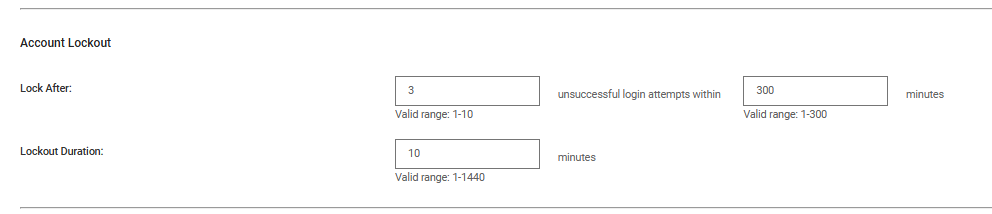
그림 1. 비밀번호 UI
Additional Information
Dell RFE(Request For Enhancement) PPAS-I-1782 잠금 사용자를 구성할 수 있도록 제출되었습니다.
Products
PowerProtect Data ManagerArticle Properties
Article Number: 000328057
Article Type: How To
Last Modified: 12 مايو 2026
Version: 3
Find answers to your questions from other Dell users
Support Services
Check if your device is covered by Support Services.