Dell Data Lakehouse: How to Decrypt an Encrypted TLS Key
Summary: This article provides instructions for decrypting an encrypted TLS key to resolve format errors during Dell Data Processing Engine configuration.
This article applies to
This article does not apply to
This article is not tied to any specific product.
Not all product versions are identified in this article.
Symptoms
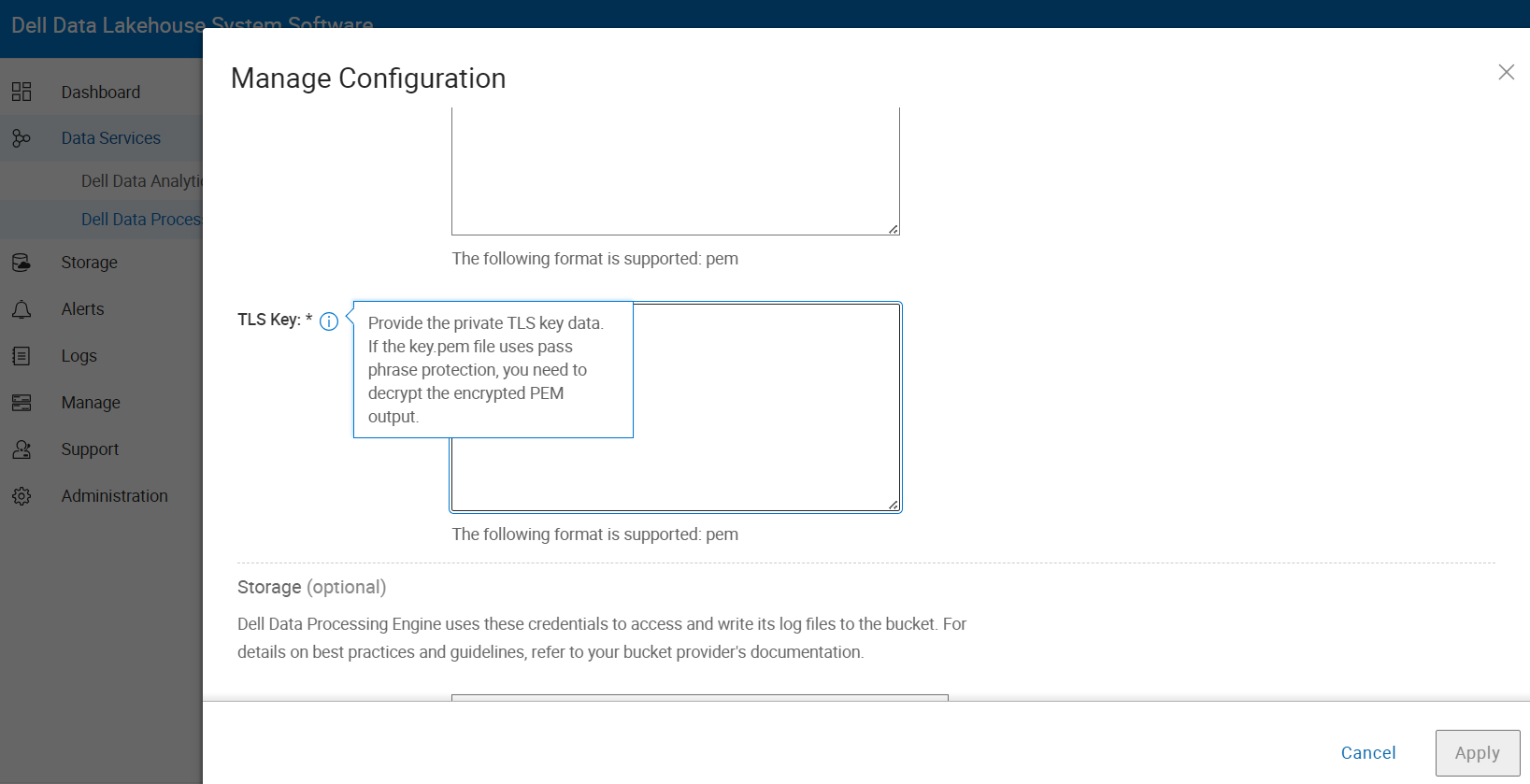
While configuring the Dell Data Processing Engine, you are required to provide private TLS key data in the TLS Key field. However, the key is not accepted, and you receive the following error:
Invalid format: Must be a valid .pem format.
This typically occurs when the key.pem file is encrypted with a passphrase.
Cause
The error occurs because the provided TLS key is encrypted and the Dell Data Processing Engine cannot parse it. Encrypted TLS keys are often protected with a passphrase and must be decrypted to convert them into a valid .pem format that the system can accept.
Resolution
Process:
- Obtain the Encrypted Key - Ensure that you have the encrypted key file, typically with a
.pemor.keyextension. - Install OpenSSL - If OpenSSL is not already installed, download, and install it from the OpenSSL website
.
- Decrypt the Key - Open a terminal or command prompt and run the following command:
openssl rsa -in <encrypted_key.pem> -out <decrypted_key.pem>
- Replace
<encrypted_key.pem>with the name of your encrypted key file. <decrypted_key.pem>is the output file containing the decrypted key.- You are prompted to enter the passphrase if the key is protected.
- Verify the Decrypted Key - Open the
decrypted_key.pemfile in a text editor. It should begin with:
-----BEGIN PRIVATE KEY-----
If it begins with:
-----BEGIN RSA PRIVATE KEY-----
Then the key is still encrypted.
- Example Output
ddae660-udslab-ctl-01:/home/mycerts # openssl rsa -in ddpe-sprk.tls.key -out decrypt.key
writing RSA key

ddae660-udslab-ctl-01:/home/mycerts # cat decrypt.key
- Copy the contents of
decrypted.keyand paste them into the TLS Key field in the Dell Data Processing Engine configuration.
The screenshot shown below is from Dell Data Lakehouse 1.5 > Data Services > Dell Data Processing Engine > Manage Configuration.
Affected Products
Data Management, Dell Data Analytics Engine 660, Dell Data LakehouseArticle Properties
Article Number: 000343383
Article Type: Solution
Last Modified: 04 ديسمبر 2025
Version: 2
Find answers to your questions from other Dell users
Support Services
Check if your device is covered by Support Services.