NetWorker NMC 19.13: NMC 사용자 인터페이스 "No Suitable JVM Found"를 시작할 수 없음
Summary: NetWorker 19.13 이상에서 NMC(NetWorker Management Console)를 시작할 수 없습니다.
This article applies to
This article does not apply to
This article is not tied to any specific product.
Not all product versions are identified in this article.
Symptoms
NMC(NetWorker Management Console) 19.13 이상:
Unable to launch NMC user interface.
다운로드 완료 gconsole.jnlp 결과는 Read error.

명령줄에서 command를 사용하여 NMC 시작 javaws https://NMC-server:9000/gconsole.jnlp 실패 No suitable JVM was found to start the application.
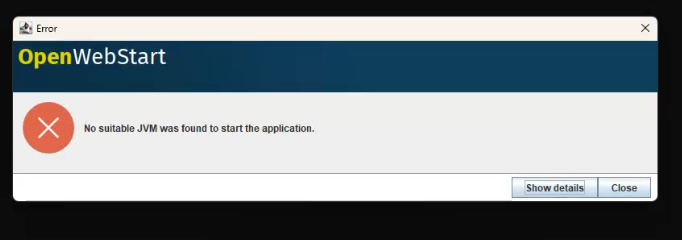
Cause
이 오류는 동일한 호스트 이름을 공유하지만 서로 다른 IP 주소에 할당된 두 NetWorker Server와 관련된 이름 확인 충돌로 인해 발생합니다. 이로 인해 호스트 이름 확인 중에 모호성이 발생했으며 NMC 시작에 영향을 미쳤습니다.
Resolution
제거된 IPADDR_REPLACE_AT_RUNTIME string을 gconsole.jnlp 동적 IP 대체를 제거하고 일관된 호스트 이름 확인을 보장하는 파일입니다.
- Linux:
/opt/lgtonmc/web/gconsole.jnlp - Windows(기본값):
C:\Program Files\EMC NetWorker\Management\GST\web\gconsole.jnlp
영향을 받는 라인이 수정됨(표시된 IP 주소는 예시):
보낸 사람:
codebase="https://IPADDR_REPLACE_AT_RUNTIME(192.168.9.150):9000/"
<argument>IPADDR_REPLACE_AT_RUNTIME(192.168.9.150)</argument>
받는 사람:
codebase="https://192.168.9.150:9000/"
<argument>192.168.9.150</argument>
이러한 줄은 이름이 유사한 NetWorker Server와의 충돌을 방지하기 위해 정적 IP 주소를 사용하도록 업데이트되었습니다.
NMC 클라이언트 호스트(NMC를 실행하는 호스트)가 NMC 서버 주소를 올바르게 확인할 수 있는지 확인합니다. NMC 클라이언트가 호스트를 올바르게 확인하지 못할 경우 NMC 시작 관리자가 "Unable to connect to server hostname, make sure the server is running"로 변경되었습니다.
- NMC 클라이언트 호스트가 호스트 이름을 확인할 수 있는지 확인합니다(PowerShell 프롬프트).
tnc hostname -p 9000 - 위의 명령이 연결에 실패했지만 IP에서 서버에 연결할 수 있는 경우 서버에 대한 호스트 파일 항목을 생성합니다.
Additional Information
Affected Products
NetWorkerProducts
NetWorker FamilyArticle Properties
Article Number: 000361215
Article Type: Solution
Last Modified: 03 ديسمبر 2025
Version: 2
Find answers to your questions from other Dell users
Support Services
Check if your device is covered by Support Services.