Dell Unity: How to Configure Link Aggregation
Summary: This article explains Unity Link Aggregation and how to configure it. (User Correctable)
Instructions
Link Aggregation combines multiple network connections into one logical link. This provides redundancy in case one connection fails, and secondarily provides some increased throughput by distributing traffic across multiple connections.
NAS Servers include one or more network interfaces that are created on the Ethernet ports for host access. Prior to configuring any interfaces on the Ethernet ports, configure Link Aggregation between two or more ports. Link Aggregation can only be used for NAS Server interfaces so attempting to configure it on Ethernet ports that have existing iSCSI interfaces is prohibited. Link Aggregation can be configured in the Settings page from Unisphere as indicated in the below image:
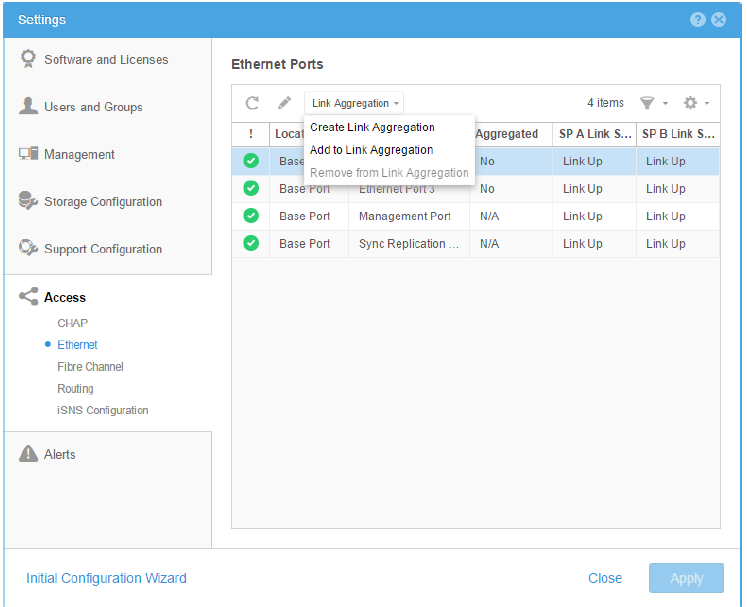
Link aggregations can be configured with two to four ports. Starting with Dell Unity OE version 4.2.1, Link Aggregations can be created using ports from different I/O Modules (IOMs) and also between IOMs and the onboard Ethernet ports. Previously, only ports belonging to the same IOM or onboard Ethernet ports could be selected to add to a link aggregation. Creating your Link Aggregation on a single IOM does not provide IOM redundancy. Also, because a "failure" of an IOM cannot be reliably detected, a failing IOM may not induce Storage Processor (SP) failover.
In other words, if you choose to configure Link Aggregation on a single IOM, and if that IOM fails, then the entire link fails. It would most likely not induce SP failover, and the most likely result is a Data Unavailable (DU) scenario.
Dell strongly encourages you to configure your Link Aggregation setups across IOMs, not isolated on a single IOM.
Additional Information
Link Aggregation can only be used for NAS Server interfaces so attempting to configure it on Ethernet ports that have existing iSCSI interfaces is prohibited from Unity Side.
For more information, view Dell Unity Family Configuring High Availability