PowerEdge: PERC12 Firmware Update to 8.14.x.x May Cause Controller Detection Failure
Summary: Updating PERC H965i or H965e firmware from versions 8.8.x.x or 8.11.x.x to 8.14.x.x may result in detection failures on Integrated Dell Remote Access Controller (iDRAC), Human Interface Infrastructure (HII), and the Operating System after the first reboot. ...
Symptoms
Observed Issues After Firmware Update:
General Detection Failure:
The controller is not detected during system boot across all management interfaces.
- iDRAC - storage tab shows no controller
- OS - controller absent in OS and the
perccli2 CLI tool - HII - controller missing from the hardware inventory
Log and Error Messages:
Lifecycle Controller (LC log): PR8 device not detected.- Affected Controllers:
Controller Model

H965i Front
H965i Adapter
H965i MX
H965e Adapter
H965i Front DC-MHS
Affected Firmware Versions:
Firmware Versions

8.8.x.x
8.11.x.x
Cause
When updating PERC12 controllers to firmware version 8.14.x.x, the update process requires an offline activation step after the DUP update. During system boot, the Remote Management Controller (RMC) fails to reload, producing a fault that blocks controller detection across all interfaces.
This condition occurs in firmware versions 8.8.x.x and 8.11.x.x. Updating to the fixed version 8.14.x.x prevents the issue from recurring.
Resolution
Issue is addressed in PERC firmware 8.14.0.0.18-14.
Workaround:
If the Controller Is Not detected after the firmware update on the first reboot:
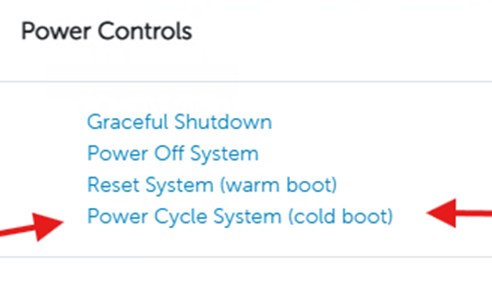
- Perform a power cycle to restore detection:
- From iDRAC, go to Power Controls and select Power Cycle System (cold boot).
OR - Power cycle the server.