PowerProtect: El VIB de TSDM desapareció del host ESXi
Summary: Falta el paquete de instalación (VIB) de vSphere TSDM de PowerProtect Data Manager en el host ESXi
Symptoms
- El VIB de TSDM de PowerProtect Data Manager ya se instaló
- PowerProtect Data Manager informa que VIB aparece como "listo para instalar" repentinamente
- El VIB de TSDM ya no está instalado en ESXi
- No hay ninguna tarea en PowerProtect Data Manager, vCenter o ESXi para mostrar que el VIB de TSDM se desinstaló
- vCenter Lifecycle Manager (VLCM) o vSphere Update Manager (VUM) están en uso
Ejemplo de servicio TSDM en ESXi en la interfaz de usuario de vSphere:
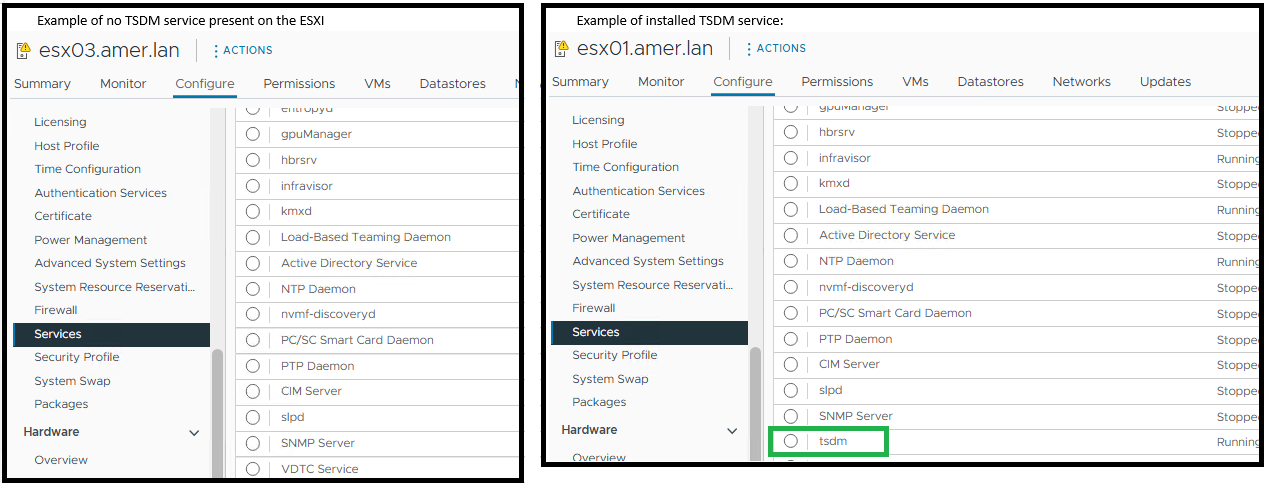
ESXi muestra que el TSDM de PowerProtect Data Manager no se instala mediante el comando de ESXi: esxcli software vib get -n tsdm:
Ejemplo de salida de ningún VIB de TSDM instalado:
[root@esx03:~] esxcli software vib get -n tsdm
 [NoMatchError]
 No VIB matching VIB search specification 'tsdm' on host.
         id = tsdm
 Please refer to the log file for more details.
Ejemplo de salida de un VIB de TSDM instalado:
[root@esx02:~] esxcli software vib get -n tsdm
DEL_bootbank_tsdm_19.22.0.3-1OEM.800.1.0.20613240
   Name: tsdm
   Version: 19.22.0.3-1OEM.800.1.0.20613240
   Type: bootbank
   Vendor: DEL
   Acceptance Level: VMwareAccepted
   Summary: Transparent Snapshot Data Mover
   Description: Used by PPDM to move backup image data to/from Data Domain
   ReferenceURLs:
   Creation Date: 2025-10-20
   Depends: vmkapi_2_10_0_0, libvmkuser-8.0.0-1, uwglibc64-2.12.2-1, uwvmkcall-8.0.0-1, nicmgmt = 0.3, iscsimgmt = 0.0, srest = 0.2
   Conflicts:
   Replaces:
   Provides:
   Maintenance Mode Required: False
   Hardware Platforms Required:
   Live Install Allowed: True
   Live Remove Allowed: True
   Stateless Ready: True
   Overlay: False
   Tags: daemon, sdkname:daemondk, sdkversion:8.0.0-20613240, epkname:esxpackagingkit, epkversion:8.0-20615152, ConfigSchema:tsdm-19.22.0.3-1OEM.800.1.0.20613240:tsdm:usr/lib/vmware/configmanager/schemas/tsdm-19.22.0.3-1OEM.800.1.0.20613240-schema.json:sha-256:81fdf89122d7bfc3ed50feaac9caf359a87bf8819161eb8f78a2eae8cb205696
   Payloads: tsdm
   Platforms: host
Cause
En este artículo, se aborda un caso de uso específico en el que el entorno de vCenter utiliza vLCM o VUM. Después de una actualización de ESXi, el VIB de PowerProtect TSDM ya no está instalado en el ESXi.
El VIB de TSDM se eliminó porque el host ESXi recibió un parche de imagen administrado por vLCM que no contenía el VIB de TSDM firmado. Cuando vLCM aplica un nuevo perfil de imagen, los VIB que no estén en ese perfil se eliminan automáticamente. Esta acción no genera una entrada de vib_uninstall estándar en esxupdate.log.
Los registros de PowerProtect Data Manager no muestran ninguna solicitud de desinstalación para el host dentro del plazo.
2025-11-12T18:00:03.566Z INFO [] [...] VIB status of host esxi.domain.com, is INSTALLED
La entrada en el registro de PowerProtect Data Manager indica que el VIB no está instalado:
2025-11-13T06:58:47.401Z INFO [] [...] tsdm vib is not installed on esxi.domain.com, uninstall request will be ignored
El esxupdate.log registra una operación de parche en torno al momento en que desapareció el VIB de TSDM. El registro muestra la actualización de la imagen, pero no hay ningún comando de desinstalación de VIB explícito (a continuación, se muestra un ejemplo que confirma si se realizó un parche o una actualización de ESXi):
2025-01-14T12:44:10Z esxupdate: INFO: vLCM remediation initiated for image compliance.
2025-01-14T12:44:11Z esxupdate: INFO: Loading metadata from /var/db/esximg/metadata.zip
2025-01-14T12:44:12Z esxupdate: INFO: Validating image profile: ESXi-8.0U2-202501001-standard
2025-01-14T12:44:15Z esxupdate: INFO: Applying VIB: VMware_lsu-lsi-mr3.vib
2025-01-14T12:44:17Z esxupdate: INFO: Successfully installed VIB: VMware_lsu-lsi-mr3
2025-01-14T12:44:18Z esxupdate: INFO: Applying VIB: VMware-ESXi-AcceptanceLevel-PartnerSupported.vib
2025-01-14T12:44:20Z esxupdate: INFO: Reboot required after installation of the above VIBs.
2025-01-14T12:44:21Z esxupdate: INFO: vLCM patch stage completed. Host will reboot to finalize changes.

OR

2025-11-12T19:20:42Z In(14) esxupdate[2102584]: Installers initiated are {'quickpatch': <vmware.esximage.Installer.QuickPatchInstaller.QuickPatchInstaller object at 0xae66a1b310>, 'live': <vmware.esximage.Installer.LiveImageInstaller.LiveImageInstaller object at 0xae67abaf10>, 'boot': <vmware.esximage.Installer.BootBankInstaller.BootBankInstaller object at 0xae67ee4950>, 'locker': <vmware.esximage.Installer.LockerInstaller.LockerInstaller object at 0xae686b6110>}
2025-11-12T19:20:42Z In(14) esxupdate[2102584]: Adding VIB VMware_tools-light_12.5.3.24819442-24853260 to ImageProfile (Updated) VMware Lifecycle Manager Generated Image
2025-11-12T19:20:42Z Db(15) esxupdate[2102584]: Adding Component VMware-VM-Tools_12.5.3.24819442-24853260 to ImageProfile (Updated) VMware Lifecycle Manager Generated Image
2025-11-12T19:20:42Z Db(15) esxupdate[2102584]: Removing reserved Component VMware-VM-Tools_12.5.3.24819442-24853260 in ImageProfile (Updated) VMware Lifecycle Manager Generated Image
2025-11-12T19:20:42Z Db(15) esxupdate[2102584]: Finished execution of command = vib.list
2025-11-12T19:20:42Z Db(15) esxupdate[2102584]: Completed esxcli output, going to exit esxcli-software
Resolution
- Asegúrese de que el VIB de TSDM firmado se agregue al perfil de imagen. Para obtener más detalles, consulte Cómo obtener el controlador de VIB de TSDM firmado para la imagen de vSphere Lifecycle Management
- Instale el VIB de TSDM en los hosts afectados si se eliminó mediante PowerProtect Data Manager-Infrastructure-Protection>> Engines-Transparent> Snapshot Data Mover