PowerProtect:TSDM VIBがESXiホストから消えた
Summary: PowerProtect Data Manager TSDM vSphere Installation Bundle (VIB)がESXiホストに存在しない
This article applies to
This article does not apply to
This article is not tied to any specific product.
Not all product versions are identified in this article.
Symptoms
- PowerProtect Data Manager TSDM VIBがすでにインストールされています
- PowerProtect Data ManagerがVIBを突然「インストール準備完了」と報告する
- TSDM VIBはESXiにインストールされなくなりました
- PowerProtect Data Manager、vCenter、ESXiにTSDM VIBがアンインストールされたことを示すタスクがない
- vCenter Lifecycle Manager(VLCM)またはvSphere Update Manager(VUM)が使用されています
vSphere UIのESXiでのTSDMサービスの例:
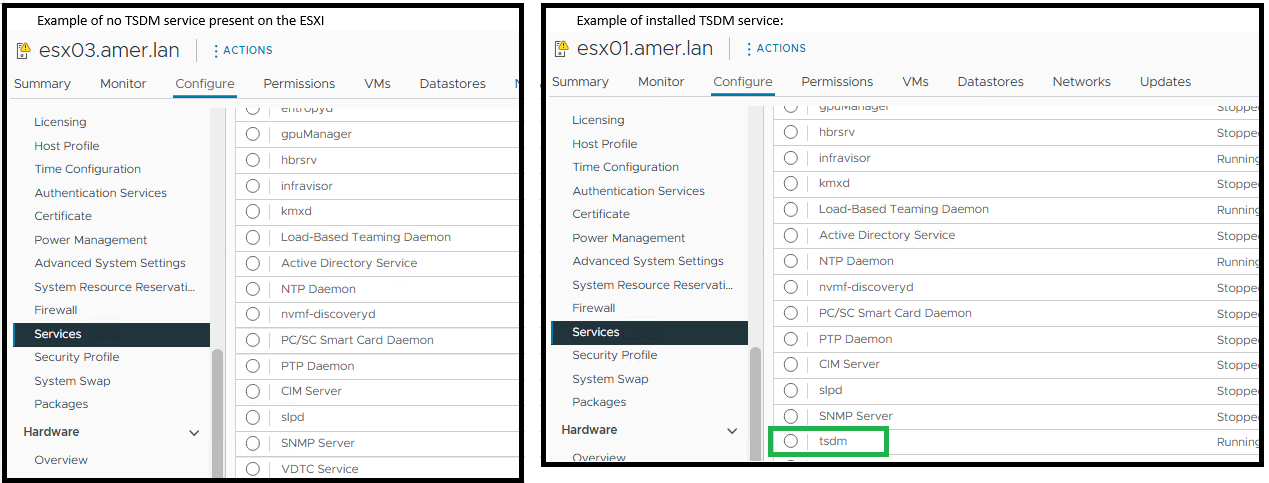
ESXiコマンドでPowerProtect Data Manager TSDMがインストールされていないとESXiで表示される esxcli software vib get -n tsdmファイルに置き換えます。
TSDM VIBがインストールされていない場合の出力例:
[root@esx03:~] esxcli software vib get -n tsdm
 [NoMatchError]
 No VIB matching VIB search specification 'tsdm' on host.
         id = tsdm
 Please refer to the log file for more details.
インストールされているTSDM VIBの出力例:
[root@esx02:~] esxcli software vib get -n tsdm
DEL_bootbank_tsdm_19.22.0.3-1OEM.800.1.0.20613240
   Name: tsdm
   Version: 19.22.0.3-1OEM.800.1.0.20613240
   Type: bootbank
   Vendor: DEL
   Acceptance Level: VMwareAccepted
   Summary: Transparent Snapshot Data Mover
   Description: Used by PPDM to move backup image data to/from Data Domain
   ReferenceURLs:
   Creation Date: 2025-10-20
   Depends: vmkapi_2_10_0_0, libvmkuser-8.0.0-1, uwglibc64-2.12.2-1, uwvmkcall-8.0.0-1, nicmgmt = 0.3, iscsimgmt = 0.0, srest = 0.2
   Conflicts:
   Replaces:
   Provides:
   Maintenance Mode Required: False
   Hardware Platforms Required:
   Live Install Allowed: True
   Live Remove Allowed: True
   Stateless Ready: True
   Overlay: False
   Tags: daemon, sdkname:daemondk, sdkversion:8.0.0-20613240, epkname:esxpackagingkit, epkversion:8.0-20615152, ConfigSchema:tsdm-19.22.0.3-1OEM.800.1.0.20613240:tsdm:usr/lib/vmware/configmanager/schemas/tsdm-19.22.0.3-1OEM.800.1.0.20613240-schema.json:sha-256:81fdf89122d7bfc3ed50feaac9caf359a87bf8819161eb8f78a2eae8cb205696
   Payloads: tsdm
   Platforms: host
Cause
この記事では、vCenter環境でvLCMまたはVUMを使用している特定のユース ケースについて説明します。ESXiのアップデート後、PowerProtect TSDM VIBはESXiにインストールされなくなります。
ESXiホストが、署名済みTSDM VIBを含まないvLCMで管理されるイメージ パッチを受信したため、TSDM VIBが削除されました。vLCMが新しいイメージ プロファイルを適用すると、そのプロファイルに含まれていないVIBは自動的に削除されます。このアクションでは、esxupdate.logに標準のvib_uninstallエントリーは生成されません。
PowerProtect Data Managerログには、期間内にホストのアンインストール要求がないことが示されています。
2025-11-12T18:00:03.566Z INFO [] [...] VIB status of host esxi.domain.com, is INSTALLED
PowerProtect Data Managerのログ エントリーは、VIBがインストールされていないことを示しています。
2025-11-13T06:58:47.401Z INFO [] [...] tsdm vib is not installed on esxi.domain.com, uninstall request will be ignored
esxupdate.logは、TSDM VIBが消えた頃のパッチ操作を記録します。ログにはイメージのアップデートは表示されますが、明示的なVIBアンインストール コマンドは表示されません(ESXiパッチまたはアップグレードが実行されたかどうかを確認する次の例を示します)。
2025-01-14T12:44:10Z esxupdate: INFO: vLCM remediation initiated for image compliance.
2025-01-14T12:44:11Z esxupdate: INFO: Loading metadata from /var/db/esximg/metadata.zip
2025-01-14T12:44:12Z esxupdate: INFO: Validating image profile: ESXi-8.0U2-202501001-standard
2025-01-14T12:44:15Z esxupdate: INFO: Applying VIB: VMware_lsu-lsi-mr3.vib
2025-01-14T12:44:17Z esxupdate: INFO: Successfully installed VIB: VMware_lsu-lsi-mr3
2025-01-14T12:44:18Z esxupdate: INFO: Applying VIB: VMware-ESXi-AcceptanceLevel-PartnerSupported.vib
2025-01-14T12:44:20Z esxupdate: INFO: Reboot required after installation of the above VIBs.
2025-01-14T12:44:21Z esxupdate: INFO: vLCM patch stage completed. Host will reboot to finalize changes.

OR

2025-11-12T19:20:42Z In(14) esxupdate[2102584]: Installers initiated are {'quickpatch': <vmware.esximage.Installer.QuickPatchInstaller.QuickPatchInstaller object at 0xae66a1b310>, 'live': <vmware.esximage.Installer.LiveImageInstaller.LiveImageInstaller object at 0xae67abaf10>, 'boot': <vmware.esximage.Installer.BootBankInstaller.BootBankInstaller object at 0xae67ee4950>, 'locker': <vmware.esximage.Installer.LockerInstaller.LockerInstaller object at 0xae686b6110>}
2025-11-12T19:20:42Z In(14) esxupdate[2102584]: Adding VIB VMware_tools-light_12.5.3.24819442-24853260 to ImageProfile (Updated) VMware Lifecycle Manager Generated Image
2025-11-12T19:20:42Z Db(15) esxupdate[2102584]: Adding Component VMware-VM-Tools_12.5.3.24819442-24853260 to ImageProfile (Updated) VMware Lifecycle Manager Generated Image
2025-11-12T19:20:42Z Db(15) esxupdate[2102584]: Removing reserved Component VMware-VM-Tools_12.5.3.24819442-24853260 in ImageProfile (Updated) VMware Lifecycle Manager Generated Image
2025-11-12T19:20:42Z Db(15) esxupdate[2102584]: Finished execution of command = vib.list
2025-11-12T19:20:42Z Db(15) esxupdate[2102584]: Completed esxcli output, going to exit esxcli-software
Resolution
- 署名済みTSDM VIBがイメージ プロファイルに追加されていることを確認します。詳細については、「vSphere Lifecycle Managementイメージ用の署名済みTSDM VIBドライバーを取得する方法」を参照してください。
- PowerProtect Data Manager->Infrastructure->Protection Engines->Transparent Snapshot Data Moverを使用してTSDM VIBが削除された場合は、影響を受けるホストにTSDM VIBをインストールします
Affected Products
PowerProtect Data Manager, PowerProtect Data Manager EssentialsProducts
PowerProtect Data Manager ApplianceArticle Properties
Article Number: 000397489
Article Type: Solution
Last Modified: 19 يناير 2026
Version: 1
Find answers to your questions from other Dell users
Support Services
Check if your device is covered by Support Services.