PowerProtect: TSDM VIB가 ESXi 호스트에서 사라짐
Summary: PowerProtect Data Manager TSDM VIB(vSphere Installation Bundle)가 ESXi 호스트에서 누락됨
This article applies to
This article does not apply to
This article is not tied to any specific product.
Not all product versions are identified in this article.
Symptoms
- PowerProtect Data Manager TSDM VIB가 이미 설치됨
- PowerProtect Data Manager가 갑자기 VIB를 "설치 준비 완료"로 보고함
- TSDM VIB가 더 이상 ESXi에 설치되지 않음
- PowerProtect Data Manager, vCenter 또는 ESXi에 TSDM VIB가 제거되었음을 표시하는 작업이 없습니다.
- VLCM(vCenter Lifecycle Manager) 또는 VUM(vSphere Update Manager)을 사용 중입니다.
vSphere UI에서 ESXi의 TSDM 서비스 예:
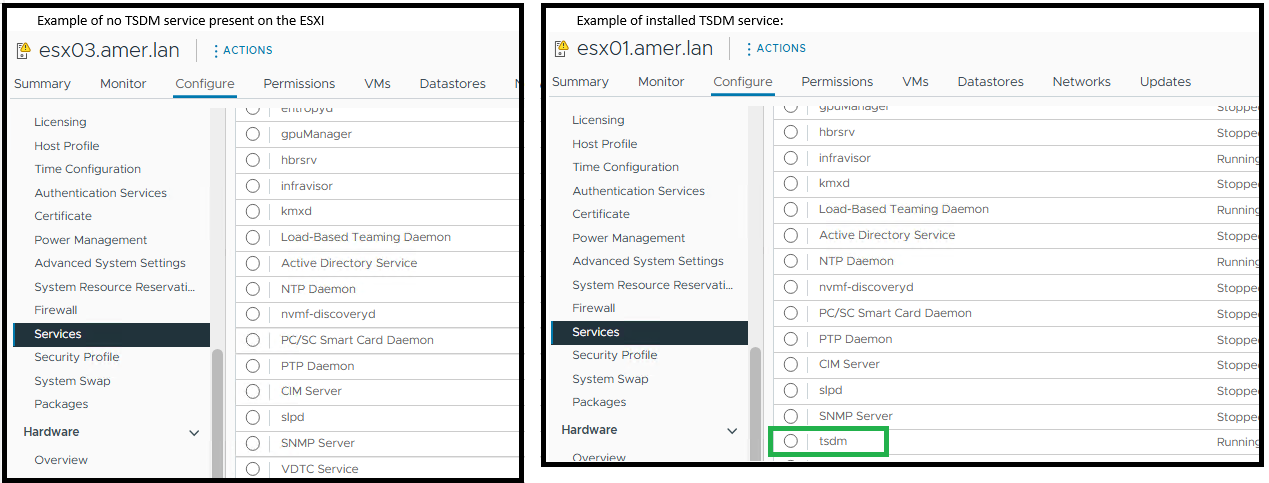
ESXi에서 ESXi 명령을 사용하여 PowerProtect Data Manager TSDM이 설치되지 않은 것으로 표시됨 - esxcli software vib get -n tsdm파일로 교체합니다.
TSDM VIB가 설치되지 않은 경우의 출력 예:
[root@esx03:~] esxcli software vib get -n tsdm
 [NoMatchError]
 No VIB matching VIB search specification 'tsdm' on host.
         id = tsdm
 Please refer to the log file for more details.
설치된 TSDM VIB의 출력 예:
[root@esx02:~] esxcli software vib get -n tsdm
DEL_bootbank_tsdm_19.22.0.3-1OEM.800.1.0.20613240
   Name: tsdm
   Version: 19.22.0.3-1OEM.800.1.0.20613240
   Type: bootbank
   Vendor: DEL
   Acceptance Level: VMwareAccepted
   Summary: Transparent Snapshot Data Mover
   Description: Used by PPDM to move backup image data to/from Data Domain
   ReferenceURLs:
   Creation Date: 2025-10-20
   Depends: vmkapi_2_10_0_0, libvmkuser-8.0.0-1, uwglibc64-2.12.2-1, uwvmkcall-8.0.0-1, nicmgmt = 0.3, iscsimgmt = 0.0, srest = 0.2
   Conflicts:
   Replaces:
   Provides:
   Maintenance Mode Required: False
   Hardware Platforms Required:
   Live Install Allowed: True
   Live Remove Allowed: True
   Stateless Ready: True
   Overlay: False
   Tags: daemon, sdkname:daemondk, sdkversion:8.0.0-20613240, epkname:esxpackagingkit, epkversion:8.0-20615152, ConfigSchema:tsdm-19.22.0.3-1OEM.800.1.0.20613240:tsdm:usr/lib/vmware/configmanager/schemas/tsdm-19.22.0.3-1OEM.800.1.0.20613240-schema.json:sha-256:81fdf89122d7bfc3ed50feaac9caf359a87bf8819161eb8f78a2eae8cb205696
   Payloads: tsdm
   Platforms: host
Cause
이 문서에서는 vCenter 환경에서 vLCM 또는 VUM을 사용하는 특정 활용 사례를 다룹니다. ESXi 업데이트 후 PowerProtect TSDM VIB는 더 이상 ESXi에 설치되지 않습니다.
ESXi 호스트가 서명된 TSDM VIB가 포함되지 않은 vLCM 관리 이미지 패치를 수신했기 때문에 TSDM VIB가 제거되었습니다. vLCM이 새 이미지 프로파일을 적용하면 해당 프로파일에 없는 VIB가 자동으로 제거됩니다. 이 작업은 esxupdate.log에서 표준 vib_uninstall 항목을 생성하지 않습니다.
PowerProtect Data Manager 로그에는 해당 기간 내에 호스트에 대한 제거 요청이 표시되지 않습니다.
2025-11-12T18:00:03.566Z INFO [] [...] VIB status of host esxi.domain.com, is INSTALLED
PowerProtect Data Manager 로그 항목은 VIB가 설치되지 않았음을 나타냅니다.
2025-11-13T06:58:47.401Z INFO [] [...] tsdm vib is not installed on esxi.domain.com, uninstall request will be ignored
esxupdate.log는 TSDM VIB가 사라진 시점의 패치 작업을 기록합니다. 로그에 이미지 업데이트가 표시되지만 명시적인 VIB 제거 명령은 표시되지 않습니다(아래 예에서는 ESXi 패치 또는 업그레이드가 수행되었는지 확인함).
2025-01-14T12:44:10Z esxupdate: INFO: vLCM remediation initiated for image compliance.
2025-01-14T12:44:11Z esxupdate: INFO: Loading metadata from /var/db/esximg/metadata.zip
2025-01-14T12:44:12Z esxupdate: INFO: Validating image profile: ESXi-8.0U2-202501001-standard
2025-01-14T12:44:15Z esxupdate: INFO: Applying VIB: VMware_lsu-lsi-mr3.vib
2025-01-14T12:44:17Z esxupdate: INFO: Successfully installed VIB: VMware_lsu-lsi-mr3
2025-01-14T12:44:18Z esxupdate: INFO: Applying VIB: VMware-ESXi-AcceptanceLevel-PartnerSupported.vib
2025-01-14T12:44:20Z esxupdate: INFO: Reboot required after installation of the above VIBs.
2025-01-14T12:44:21Z esxupdate: INFO: vLCM patch stage completed. Host will reboot to finalize changes.

OR

2025-11-12T19:20:42Z In(14) esxupdate[2102584]: Installers initiated are {'quickpatch': <vmware.esximage.Installer.QuickPatchInstaller.QuickPatchInstaller object at 0xae66a1b310>, 'live': <vmware.esximage.Installer.LiveImageInstaller.LiveImageInstaller object at 0xae67abaf10>, 'boot': <vmware.esximage.Installer.BootBankInstaller.BootBankInstaller object at 0xae67ee4950>, 'locker': <vmware.esximage.Installer.LockerInstaller.LockerInstaller object at 0xae686b6110>}
2025-11-12T19:20:42Z In(14) esxupdate[2102584]: Adding VIB VMware_tools-light_12.5.3.24819442-24853260 to ImageProfile (Updated) VMware Lifecycle Manager Generated Image
2025-11-12T19:20:42Z Db(15) esxupdate[2102584]: Adding Component VMware-VM-Tools_12.5.3.24819442-24853260 to ImageProfile (Updated) VMware Lifecycle Manager Generated Image
2025-11-12T19:20:42Z Db(15) esxupdate[2102584]: Removing reserved Component VMware-VM-Tools_12.5.3.24819442-24853260 in ImageProfile (Updated) VMware Lifecycle Manager Generated Image
2025-11-12T19:20:42Z Db(15) esxupdate[2102584]: Finished execution of command = vib.list
2025-11-12T19:20:42Z Db(15) esxupdate[2102584]: Completed esxcli output, going to exit esxcli-software
Resolution
- 서명된 TSDM VIB가 이미지 프로파일에 추가되었는지 확인합니다. 자세한 내용은 vSphere 수명주기 관리 이미지에 대해 서명된 TSDM VIB 드라이버를 가져오는 방법을 참조하십시오.
- PowerProtect Data Manager-Infrastructure-Protection>> Engines-Transparent> Snapshot Data Mover를 사용하여 TSDM VIB를 제거한 경우 영향을 받는 호스트에 TSDM VIB를 설치합니다.
Affected Products
PowerProtect Data Manager, PowerProtect Data Manager EssentialsProducts
PowerProtect Data Manager ApplianceArticle Properties
Article Number: 000397489
Article Type: Solution
Last Modified: 19 يناير 2026
Version: 1
Find answers to your questions from other Dell users
Support Services
Check if your device is covered by Support Services.