PowerProtect: O VIB TSDM desapareceu do host do ESXi
Summary: Pacote de instalação do vSphere (VIB) do PowerProtect Data Manager TSDM ausente do host do ESXi
Symptoms
- O VIB do TSDM do PowerProtect Data Manager já estava instalado
- O PowerProtect Data Manager relata o VIB como "pronto para instalar" repentinamente
- O VIB TSDM não está mais instalado no ESXi
- Nenhuma tarefa no PowerProtect Data Manager, vCenter ou ESXi para mostrar que o VIB do TSDM foi desinstalado
- O vCenter Lifecycle Manager (VLCM) ou o vSphere Update Manager (VUM) está em uso
Exemplo de serviço TSDM no ESXi na IU do vSphere:
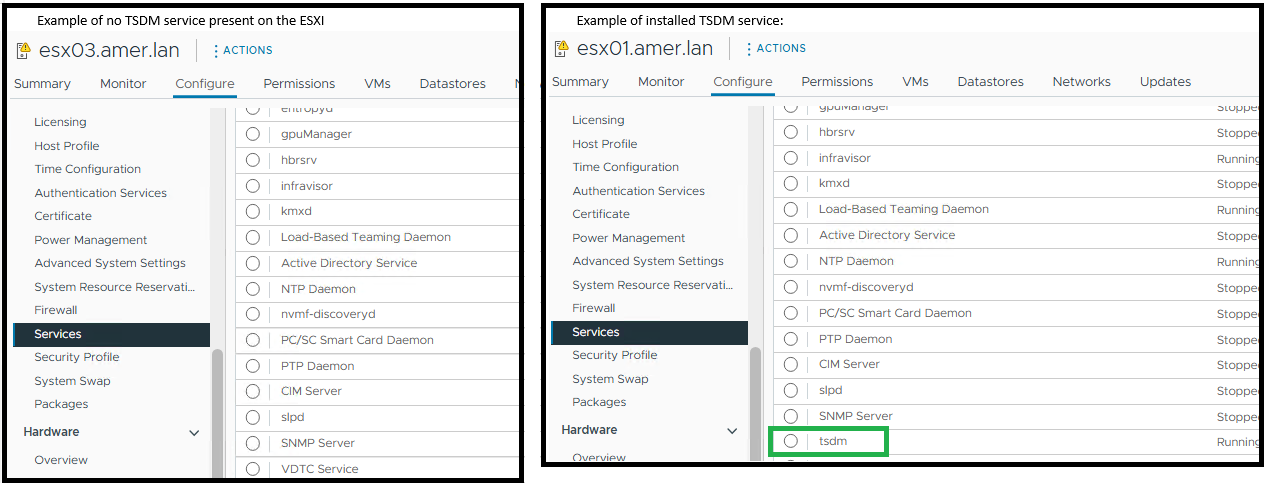
O ESXi mostra que o TSDM do PowerProtect Data Manager não está instalado usando o comando ESXi - esxcli software vib get -n tsdm:
Exemplo de saída de nenhum VIB do TSDM instalado:
[root@esx03:~] esxcli software vib get -n tsdm
 [NoMatchError]
 No VIB matching VIB search specification 'tsdm' on host.
         id = tsdm
 Please refer to the log file for more details.
Exemplo de resultado de um VIB do TSDM instalado:
[root@esx02:~] esxcli software vib get -n tsdm
DEL_bootbank_tsdm_19.22.0.3-1OEM.800.1.0.20613240
   Name: tsdm
   Version: 19.22.0.3-1OEM.800.1.0.20613240
   Type: bootbank
   Vendor: DEL
   Acceptance Level: VMwareAccepted
   Summary: Transparent Snapshot Data Mover
   Description: Used by PPDM to move backup image data to/from Data Domain
   ReferenceURLs:
   Creation Date: 2025-10-20
   Depends: vmkapi_2_10_0_0, libvmkuser-8.0.0-1, uwglibc64-2.12.2-1, uwvmkcall-8.0.0-1, nicmgmt = 0.3, iscsimgmt = 0.0, srest = 0.2
   Conflicts:
   Replaces:
   Provides:
   Maintenance Mode Required: False
   Hardware Platforms Required:
   Live Install Allowed: True
   Live Remove Allowed: True
   Stateless Ready: True
   Overlay: False
   Tags: daemon, sdkname:daemondk, sdkversion:8.0.0-20613240, epkname:esxpackagingkit, epkversion:8.0-20615152, ConfigSchema:tsdm-19.22.0.3-1OEM.800.1.0.20613240:tsdm:usr/lib/vmware/configmanager/schemas/tsdm-19.22.0.3-1OEM.800.1.0.20613240-schema.json:sha-256:81fdf89122d7bfc3ed50feaac9caf359a87bf8819161eb8f78a2eae8cb205696
   Payloads: tsdm
   Platforms: host
Cause
Este artigo trata de um caso de uso específico em que o ambiente do vCenter está usando o vLCM ou o VUM. Após uma atualização do ESXi, o VIB do TSDM do PowerProtect não está mais instalado no ESXi.
O VIB TSDM foi removido porque o host do ESXi recebeu um patch de imagem gerenciado pelo vLCM que não continha o VIB assinado do TSDM. Quando o vLCM aplica um novo perfil de imagem, todos os VIBs que não estiverem nesse perfil são removidos automaticamente. Essa ação não gera uma entrada de vib_uninstall padrão no esxupdate.log.
Os registros do PowerProtect Data Manager não mostram nenhuma solicitação de desinstalação para o host dentro do período.
2025-11-12T18:00:03.566Z INFO [] [...] VIB status of host esxi.domain.com, is INSTALLED
A entrada de registro do PowerProtect Data Manager indica que o VIB não está instalado:
2025-11-13T06:58:47.401Z INFO [] [...] tsdm vib is not installed on esxi.domain.com, uninstall request will be ignored
O esxupdate.log registra uma operação de patch na época em que o VIB do TSDM desapareceu. O log mostra a atualização da imagem, mas nenhum comando explícito de desinstalação do VIB (abaixo estão exemplos que confirmam se um patch ou upgrade do ESXi foi realizado):
2025-01-14T12:44:10Z esxupdate: INFO: vLCM remediation initiated for image compliance.
2025-01-14T12:44:11Z esxupdate: INFO: Loading metadata from /var/db/esximg/metadata.zip
2025-01-14T12:44:12Z esxupdate: INFO: Validating image profile: ESXi-8.0U2-202501001-standard
2025-01-14T12:44:15Z esxupdate: INFO: Applying VIB: VMware_lsu-lsi-mr3.vib
2025-01-14T12:44:17Z esxupdate: INFO: Successfully installed VIB: VMware_lsu-lsi-mr3
2025-01-14T12:44:18Z esxupdate: INFO: Applying VIB: VMware-ESXi-AcceptanceLevel-PartnerSupported.vib
2025-01-14T12:44:20Z esxupdate: INFO: Reboot required after installation of the above VIBs.
2025-01-14T12:44:21Z esxupdate: INFO: vLCM patch stage completed. Host will reboot to finalize changes.

OR

2025-11-12T19:20:42Z In(14) esxupdate[2102584]: Installers initiated are {'quickpatch': <vmware.esximage.Installer.QuickPatchInstaller.QuickPatchInstaller object at 0xae66a1b310>, 'live': <vmware.esximage.Installer.LiveImageInstaller.LiveImageInstaller object at 0xae67abaf10>, 'boot': <vmware.esximage.Installer.BootBankInstaller.BootBankInstaller object at 0xae67ee4950>, 'locker': <vmware.esximage.Installer.LockerInstaller.LockerInstaller object at 0xae686b6110>}
2025-11-12T19:20:42Z In(14) esxupdate[2102584]: Adding VIB VMware_tools-light_12.5.3.24819442-24853260 to ImageProfile (Updated) VMware Lifecycle Manager Generated Image
2025-11-12T19:20:42Z Db(15) esxupdate[2102584]: Adding Component VMware-VM-Tools_12.5.3.24819442-24853260 to ImageProfile (Updated) VMware Lifecycle Manager Generated Image
2025-11-12T19:20:42Z Db(15) esxupdate[2102584]: Removing reserved Component VMware-VM-Tools_12.5.3.24819442-24853260 in ImageProfile (Updated) VMware Lifecycle Manager Generated Image
2025-11-12T19:20:42Z Db(15) esxupdate[2102584]: Finished execution of command = vib.list
2025-11-12T19:20:42Z Db(15) esxupdate[2102584]: Completed esxcli output, going to exit esxcli-software
Resolution
- Certifique-se de que o VIB do TSDM assinado seja adicionado ao perfil da imagem. Para obter mais detalhes , consulte Como obter o driver do VIB do TSDM assinado para a imagem do vSphere Lifecycle Management
- Instale o VIB do TSDM nos hosts afetados se ele tiver sido removido usando o PowerProtect Data Manager-Infraestrutura-Mecanismos>> de proteção-Transparent> Snapshot Data Mover