PowerProtect:TSDM VIB 从 ESXi 主机中消失
Summary: ESXi 主机中缺少 PowerProtect Data Manager TSDM vSphere 安装捆绑包 (VIB)
This article applies to
This article does not apply to
This article is not tied to any specific product.
Not all product versions are identified in this article.
Symptoms
- PowerProtect Data Manager TSDM VIB 已安装
- PowerProtect Data Manager 突然将 VIB 报告为“准备安装”
- TSDM VIB 不再安装在 ESXi 上
- PowerProtect Data Manager、vCenter 或 ESXi 中未卸载任何显示 TSDM VIB 的任务
- 正在使用 vCenter Lifecycle Manager (VLCM) 或 vSphere Update Manager (VUM)
vSphere UI 中 ESXi 上的 TSDM 服务示例:
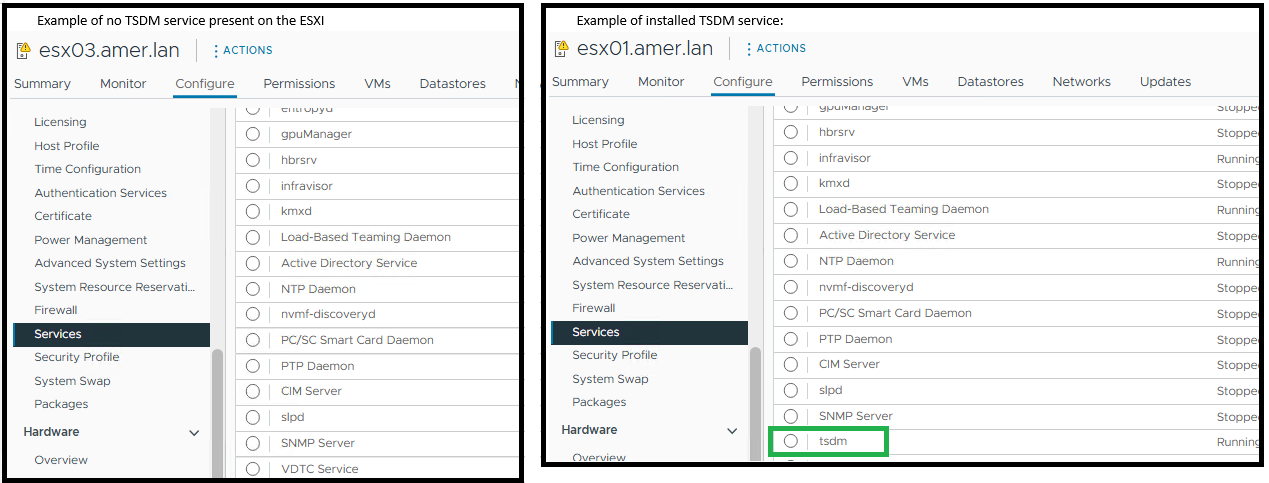
ESXi 显示未使用 ESXi 命令安装 PowerProtect Data Manager TSDM - esxcli software vib get -n tsdm管理此进程:
未安装 TSDM VIB 的输出示例:
[root@esx03:~] esxcli software vib get -n tsdm
 [NoMatchError]
 No VIB matching VIB search specification 'tsdm' on host.
         id = tsdm
 Please refer to the log file for more details.
已安装 TSDM VIB 的输出示例:
[root@esx02:~] esxcli software vib get -n tsdm
DEL_bootbank_tsdm_19.22.0.3-1OEM.800.1.0.20613240
   Name: tsdm
   Version: 19.22.0.3-1OEM.800.1.0.20613240
   Type: bootbank
   Vendor: DEL
   Acceptance Level: VMwareAccepted
   Summary: Transparent Snapshot Data Mover
   Description: Used by PPDM to move backup image data to/from Data Domain
   ReferenceURLs:
   Creation Date: 2025-10-20
   Depends: vmkapi_2_10_0_0, libvmkuser-8.0.0-1, uwglibc64-2.12.2-1, uwvmkcall-8.0.0-1, nicmgmt = 0.3, iscsimgmt = 0.0, srest = 0.2
   Conflicts:
   Replaces:
   Provides:
   Maintenance Mode Required: False
   Hardware Platforms Required:
   Live Install Allowed: True
   Live Remove Allowed: True
   Stateless Ready: True
   Overlay: False
   Tags: daemon, sdkname:daemondk, sdkversion:8.0.0-20613240, epkname:esxpackagingkit, epkversion:8.0-20615152, ConfigSchema:tsdm-19.22.0.3-1OEM.800.1.0.20613240:tsdm:usr/lib/vmware/configmanager/schemas/tsdm-19.22.0.3-1OEM.800.1.0.20613240-schema.json:sha-256:81fdf89122d7bfc3ed50feaac9caf359a87bf8819161eb8f78a2eae8cb205696
   Payloads: tsdm
   Platforms: host
Cause
本文介绍 vCenter 环境使用 vLCM 或 VUM 的特定应用场景。ESXi 更新后,PowerProtect TSDM VIB 不再安装在 ESXi 上。
TSDM VIB 已被删除,因为 ESXi 主机收到的 vLCM 托管映像修补程序不包含签名的 TSDM VIB。当 vLCM 应用新的映像配置文件时,将自动删除不在该配置文件中的任何 VIB。此作不会在 esxupdate.log 中生成标准vib_uninstall条目。
PowerProtect Data Manager 日志显示该时间范围内没有针对主机的卸载请求。
2025-11-12T18:00:03.566Z INFO [] [...] VIB status of host esxi.domain.com, is INSTALLED
PowerProtect Data Manager 日志条目指示未安装 VIB:
2025-11-13T06:58:47.401Z INFO [] [...] tsdm vib is not installed on esxi.domain.com, uninstall request will be ignored
esxupdate.log记录 TSDM VIB 消失前后的一次修补作。日志显示映像更新,但没有明确的 VIB 卸载命令(下面是确认是否执行了 ESXi 修补程序或升级的示例):
2025-01-14T12:44:10Z esxupdate: INFO: vLCM remediation initiated for image compliance.
2025-01-14T12:44:11Z esxupdate: INFO: Loading metadata from /var/db/esximg/metadata.zip
2025-01-14T12:44:12Z esxupdate: INFO: Validating image profile: ESXi-8.0U2-202501001-standard
2025-01-14T12:44:15Z esxupdate: INFO: Applying VIB: VMware_lsu-lsi-mr3.vib
2025-01-14T12:44:17Z esxupdate: INFO: Successfully installed VIB: VMware_lsu-lsi-mr3
2025-01-14T12:44:18Z esxupdate: INFO: Applying VIB: VMware-ESXi-AcceptanceLevel-PartnerSupported.vib
2025-01-14T12:44:20Z esxupdate: INFO: Reboot required after installation of the above VIBs.
2025-01-14T12:44:21Z esxupdate: INFO: vLCM patch stage completed. Host will reboot to finalize changes.

OR

2025-11-12T19:20:42Z In(14) esxupdate[2102584]: Installers initiated are {'quickpatch': <vmware.esximage.Installer.QuickPatchInstaller.QuickPatchInstaller object at 0xae66a1b310>, 'live': <vmware.esximage.Installer.LiveImageInstaller.LiveImageInstaller object at 0xae67abaf10>, 'boot': <vmware.esximage.Installer.BootBankInstaller.BootBankInstaller object at 0xae67ee4950>, 'locker': <vmware.esximage.Installer.LockerInstaller.LockerInstaller object at 0xae686b6110>}
2025-11-12T19:20:42Z In(14) esxupdate[2102584]: Adding VIB VMware_tools-light_12.5.3.24819442-24853260 to ImageProfile (Updated) VMware Lifecycle Manager Generated Image
2025-11-12T19:20:42Z Db(15) esxupdate[2102584]: Adding Component VMware-VM-Tools_12.5.3.24819442-24853260 to ImageProfile (Updated) VMware Lifecycle Manager Generated Image
2025-11-12T19:20:42Z Db(15) esxupdate[2102584]: Removing reserved Component VMware-VM-Tools_12.5.3.24819442-24853260 in ImageProfile (Updated) VMware Lifecycle Manager Generated Image
2025-11-12T19:20:42Z Db(15) esxupdate[2102584]: Finished execution of command = vib.list
2025-11-12T19:20:42Z Db(15) esxupdate[2102584]: Completed esxcli output, going to exit esxcli-software
Resolution
- 确保已签名的 TSDM VIB 已添加到映像配置文件中 — 有关更多详细信息 ,请参见如何获取 vSphere 生命周期管理映像的签名 TSDM VIB 驱动程序
- 如果使用 PowerProtect Data Manager-Infrastructure-Protection>> Engines-Transparent> Snapshot Data Mover 删除了 TSDM VIB,请在受影响的主机上安装 TSDM VIB
Affected Products
PowerProtect Data Manager, PowerProtect Data Manager EssentialsProducts
PowerProtect Data Manager ApplianceArticle Properties
Article Number: 000397489
Article Type: Solution
Last Modified: 19 يناير 2026
Version: 1
Find answers to your questions from other Dell users
Support Services
Check if your device is covered by Support Services.