PowerEdge:適用於 Microsoft Secure Boot 憑證的伺服器 BIOS 更新準則
Summary: 請先完成必要的先決條件,再將執行 Windows 的 Dell PowerEdge 伺服器更新至 2025 年 12 月 BIOS 版本。BIOS 更新包含新的安全開機憑證,若未遵循以下步驟,可能會導致伺服器進入未定義的狀態。 如果未啟用安全開機,則 BIOS 可透過正常程序更新,但本文件不適用。 注意:本文件僅適用於已啟用安全開機、TPM 並執行 Windows Server 作業系統的伺服器。 ...
Instructions
若未遵循以下步驟,可能會導致伺服器進入未定義的狀態。
無法定義的狀態症狀:
- 在系統開機期間進入 BitLocker 復原畫面。
- Azure Stack 或本機註冊狀態顯示「不符合原則」錯誤。 https://learn.microsoft.com/en-us/previous-versions/azure/azure-local/deploy/troubleshoot-hci-registration#out-of-policy-error

目標伺服器和作業系統
執行 Windows Server 或 Azure Stack HCI 的所有 PowerEdge 第 14、15 和 16 代伺服器
伺服器世代和 BIOS 識別碼
以下是針對不同世代 Dell PowerEdge 伺服器所發佈的 BIOS 版本詳細資料,其中包括 2023 Microsoft Secure Boot 憑證。
|
平台 |
BIOS 版本 |
|
R260、R360、T160、T360 |
2.4.0 |
|
R660、R760、R860、R760XD2、R760XA、XE8640、XE9680、HS5620、XR7620、R760XS、XR5610、XR8610T、XR8620T、R960、T560、MX760C、XC760、VS-760、XC660、XC760XD2、VE660、VP-760、XC660XS、XC760XA、VP-760XA |
2.8.2 |
|
R6625、R7625 |
1.15.3 |
|
C6615 |
1.10.3 |
|
R6615、R7615 |
1.15.3 |
|
R750、R750xa、R750xs、R650、R650xs、R550、R450、C6520、MX750c、T550 |
1.19.2 |
|
XR4510c、XR4520c |
1.21.1 |
|
R350、R250、T350、T150 |
1.13.0 |
|
R6515、R7515 |
2.22.0 |
|
R6525、R7525 |
2.22.0 |
|
R7425 |
1.23.0 |
|
R7415、R6415 |
1.23.0 |
|
R740、R740XD、R640、R940 |
2.25.0 |
|
C4140 |
2.25.0 |
|
R840、R940XA |
2.25.0 |
|
T640 |
2.25.0 |
|
R540、R440、T440 |
2.25.0 |
|
R740XD2 |
2.25.0 |
|
MX740C |
2.25.0 |
|
MX840 |
2.25.0 |
|
M640、FC640、M640 (VRTX) |
2.25.0 |
|
C6420 |
2.25.0 |
|
XE7420、XE7440 |
2.25.0 |
|
XE2420 |
2.25.0 |
|
R340、T340、R240、T140 |
2.21.0 |
先決條件
- 伺服器執行的 BIOS 版本必須比上述版本更舊。
- 伺服器必須具有 TPM 2.0,且應處於活動狀態。
- 應啟用安全開機。
- BitLocker 應停用。如果 BitLocker 已在使用中,則應暫時停用。
- 請依照下方連結中的指示,使用 Azure Stack HCI 叢集管理 BitLocker。
- 在 Azure 本機上管理 BitLocker 加密
- 使用者應具有伺服器的管理許可權。
- PowerShell 執行原則應設為「無限制」或「略過」。(用
Set-ExecutionPolicy命令)
注意:以下檔案僅可附加至本文的英文版本。
更新安全開機憑證和 BIOS 的步驟。
- 請確定伺服器執行的 BIOS 版本比上述版本早。
- 系統應執行 Windows Server 2025、Windows Server 2022 或 HCI 作業系統。
- 下載此 KB 附加的安全開機憑證和指令檔。
- 將安全開機憑證複製到系統。
- 若為 16G - 複製
16G_Secure_Boot_Cerifcates_pkb.zip並解壓縮到任何資料夾。 - 若為 15G - 複製
15G_Secure_Boot_Cerifcates_pkb.zip並解壓縮到任何資料夾。 - 若為 14G - 複製
14G_Secure_Boot_Cerifcates_pkb.zip並解壓縮到任何資料夾。
- 若為 16G - 複製
- 執行適當的指令檔以更新安全開機憑證。
- 若為 16G:
16G_SecureBoot_Cert_Update_pkb.ps1 - 若為 15G:
15G_SecureBoot_Cert_Update_pkb.ps1 - 若為 14G:
14G_SecureBoot_Cert_Update_pkb.ps1 - 儲存所有必要憑證檔案的資料夾路徑必須提供作為輸入。
- 若為 16G:
- 請確定指令檔成功執行,並出現重新開機訊息。
- 將伺服器重新開機。
- 注意:UEFI0074 BIOS POST 期間和生命週期記錄中可能會出現「自上次啟動系統後,安全開機原則已修改」的警告。
- 伺服器重新開機進入作業系統後,請透過 Dell 支援的任何更新工具/機制 (Dell Update Package、iDRAC、OpenManage Enterprise 等) 更新 BIOS。
- 再次將伺服器重新開機。
- 確認伺服器正在執行新的 BIOS。
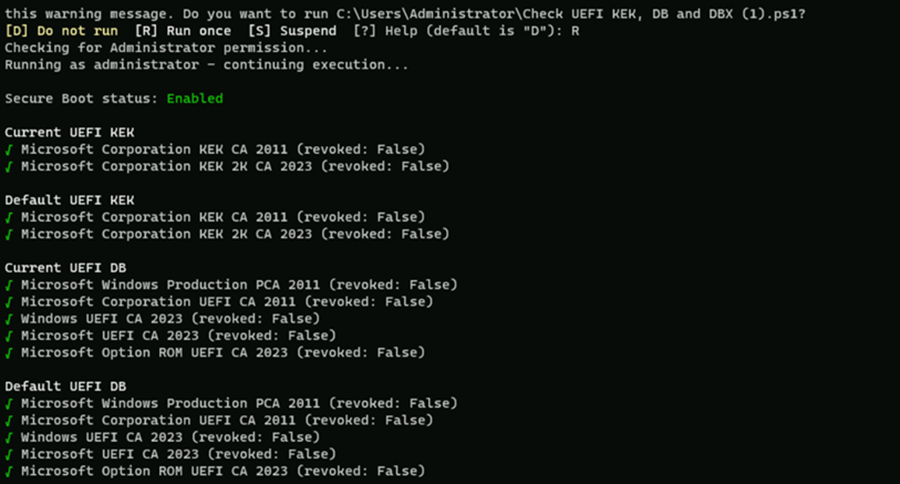
- Dell 建議您檢查 BIOS 中是否提供新的安全開機憑證。這是通過從操作系統內運行以下腳本來完成的。
-
Check UEFI KEK, DB, and DBX.ps1 - 可以從這裡下載此指令檔:GitHub:Check-UEFISecureBootVariables
-
執行指令檔時,預期會顯示以下輸出。